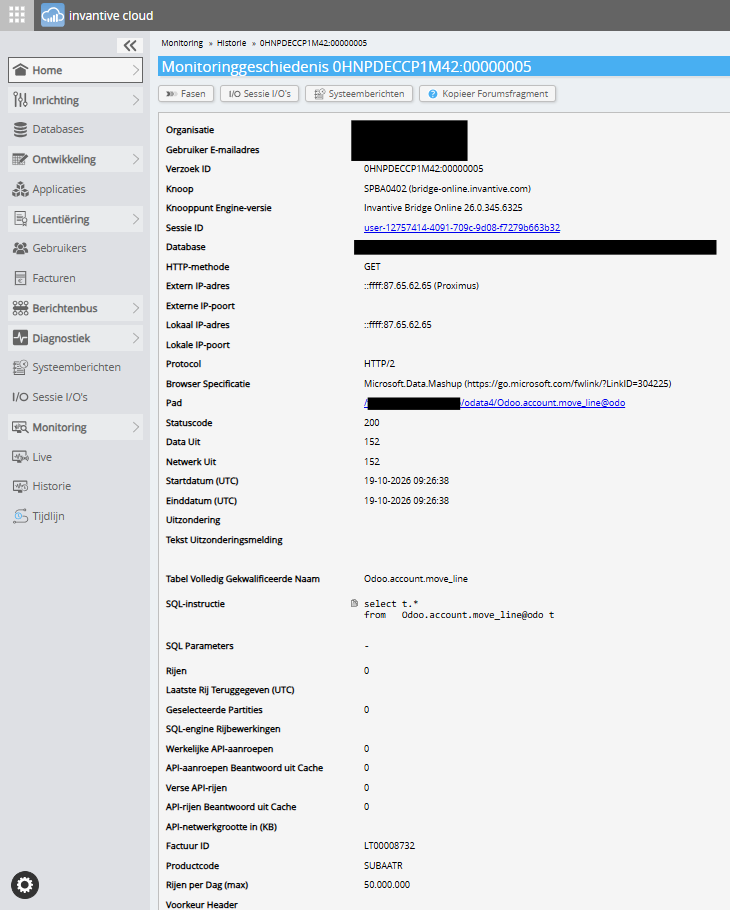
Using your connector, I’m able to connect to Odoo and most tables load in perfectly. Only Account.move_line doesn’t load properly; it loads the column names, but doesn’t show any data.
As far as I know, I have all the permissions set on my account. Also, when I look at the Session I/O screen, I don’t see any error message and it says ‘successful’. I’ve gone through your forums but can’t find a similar case being discussed.
Is it possible to add a (anonymised) screenshot of the request details in Online Monitoring on Invantive Cloud as described at Meer inzicht met nieuwe Online Monitoring?
You can find the details by clicking on the download request that represents the subject of this topic.
The download request usually includes a SQL statement where the table name is visible.
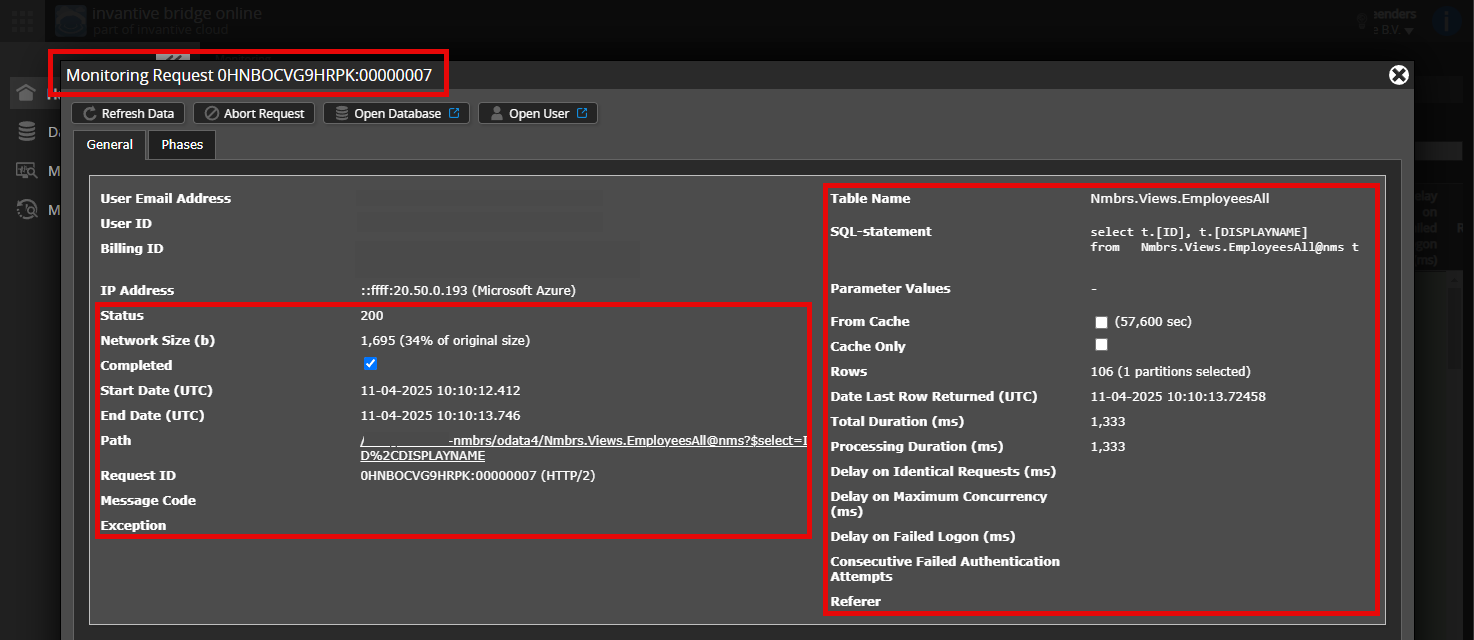
Please make sure to reveal at least the following information from both columns:
the title bar with the request ID,
the status code, network size, path, and timestamps in the left column,
the error code and error message at the very bottom of the left column,
the entire right column including the SQL statement, table name, and parameter values.
Ensure that you carefully log in to the Invantive Cloud website using the same username you use for processing data via, for example, Invantive Bridge Online. You will only see the requests of the Invantive Cloud user you log in with on the website.
Check Correct Request and Details
Make sure you select the request first to display the details. Only one request should be visible in the screenshot.
Also, carefully check that the request has a path with odata4, apps, or mcp. Requests with other paths are generally not relevant for this purpose.
Error Message and Tips via Email
Additionally, the Invantive Cloud user who received the error message will usually receive an email with an error message and tips if there is an error message in Power BI, Power Query, Azure Data Factory, Qlik or Tableau.
The advice is to check the spam folder of the relevant user for such emails sent from support@invantive.eu.
The problem now is that we can’t determine which fields require what features, so it would mean to either completely remove this column (or columns) or add them to a derived table.
Is it problematic to check the box and see if that fixes the problem or does it change the administration? It would help to know if this is the same issue. (This can also be done on a test administration when available.)
Following internal discussion, it has been decided to keep the current logic in place: if a user does not have permissions on a model according to the API server (in this case, from Odoo), then no rows are returned.
This ensures that the behaviour is predictable and remains consistent across all platforms and all linked tables.
However, an (internal) log has been added so that it becomes easier to analyse in the future via the code itgenodo111. In Session I/O’s, it should be visible that permissions were missing, and it may be refined further so that this becomes visible without having to click through.
There is a new provider attribute that can be set on the startup SQL or preferably when testing tables from the UniversalSQL editor in Invantive Cloud:
set skip-error-on-no-access false
This way an error message comes through when there is no access, which makes it easier to diagnose the issue. Additionally session I/Os will be updated to show a failed HTTP request.
Deze vraag is automatisch gesloten na 1 week inactiviteit. Het laatste gegeven antwoord is gemarkeerd als oplossing.
Gelieve een nieuwe vraag te stellen via een apart topic als het probleem opnieuw optreedt. Gelieve in de nieuwe vraag een link naar dit topic op te nemen door de URL er van in de tekst te plakken.