Invantive App Online makes it possible to offer your own apps. These apps can, for example, produce JSON or an Excel file as a result, containing data from the linked data containers.
In this example, an existing Invantive Cloud app that accesses Exact Online sales figures is approached directly from Excel in order to retrieve the data and save it to the file system. See also App Online module om alle Exact Online verkoopfactuurregels te downloaden.
This approach is purely illustrative of the use of VBA with App Online; it is a roundabout way of doing things, since the data can also be retrieved directly using curl or directly via Power Query (see also Hoe gebruik ik curl om een Invantive Cloud OData4-verzoek uit te voeren?).
This functionality is only available in the Windows version of Excel, since Microsoft Excel for Mac lacks large parts of the functionality found in the Windows version. The use of curl is possible on the Mac version, but Power Query is not yet available.
Security
In this example, (confidential) password information is stored unencrypted. This is purely for demonstration purposes. The advice is to request passwords anew each time.
Excel download from Exact Online via Invantive App Online
The first step is to create a new Excel file with the following content:
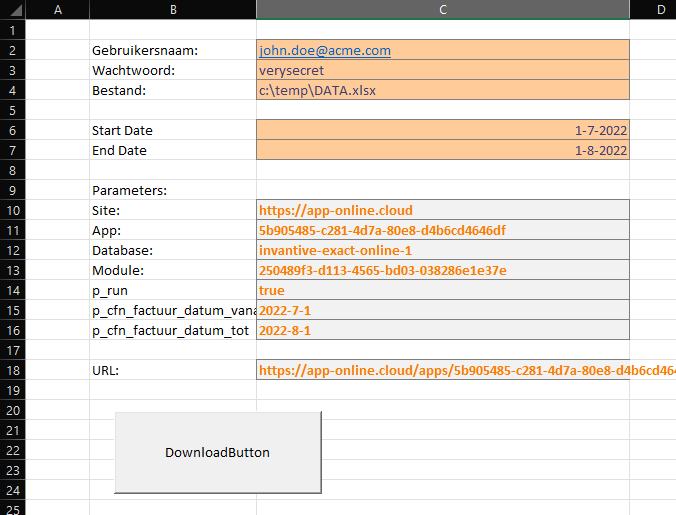
Here, cells C2, C3, C4, C6 and C7 can be filled in. The data in the grey cells is calculated or fixed:
- C10: copied from the App Online link returned by “Copy Link”
- C11: copied from the App Online link returned by “Copy Link”
- C12: copied from the App Online link returned by “Copy Link”
- C13: copied from the App Online link returned by “Copy Link”
- C14: fixed
- C15:
=JAAR(C6) & "-" & MAAND(C6) & "-" & DAG(C6) - C16:
=JAAR(C7) & "-" & MAAND(C7) & "-" & DAG(C7) - C18:
=C10 & "/apps/"&C11&"/databases/"&C12&"/modules/"&C13&"/?"&B14&"="&C14&"&"&B15&"="&C15&"&"&B16&"="&C16
VBA
The second step is to draw the Download button and register the following code in VBA for the click event:
'
' Handle button click for download.
'
Private Sub DownloadButton_Click()

Dim url As String
Dim username As String
Dim password As String
Dim targetFilename As String

url = Range("C18").Value
username = Range("C2").Value
password = Range("C3").Value
targetFilename = Range("C4").Value

Dim objXmlHttpReq As Object
Dim objStream As Object

Set objXmlHttpReq = CreateObject("Microsoft.XMLHTTP")
objXmlHttpReq.Open "GET", url, False, username, password
objXmlHttpReq.send

If objXmlHttpReq.Status = 200 Then
     Set objStream = CreateObject("ADODB.Stream")
     objStream.Open
     objStream.Type = 1
     objStream.Write objXmlHttpReq.responseBody
     objStream.SaveToFile targetFilename, 2
     objStream.Close
End If

End Sub
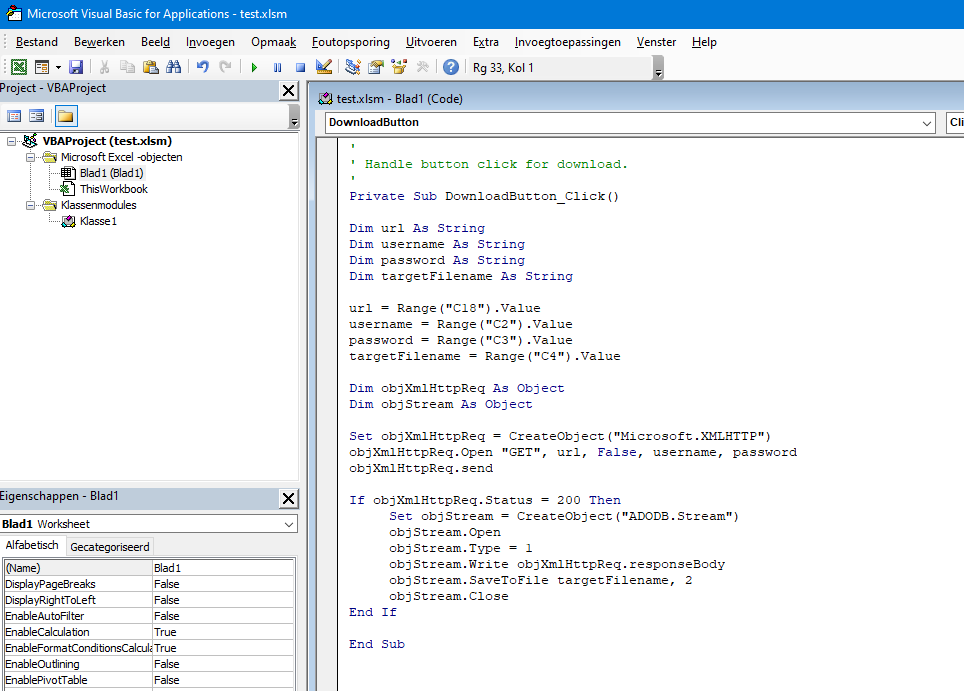
In the Microsoft Visual Basic for Applications Editor, this looks as follows:
Usage
The user can now open the Excel sheet and select the download button. The Invantive App Online module retrieves the figures from Exact Online as an Excel sheet and saves them in the c:\temp folder as DATA.xlsx.
This Exact Online sales data can, for example, be processed further or used in a pivot table as described in Draaitabel of rapport baseren op gegevens in een ander (extern) Excel-bestand.