この記事では、Invantive Cloudを使って、1つまたは複数のExact Online管理からデータを一括でダウンロードし、Excelファイルとして保存できる小さなオンラインアプリケーションの作り方を学びます。
ExcelとExact Onlineのダウンロード
Invantiveのさまざまな製品を使うと、(例えば)Exact Onlineのデータを含むExcelファイルを作成できます。
- Invantive Control for Excel:例えば De meest populaire Exact Online Excel add-in formules を参照
- Get My Report:Get My Exact Online Report
- Invantive SQLとInvantive Script:例えば Export all Outstanding Items (AP and AR) from Exact Online Companies を参照
これらのツールはいずれも、Excelの制限を除けば、取り込める行数に実質的な上限がありません。また、ビジネスユーザーは、列と行がきちんと整理された構造を喜んでくれます。さらに、Invantive製品は「名前付き範囲(named range)」も自動的に作成するため、データを簡単にピボットテーブルに入れることができます。
とはいえ、いくつか制約もありました。例えば、Macユーザーは「Get My Report」または技術的な「Invantive Data Hub」に限定せざるを得ませんでした。そして、Windowsユーザーも、タブレットですばやく分析結果を取得できるのは「Get My Report」経由のみでした。
Invantive CloudによるExact Onlineのオンラインエクスポート
Invantive Cloud上の独自アプリを使うことで、今では、Exact Onlineや他のプラットフォームから大量の数値データを、素早く確実に便利なExcelファイルへ変換できるようになりました。
最終結果は例えば次のようになります。
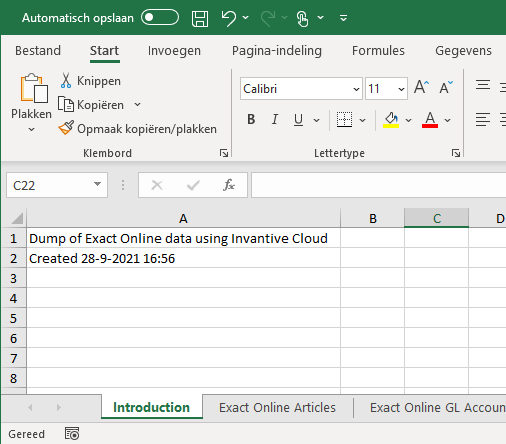
この例では、以下を扱います。
- Exact Onlineデータベースとアプリの登録
- アプリ内でのExcelファイルの作成
- 任意の名前を付けたワークシートの追加
- 「Dump of Exact Online…」のような値を特定のセルに入力
- SQLクエリによるワークシートへのデータ入力
CSVファイルの例、またはJSONやXML形式でのエクスポート、あるいはPower PivotやPower Queryを使ったソリューションをお探しですか?次の記事が参考になります。
- JSON genereren vanuit Invantive UniversalSQL
- Laad Exact Online in Qlik Sense en Tableau
- Ophalen in CSV van RIVM Covid-19 Gegevens
- Export all Outstanding Items (AP and AR) from Exact Online Companies
- Exporteer Exact Online Stukslijsten naar Excel
- Binnenhalen artikelvoorraden in Excel Power Query
- Verbind Power Query met Exact Online
事前準備
以下の事前準備が必要です。
- Invantive Cloudのログイン情報
- 1つまたは複数の管理を含むExact Onlineのログイン情報
Exact Onlineデータベースの定義
最初のステップは、Exact Onlineデータベースを定義することです。次の手順に従えば簡単にできます。
このExact Onlineデータベースは、Power BI、Power Query、Azure Data Factoryで使うことができますが、同様にAccess ODataや、Invantive Cloudアプリケーションのデータソースとしても簡単に使えます。
クラウドアプリケーションの定義
次のステップは、Invantive Cloud上でアプリを定義することです。以下の手順を実行してください。
- メニューの「アプリケーション」を選択します。
- 「新規」を選択します。
- フィールドに次のように入力します。
- 「モジュール」を選択します。
- 「新規」を選択します。
- フィールドに次のように入力します。


Excelファイルの作成と入力
このモジュールには、Excelファイルを作成するためのコードが含まれます。
完全なコードはこの記事の最後に掲載しています。
すぐに先に進みたいですか?
- コードを「ソースコード」フィールドのモジュールに貼り付けます。
- 上部のパンくずリストで「My First App」を選択します。
- 「実行」を選択します。
- Exact Onlineデータベースを選択します。
- 「実行」を選択します。
- モジュールを選択します。
- Excelファイルがダウンロードされます。


3分以上かかる大きなダウンロードの場合は、Invantive App Online経由でモジュールを起動する必要があります。Invantive App Onlineを使えば、IPアドレスの検証やユーザー名/パスワードでモジュールを実行したり、モジュールをCDNの背後に配置したりすることもできます。
では、このコードは何をしているのでしょうか?このコードはInvantive PSQLという言語で書かれています。これはInvantive SQLの手続き型拡張です。
Declare
declareブロックでは、3つの変数を定義しています。
declare
  l_workbook  excel_workbook;
  l_worksheet excel_worksheet;
  l_binary    blob;
これらの変数のうち2つは、PSQLでのみ使用できるデータ型です。
excel_workbookexcel_worksheet
excel_workbookは、完全なExcelワークブックを表します。各ワークブックは、excel_worksheetで表される1つまたは複数のワークシートで構成されます。
blobデータ型は、生成された(バイナリの)Excelファイルを格納するために使われます。
Excelワークブックと表紙シート
最初のステップは、Excelワークブックを定義することです。これは、いわゆる「パッケージ」(関数のまとまり)を呼び出すことで行われます。詳しくは A short overview of Invantive PSQL packages をご覧ください。
  --
  -- Create an Excel workbook.
  --
  l_workbook := excel.new();
このワークブックはまだ空です。excelパッケージのadd_worksheet関数を呼び出すことで、「Introduction」というタイトルのワークシートを追加します。
  --
  -- Add a worksheet with a title.
  --
  l_worksheet := excel.add_worksheet
  ( l_workbook
  , 'Introduction'
  );
その後、set_cell_contents関数を使って、2つのセルにいくつかの情報を入力します。
  excel.set_cell_contents(l_worksheet, 'A1', 'Dump of Exact Online data using Invantive Cloud');
  excel.set_cell_contents(l_worksheet, 'A2', 'Created ' || to_char(sysdate));
クエリによるExcelワークシートの入力
もちろん、Exact OnlineデータベースへのSQLクエリの結果は、for r in (query) loop...end loopの中でset_cell_contentsを使って1件ずつExcelワークシートに入力することができます。
しかし、より速く簡単な方法は、fill_using_query関数を使うことです。これは、Invantive SQLクエリの結果を使って、一度にワークシートの入力と書式設定を行います。
Exact Online管理からExcelへデータを取り込む方法はいくつかあります。最初の例では、クエリで入力される一時テーブルを使っています。
  --
  -- Add a worksheet for Exact Online articles.
  --
  l_worksheet := excel.add_worksheet
  ( l_workbook
  , 'Exact Online Articles'
  );
  --
  -- Create a list of articles consisting of code, description and EAN.
  --
  create or replace table itm@inmemorystorage
  as
  select itm.code
  ,      itm.description
  ,      itm.barcode
  from   ItemsIncremental@eol itm
  order
  by     itm.code
  ;
  --
  -- Place the items in the Excel worksheet.
  --
  excel.fill_using_query(l_worksheet, 'select * from itm@inmemorystorage');
この方法の利点は、一時テーブルの作成と入力を、別のモジュールやPSQL関数に分離できることです。また、ここで勘定科目(General Ledger Accounts)の例で示すように、完全なExact Onlineクエリを直接fill_using_queryに渡すことも可能です。
  --
  -- Add a worksheet for Exact Online General Ledger Accounts.
  --
  l_worksheet := excel.add_worksheet
  ( l_workbook
  , 'Exact Online GL Accounts'
  );
  --
  -- Place the General Ledger accounts in the Excel worksheet.
  --
  -- Instead of using a temporary table, this approach uses a direct query to fill
  -- the Excel worksheet.
  --
  excel.fill_using_query
  ( l_worksheet
  , 'select gat.code, gat.description'
    || ' from GLAccountsIncremental@eol gat'
    || ' order by gat.code'
  );
XLSXファイルへの変換
変数l_workbookには、現在3つのワークシートが含まれています。次のコードは、export_to_xlsxを呼び出すことで、それをExcel用のXLSXファイルに変換します。続いて、バイナリの内容がcloud_httpパッケージを通じてブラウザに返されます。
  --
  -- Retrieve the resulting XLSX-file.
  --
  l_binary := excel.export_to_xlsx(l_workbook);
  --
  -- Return the XLSX file to the user.
  --
  cloud_http.set_response_body_binary(l_binary);
  cloud_http.set_response_content_type('application/vnd.openxmlformats-officedocument.spreadsheetml.sheet');
  cloud_http.set_response_header_value('Content-Disposition', 'attachment; filename="items.xlsx"');
end;
Exact Online Exporter to ExcelのPSQL完全コード
declare
  l_workbook  excel_workbook;
  l_worksheet excel_worksheet;
  l_binary    blob;
begin
  --
  -- Create an Excel workbook.
  --
  l_workbook := excel.new();
  --
  -- Add a worksheet with a title.
  --
  l_worksheet := excel.add_worksheet
  ( l_workbook
  , 'Introduction'
  );
  excel.set_cell_contents(l_worksheet, 'A1', 'Dump of Exact Online data using Invantive Cloud');
  excel.set_cell_contents(l_worksheet, 'A2', 'Created ' || to_char(sysdate));
  --
  -- Add a worksheet for Exact Online articles.
  --
  l_worksheet := excel.add_worksheet
  ( l_workbook
  , 'Exact Online Articles'
  );
  --
  -- Create a list of articles consisting of code, description and EAN.
  --
  create or replace table itm@inmemorystorage
  as
  select itm.code
  ,      itm.description
  ,      itm.barcode
  from   ItemsIncremental@eol itm
  order
  by     itm.code
  ;
  --
  -- Place the items in the Excel worksheet.
  --
  excel.fill_using_query(l_worksheet, 'select * from itm@inmemorystorage');
  --
  -- Add a worksheet for Exact Online General Ledger Accounts.
  --
  l_worksheet := excel.add_worksheet
  ( l_workbook
  , 'Exact Online GL Accounts'
  );
  --
  -- Place the General Ledger accounts in the Excel worksheet.
  --
  -- Instead of using a temporary table, this approach uses a direct query to fill
  -- the Excel worksheet.
  --
  excel.fill_using_query
  ( l_worksheet
  , 'select gat.code, gat.description'
    || ' from GLAccountsIncremental@eol gat'
    || ' order by gat.code'
  );
  --
  -- Retrieve the resulting XLSX-file.
  --
  l_binary := excel.export_to_xlsx(l_workbook);
  --
  -- Return the XLSX file to the user.
  --
  cloud_http.set_response_body_binary(l_binary);
  cloud_http.set_response_content_type('application/vnd.openxmlformats-officedocument.spreadsheetml.sheet');
  cloud_http.set_response_header_value('Content-Disposition', 'attachment; filename="items.xlsx"');
end;