We have the following problem on a PC (an earlier version of Invantive worked fine on it at some point):
- Starting Excel with the Invantive Control plugin active easily takes around 5 minutes
- We installed the Invantive Support Assistant, which also took several minutes to start up, and afterwards it shows just one tile “Enable Invantive Control for Excel”, which, after clicking, says it hasn’t changed anything.
- During installation, a strange message already appears (but we are able to continue afterwards):
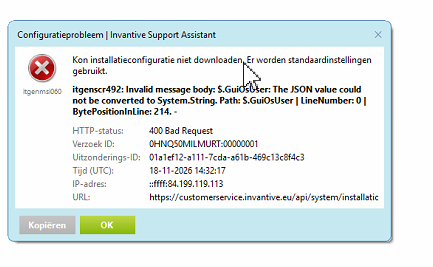
itgenmsi060
Could not download installation configuration.
Default settings are being used.
itgenscr492
Invalid message body: $.GuiOsUser: The JSON value could not be converted to System.String.
Path: $.GuiOsUser | LineNumber: 0 | BytePositionInLine: 214.
HTTP status: 400 Bad Request
Request ID: 0HNQ50MILMURT:00000001
Time (UTC): 18-11-2026 14:32:17
IP address: ::ffff:84.199.119.133
URL: https://customerservice.invantive.eu/api/system/installatio…
- Once Excel has finally finished starting up, the Invantive tabs don’t become visible, and eventually (after waiting a bit more) an error message appears:
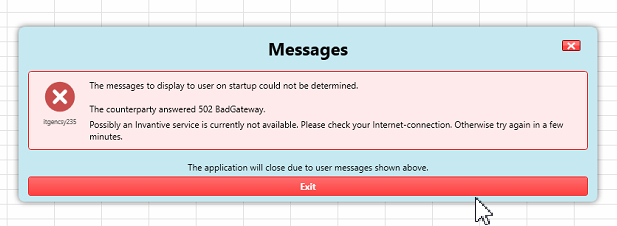
itgencsy235
The messages to display to user on startup could not be determined.
The counterparty answered 502 BadGateway.
Possibly an Invantive service is currently not available.
Please check your Internet connection.
Otherwise try again in a few minutes.
The user has this issue both at the office and at home, so it doesn’t seem to be a firewall issue either.