結果をExcelでエクスポートできないのですか?

Do you know why there is no “Export SAVE AS” option when I run the Query tool from Invantive Control?

Can you illustrate with a screen print?

In Invantive Control the Query Tool of 22.0 and 22.1 BETA displays export here:

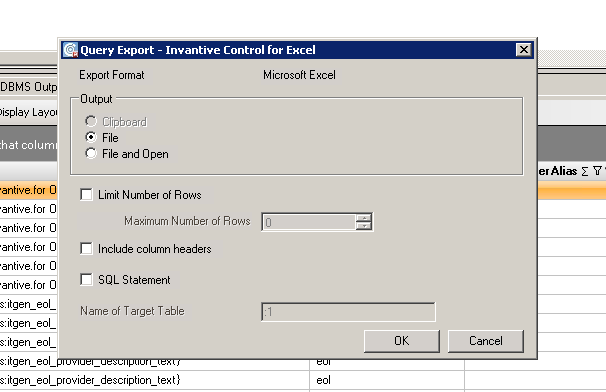
After I clicked the Export Excel and there is no save option in next screen (where I can click include header).

I don’t know how to insert the picture in this forum.

I did not use Query Tool separately; the Query Tool is in Invantive Control.

A reproduction scenario or image is needed to understand your issue.

A reproduction scenario can be added by listing all individual actions from the startup of Excel, such that someone can reproduce it in another environment.

An image as an alternative can be inserted by Copy & Paste or using the Upload button above.

As you can see ,there is no “Save” option.

表示されているフォントは、ヨーロッパ文字を中国語フォントでレンダリングしたもののように見えます。

高解像度および特殊フォントに関するWindows Formsの制限により、この表示を構成することはほぼ不可能です。

ヨーロッパ専用のUnicodeフォントで再度お試しください。それでも解決しない場合は、高解像度ディスプレイではなく、1920x1200をご使用ください。

あるいは、AltOを押してOKボタンを押すことも可能です。

または、以下で説明されているように、Invantive Scriptステートメントを使用してExcelにエクスポートすることもできます。

詳細はこちらに記載されています:

This question was automatically closed after at least 2 weeks of inactivity after a possible solution was provided. The last answer given has been marked as a solution.

Please ask a new question via a separate topic if the problem occurs again. Please include a link to this topic in the new question by pasting its URL into the text.

Invantive Scriptを使用して、以下のようにExcelへのスクリプトエクスポートも可能であることにご注意ください。

local export results as "${system:userdocumentsdirectory}\probably-unmatched.xlsx" format xlsx include headers

詳細については、こちらをご覧ください。