For a few days now, we’ve been getting the above error message whenever we refresh the data in PowerBI. In addition, the connector is also no longer active (see attachment).

Additional information
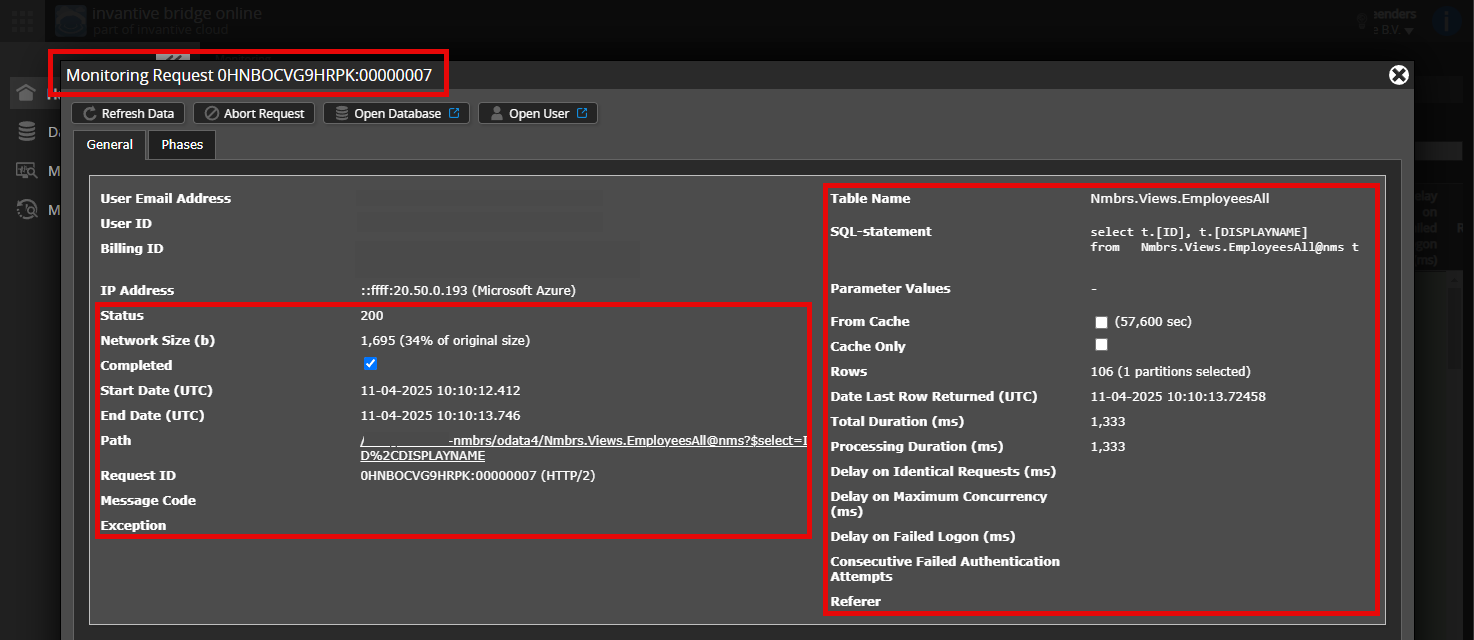
Is it possible to add a (anonymised) screenshot of the details of the request in Invantive Bridge Online Monitoring, as described in Meer inzicht met nieuwe Online Monitoring?
You can find the details by clicking on the download request which represents the subject of this topic.
The download request usually has an SQL statement in which the table name is visible.
Please keep at least the following information visible from both columns:
- the title bar with the request ID,
- the status code, network size, path and timestamps in the left-hand column,
- the error code and error message right at the bottom of the left-hand column,
- the entire right-hand column including the SQL statement, table name and parameter values.
For example:
Check the correct server and user
Please check carefully that you are logging in to the Bridge Online website that is also used from Power BI, and with the same username. You will only see the requests of the Invantive Cloud user with which you log in to the website.
There are four servers in use:
bridge-online.cloudapp-online.cloudbridge-online.invantive.comapp-online.invantive.com
You can see the server being used in your script or report source code.
Check the correct request and details
Make sure you select the request first in order to display the details. Only one request should be visible in the screenshot.
Also check carefully whether the request has a path with odata4 or apps. Requests with other paths are generally not relevant for this purpose.
Error message and tips by email
In addition, the Invantive Cloud user who received the error message will usually receive an email at their email address with an error message and tips if there is an error in Power BI, Power Query, Azure Data Factory, Qlik or Tableau.
We advise checking the spam folder of the user concerned for such emails sent from support@invantive.com.


In order to assist you properly, we need the corresponding request.
Could you please add it?
Again, the OData connection between PowerBI and the Invantive platform cannot be established. As a result, I’m not getting any logs in the dashboard (only logs of the activities I carry out on the platform itself). Could it perhaps have something to do with the high number of API calls we’ve made? That number is — for a reason that’s unclear to me — very high:

The number of fresh API calls is well above 100%. This will cause an error message when retrieving data.
You can see the limit and the number of API calls made by hovering over the blue bar. Full details can be viewed via the Session I/Os screen.
It is advisable to check which download caused this and optimise where necessary.
With all due respect, but nothing has changed on our end in recent months. Roughly the same amount of data is being pulled in every day. I’ve no idea why the number of API calls has increased drastically over the last 2 days. Has something perhaps changed on your end? I also don’t think it’s very customer-friendly to block our access on this basis. At the very least, a warning should have been sent out… And what does this mean for the coming days?
Change
Between 23 and 24 March, the various components were upgraded from release 25.0 to 26.0. See also: Release 26.0 rolling out on all products (English).
Limits
The limits per plan remained unchanged during the transition; on Invantive Cloud you can find the limits for your agreement by clicking on the “Product code” field.
However, the integration of usage measurement has been improved in numerous areas, meaning that usage which previously occurred but was not measured is now being recorded. It cannot be determined whether this is the case here.
Monitoring limits is necessary to distribute the shared equipment among the various users. For more background, see: Fair Use Daglimieten voor een Betere Gebruikerservaring
At present, no warnings are sent; this is only visible in the dashboard on Invantive Cloud. There are no plans to send warnings, as any excess usage typically occurs outside office hours.
These limits do not apply when using a local (on-premises) installation. This is an alternative for users with extremely large volumes. With a local (on-premises) installation, you can also determine to some extent when the transition between releases takes place.
Approach
The expectation is that the number of API calls will remain unchanged going forward. You may be using a complex query that follows a different execution path, or different logic may be in use.
A brief review of your plan showed that the large volumes come from:
- 15,413x
InvoiceLinesById - 4,366x
SubscriptionLinesBySubscriptionId
Together, these account for 93% of the 21,143 fresh API calls, where fresh calls are limited to 25,000 under this plan, as expected.
The number of fresh plus non-fresh API calls is limited to 50,000. However, actual usage is 172,132. This is the excess.
Unfortunately, the label is not visible due to its small size. You can see it if you enlarge the chart.
The two tables mentioned are known limitations of Teamleader Focus; unfortunately, it is not possible for Invantive to improve this, so an environment-specific solution will be needed, or an improvement by Teamleader itself.
Our advice is to note down the two figures associated with the long blue bar.
The next step is to investigate which query or queries are causing the problem. Tips for this can be found under the heading “For Affected Users” at Fair Use Daglimieten voor een Betere Gebruikerservaring.
Retrieving data less frequently will significantly improve performance, for example once a day instead of around eight times. Alternatively, you could use your own storage.
An alternative is to switch to a different (larger) plan, but in general the advice is to first try to optimise usage.
If this is not successful, we advise involving an Invantive consultant. Given the nature of the problem, it is advisable to do this directly with Invantive. You can schedule this via the chat box in the bottom right corner of any Invantive website.
It might have been better to first inform the users of the changes and the consequences. As you point out yourself, neither we nor you have any influence over how TeamLeader sets up its tables. What’s more, I’m now completely stuck: I could, for example, build up the history of the “InvoiceLines” for 2024 (and perhaps even 2025), but at the moment I can’t access the data at all, as I keep running into the limits.
Sorry, but I’m currently not at all satisfied with this way of doing things, and on top of that, I’m being put under pressure by our owners to deliver the figures.
PS: we only refresh once a day (only that, at 4:00), I don’t know where you’re getting the 8 times a day from.
As annoying as it may be, as far as we know there is no reason to believe this is a bug.
Our advice is to follow the recommendations mentioned earlier.
You might also consider switching to the Premium plan. This significantly increases the limits, and with your current approach, you’re already approaching the end of the standard plan’s limits even for fresh rows.
What does a Premium plan cost and what are the limits?
The Premium plan can be found, for example, at:
by ticking “Inclusief Exact Online Premium en Twinfield”
The limits can be found by going to your agreement, clicking on Product Code there, and then adding the form: SUB25EA10. The added column shows the various properties and limits.
This question was automatically closed after 1 week of inactivity. The last answer given has been marked as the solution.
Please ask a new question via a separate topic if the problem occurs again. Please include a link to this topic in the new question by pasting its URL into the text.