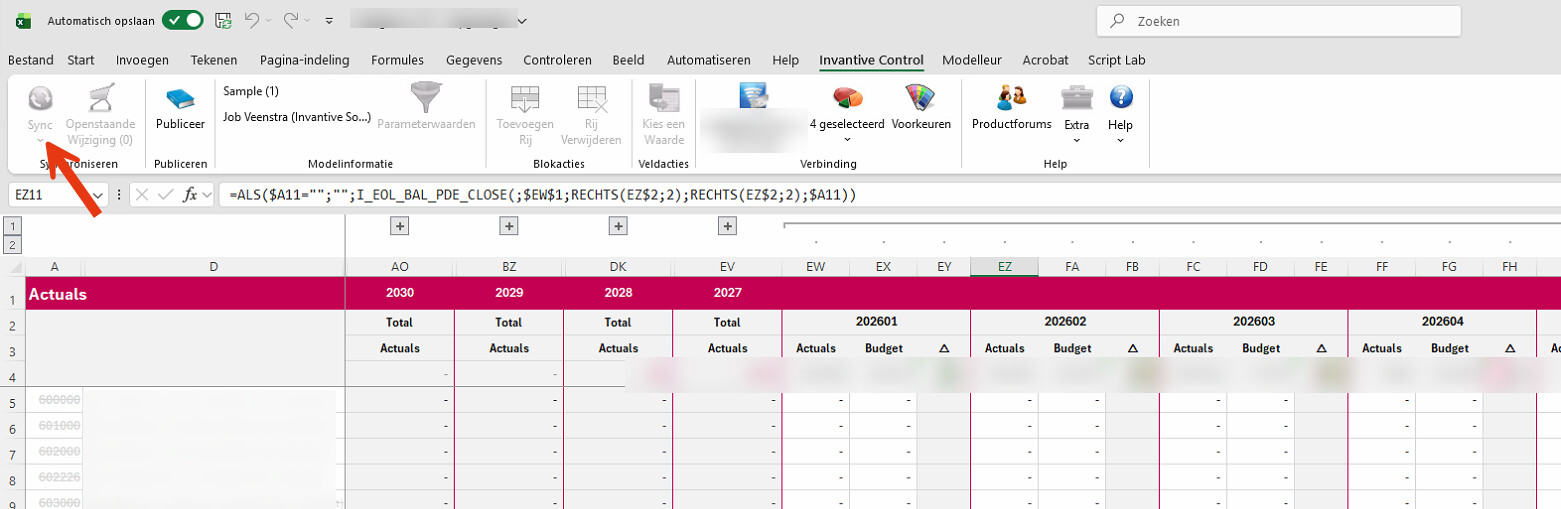
Sync button remains disabled

We use the Invantive Control for Excel plug-in to load data from Exact Online.

Today I installed the plug-in on a user’s new PC and connected to Exact Online, which seems to have worked fine. However, the “Sync” button remains disabled.

I’ve already fully restarted Excel (and also verified via Task Manager that it was completely closed), but the problem seems to persist.

I found a similar issue on the forum, but unfortunately without a solution :slightly_smiling_face:

It is advised to check that:

  • a model is present (in the Modeller tab, the slider on the left must be green)
  • design mode is not switched on (the button of the same name must not be pressed in)

Should that not help, please add a screenshot of the Modeller ribbon.

This question was automatically closed after 1 week of inactivity. The last answer given has been marked as the solution.

Please ask a new question via a separate topic if the problem occurs again. Please include a link to this topic in the new question by pasting its URL into the text.