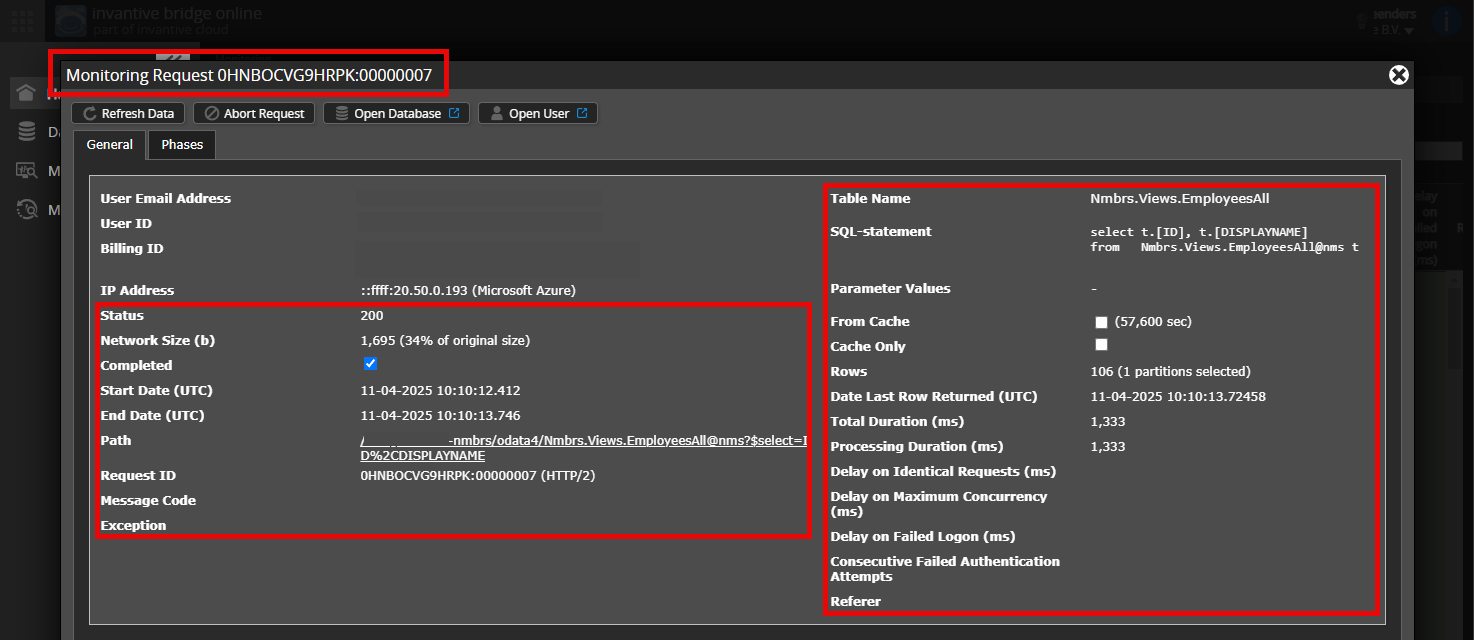
Is it possible to add an (anonymised) screenshot of the details of the request in Invantive Bridge Online Monitoring as described in Meer inzicht met nieuwe Online Monitoring?
You can find the details by clicking on the download request which is the subject of this topic.
The download request usually includes a SQL statement where the table name is visible.
Please make sure to leave at least the following information visible from both columns:
the title bar with the request ID,
the status code, network size, path and timestamps in the left column,
the error code and error message right at the bottom of the left column,
the entire right-hand column including the SQL statement, table name and parameter values.
Carefully check that you log in on the Bridge Online website that is also used from Power BI and with the same username. You will only see the requests from the Invantive Cloud user with which you log in on the website.
There are four servers in use:
bridge-online.cloud
app-online.cloud
bridge-online.invantive.com
app-online.invantive.com
You can see the server used in your script or reporting source code.
Check correct request and details
Ensure that you select the request first to display its details. Only one request should be visible in the screenshot.
Also, carefully check whether the request has a path with odata4 or apps. Requests with other paths are generally not relevant for this purpose.
Error message and tips via email
In addition, the Invantive Cloud user who has the error message has usually already received an email at their email address with an error message and tips if there is an error in Power BI, Power Query, Azure Data Factory, Qlik or Tableau.
It is advised to check the spam of the involved user for such emails sent from support@invantive.com.
This question has been automatically closed after 1 week of inactivity. The last given answer has been marked as the solution.
Please post a new question in a separate topic if the issue occurs again. Kindly include a link to this topic in the new question by pasting its URL into the text.