I’m in the process of switching my Power BI connection from Davista to Invantive. On the whole, it’s going reasonably well, apart from quite a bit of fiddly work.
However, on the day of going live, I’m receiving reports from several Power BI users that they’ve been getting a message saying the 2GB memory capacity has been reached. My data model is 44mb, my largest table has 140k rows, and the issue also occurs with very simple measures. So in terms of volume/complexity, it’s absolutely not an issue.
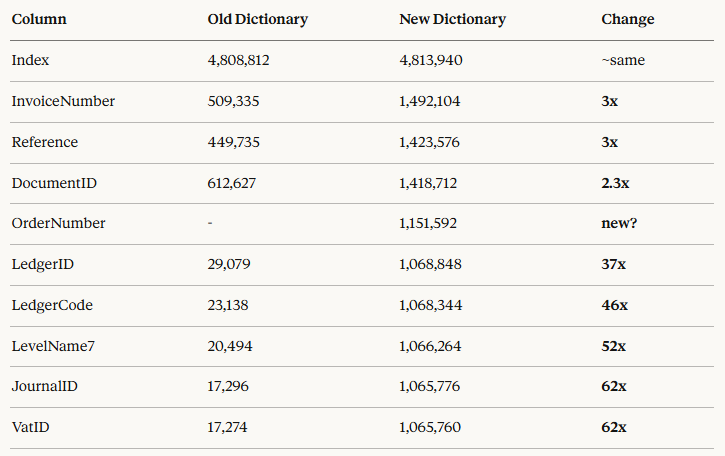
After some investigation, it seems to be caused by the data provided by Invantive, which has led to enormous increases in dictionary size. Here’s an overview of my largest table (old = Davista, new = Invantive):
VatID has around 12 unique values with both connectors, so it should have a very similar dictionary size. Do you have an explanation and a solution for this?
Apologies for the confusion. What does the full concept of “old dictionary” and “new dictionary” from the image mean? How do these come about, i.e. where can documentation on this be found?
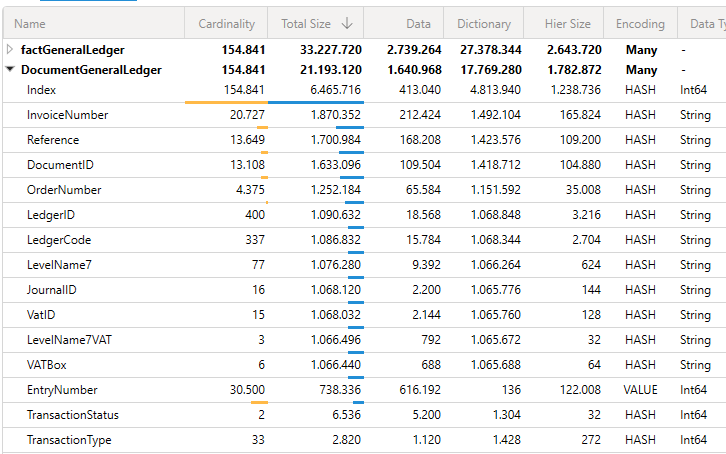
This is the result of the VertiPaq Analyzer in DAX Studio. Below is the output of the Analyzer. Columns with a low cardinality have a huge impact on the overall size of the table and therefore the overall model:
It doesn’t seem like a coincidence to me that all columns have an almost identical size of ~1,068,000. It looks as though a fixed overhead is being applied by the feed, regardless of the dynamics of the column.
The Dictionary column in VertiPaq Analyzer shows how much memory Power BI uses internally to store the unique values of a column.
The issue: when the same data (same values, same data types, same number of rows) is loaded via Invantive Cloud OData instead of the old Davista connector, Power BI uses 30-60x more memory per column. This causes ‘Resource Governance’ memory errors for our end users.
A concrete example — the VatID column with 15 unique text values:
Via Davista: 17 KB memory usage
Via Invantive OData: 1,065 KB memory usage
This pattern applies to all columns, regardless of cardinality. Columns with 3 unique values use just as much memory as columns with 400 unique values (~1 MB per column).
This suggests that the OData response from Invantive contains something — extra padding, metadata, or a different string encoding — that prevents the Power BI engine from compressing the data as efficiently.
My question: could you look into how the OData feed returns the string values? Specifically: which encoding is used (UTF-8 vs UTF-16), whether any trailing whitespace or invisible characters are included, and whether there’s any difference in the OData response formatting compared to Davista?
What has been described is a mechanism that Invantive UniversalSQL also applies internally on a regular basis to limit the memory footprint of large result sets with a lot of repetition.
There is no known issue causing the data to be returned in different variants. The OData feed only contains the registration, without padding or anything of that kind.
The OData data can be viewed as readable text by opening the request URL on Invantive Cloud Monitoring in your browser. The encoding can also be seen here via the HTTP headers in the DevTools of Edge, or Chromium-based browsers.
It cannot be ruled out that this is a limitation of the Microsoft driver. Should that be the case, there are a few alternatives:
Use a Power BI environment that is not limited by the 32-bit memory boundary.
Compare the memory footprint with the TDS (Microsoft SQL Server) access point of Invantive Cloud, currently in BETA.
Limit the number of rows and/or columns.
Report the issue to Microsoft.
Should you nevertheless find different representations for equal values (text, number, GUID or otherwise) in the OData feed, please provide a few examples, including the table and column names.
Thanks for the reply. I had a feeling that if this was indeed being supplied by you in this way, you’d have run into problems with it more often. I’ll take it up with Microsoft, although I fear they won’t be as quick and helpful as you lot
Thank you for the trust expressed in our service. It doesn’t always work out, and sometimes simply doesn’t, but our intention is to be of service as well as possible.
Although the screen was unfamiliar to us, Invantive UniversalSQL does share a large number of concepts with Power Query. This also includes a number of technical elements. Both run on a PC with Microsoft .net. Within Microsoft .net, every piece of text (“string”) is different, even if several have the same value. The same applies to many other data types.
Sharing values is possible in various ways, but it actually always requires a conscious trade-off on the part of the programmer. Weighing it up incorrectly can have major adverse consequences, such as memory leaks. More explanation about this concept can be found at:
In general, the UniversalSQL engine will store a very limited number of values permanently and centrally if it is known that they recur often. Think of constants, company names, and so on.
In addition, the engine works with result sets. These are generally based on “sparse arrays”, i.e. a series of values that together describe the non-empty values in a row. “Sparse” because there are “gaps” in them, in order to limit memory usage in tables with thousands of (mostly empty) columns.
A result set is usually accompanied by a series of shared objects. For example, pieces of text are stored centrally here, so that only a reference to them is needed on repetition. In various ways, these series of shared objects are compressed and released during processing. A historical example illustrates this: a query result set that contained 4.5 terabytes of data due to a typo by the author of this text fitted into 32 GB of working memory.
This approach also ensures that it is unlikely that different pieces of text will come out on the output side; they share the same basis.
Power Query appears to use a similar mechanism when applying joins, which seems to be implemented as a “hash join”. This is also one of the join strategies within UniversalSQL, but UniversalSQL also has a so-called “nested loop join”. It is also possible to switch between them, for example via the SQL hint join_set.
When filling a translation table (“dictionary”) with hashes, it is necessary to check whether a value already exists while it is being added. This is not always trivial in Microsoft .net.
This question was automatically closed after 1 week of inactivity. The last provided answer has been marked as the solution.
Please raise a new question in a separate topic if the issue occurs again. In the new question, please include a link to this topic by pasting its URL in the text.