Problems refreshing Teamleader and Twinfield data

We are using a Power BI dashboard connected to Teamleader and Twinfield. This dashboard has been running for over a year without changes to the data model.

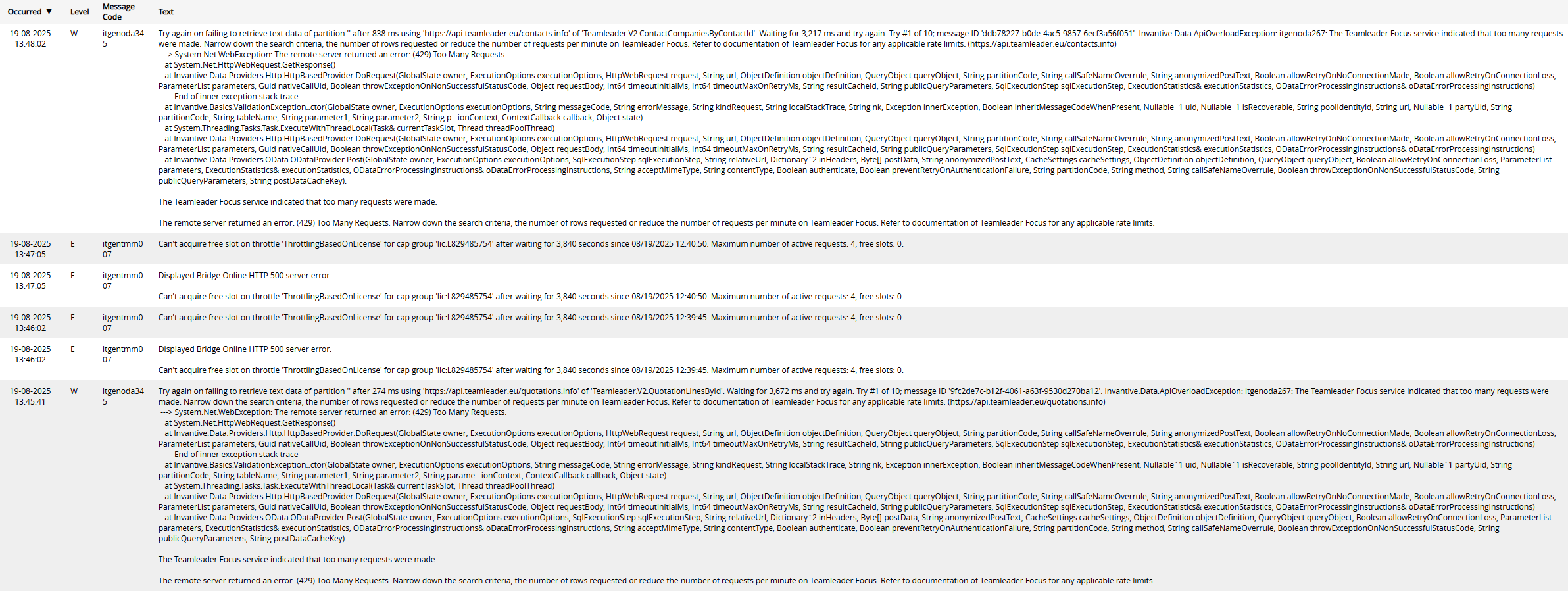
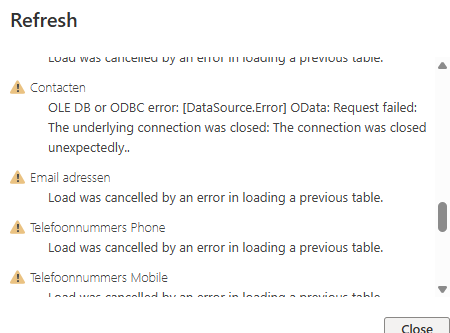
However, since yesterday, we have been experiencing issues with refreshing the data. The process takes significantly longer than usual (more than 1 hour), and eventually, we receive the following error message:

image

Additionally, we notice that the limits of our licence are being reached, which we did not encounter before.

Is there a known issue with retrieving data from Teamleader or Twinfield?

Aanvullen informatie

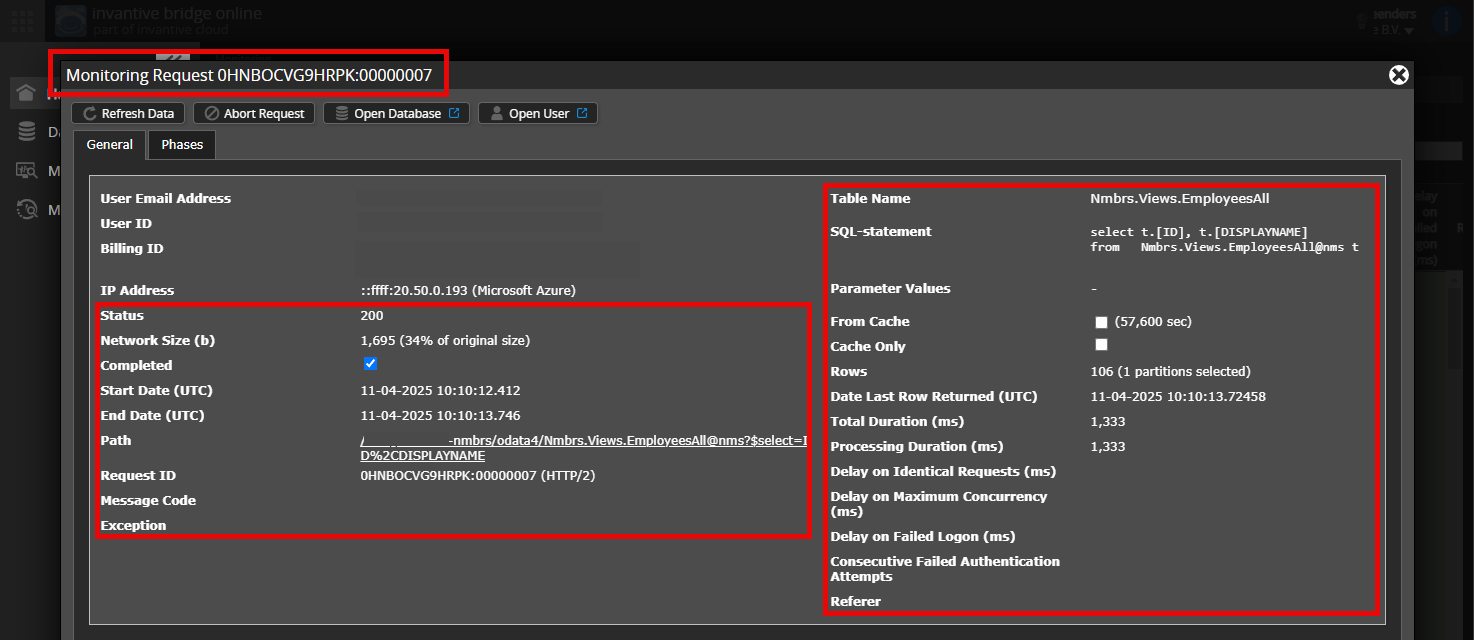
Is het mogelijk om een (geanonimiseerde) schermafdruk van de details van het verzoek in Invantive Bridge Online Monitoring toe te voegen zoals beschreven in Meer inzicht met nieuwe Bridge Online Monitoring?

De details vindt u door te klikken op het downloadverzoek welke het onderwerp van dit onderwerp representeert.

Het downloadverzoek heeft meestal een SQL-statement waarin de tabelnaam zichtbaar is.

Gelieve tenminste de volgende gegevens zichtbaar te laten van beide kolommen:

  • de titelbalk met de request ID,
  • de statuscode, netwerkgrootte, pad en tijdstippen in de linkerkolom,
  • de foutcode en foutmelding helemaal onderaan in de linkerkolom,
  • de gehele rechterkolom inclusief het SQL statement, tabelnaam en parameterwaardes.

Bijvoorbeeld:

Controleer juiste server en gebruiker

Controleer zorgvuldig dat u zich aanmeldt op de Bridge Online-website die ook gebruikt wordt vanuit Power BI en met dezelfde gebruikersnaam. U ziet alleen de verzoeken van de Invantive Cloud-gebruiker waarmee u zich aanmeldt op de website.

Er zijn vier servers in gebruik:

  • bridge-online.cloud
  • app-online.cloud
  • bridge-online.invantive.com
  • app-online.invantive.com

De gebruikte server ziet u in uw script of broncode van rapportage.

Controleer juiste aanvraag en details

Zorg ervoor dat u het verzoek eerst selecteert om de details weer te geven. Er hoort maar één verzoek zichtbaar zijn in de schermafbeelding.

Controleer ook zorgvuldig of het verzoek een pad heeft met odata4 of apps. Verzoeken met andere paden zijn over het algemeen niet relevant voor dit doel.

Foutmelding en tips per e-mail

Daarnaast zal de Invantive Cloud-gebruiker die de foutmelding heeft op zijn e-mailadres veelal een e-mail ontvangen met een foutmelding en tips als er sprake is van een foutmelding in Power BI, Power Query, Azure Data Factory, Qlik of Tableau.

Advies is om de spam van de betrokken gebruiker te controleren op dergelijke e-mails verzonden vanaf support@invantive.com.

We are still encountering this problem; every time we fetch the data, it stops after approximately 1 hour.

In the message, I have seen the following: image

I am currently running a new data refresh to see where the error codes appear in the monitor overview. What could help to resolve this?

The essential error code here is itgentmm007. This means that the Power BI Service is starting more processes than the maximum number that can be executed simultaneously, and each of these processes is also taking an extremely long time.

There are several possible solutions:

  • Switch to a subscription model with more parallel downloads. This can usually be done by switching to the current 2025 Invantive Office subscription model. This increases the number of channels from 4 to 6 but limits the number of partitions for the same amount to 25.
  • Execute heavy downloads less in parallel, for example by spreading them over time.
  • Optimise downloads with filters or smarter retrieval methods.

Thank you for the response. However, after some investigation, I think the issue might lie elsewhere. It is quite strange that after almost a year of retrieving the same tables, there are suddenly problems with the limits (with an exceedance of 500%).

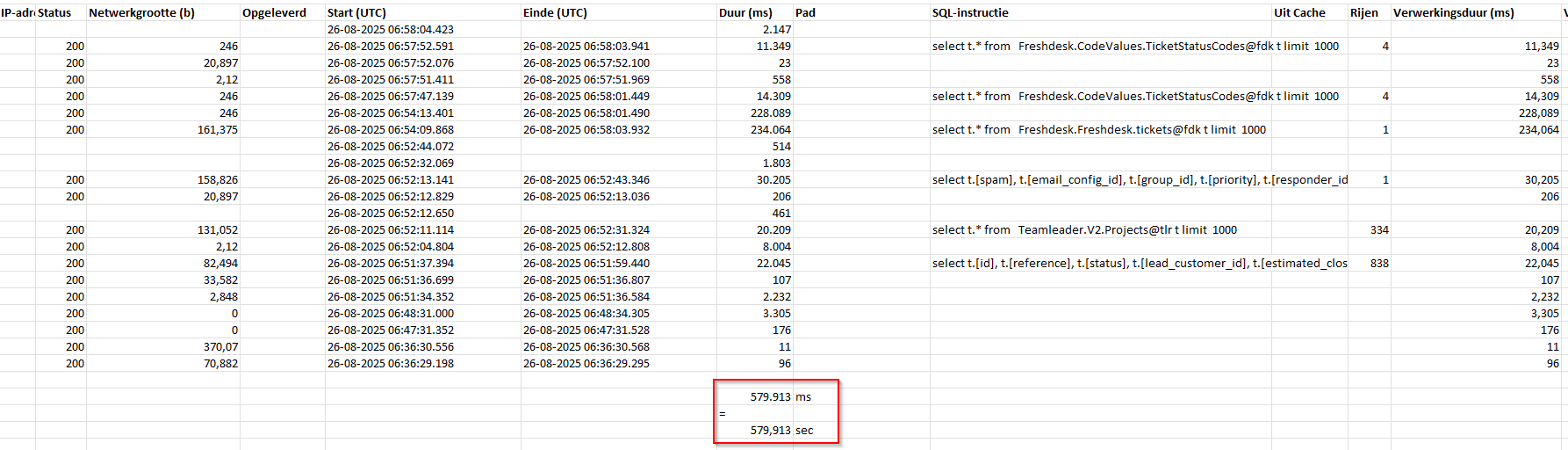
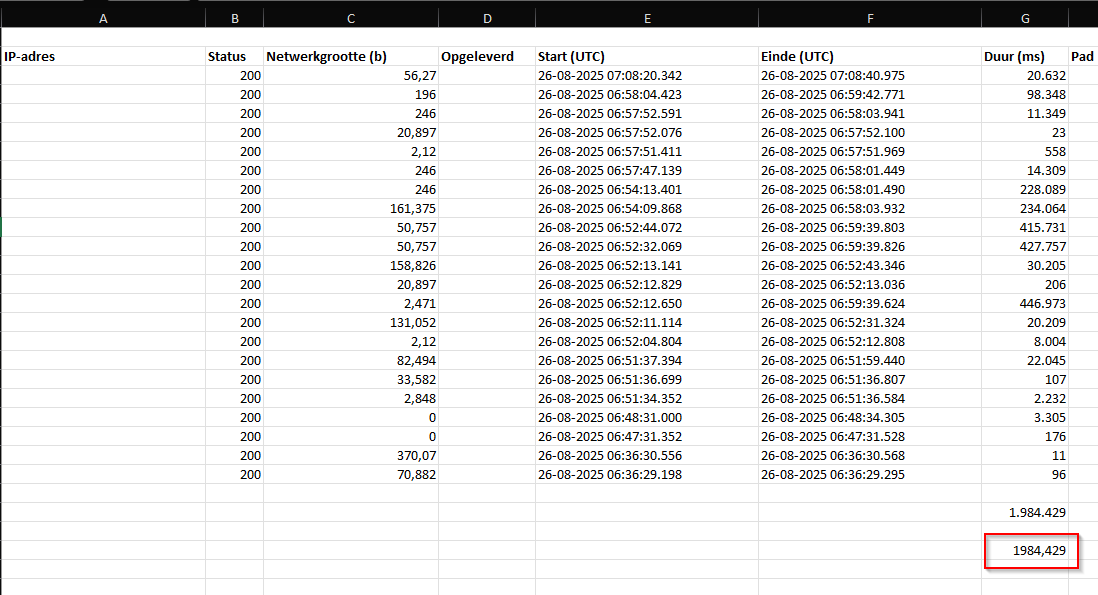
This led me to suspect that something is going wrong in the calculation of the number of seconds used per day. For this reason, I have turned off the refresh in recent days so that we can start the day with the limits at 0%. Then I started testing in Power Query, which applies a limit of 1000 rows to tables, to see how high the limits would be when retrieving a number of tables (these were not executed in parallel). Loading these tables took quite a long time, and I deliberately did not complete one to avoid blowing up the limits. Then I made an Excel output of the bridge online monitoring:
image

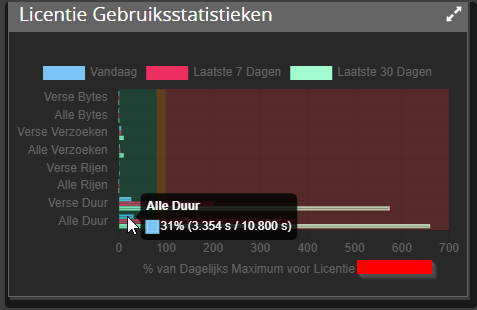
The bridge online monitoring indicates that 579 seconds have been refreshed. But when I then looked at the limits, there was a value of 1677 seconds.
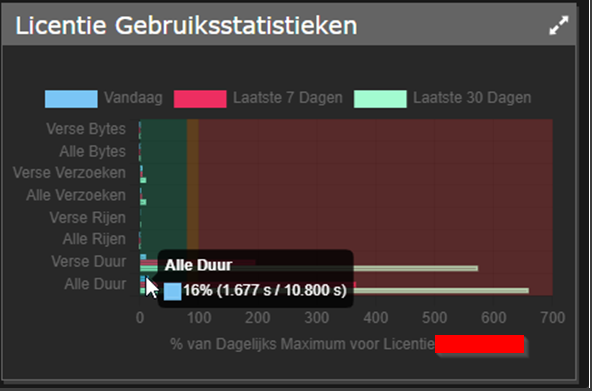
image

Then I tried to retrieve the table Teamleader.V2.Companies@tlr. No transformations were done on this table, only a filtering on the retrieved columns to retrieve as little data as possible. This took 20 seconds for 900 rows.

Upon a second look at the bridge online monitoring, I saw that in the background, the table I did not want to load was executed with a ‘top 1000’ statement. This resulted in values between 200,000 and 500,000 ms, while few transformations are performed in these tables.

I eventually retrieved a top 1000 from 5 tables. After a second output of the monitoring, I ended up with approximately 2000 seconds. I find this quite high for a top 1000 of 5 tables:
image

Strangely enough, the monitoring displays the wrong number:
image

Can you check what is going wrong here?

And to return to this response from you:
‘switching to a subscription model with more parallel downloads. Usually, this can be done by switching to the current 2025 Invantive Office subscription model. This increases the number of channels from 4 to 6, but limits the number of partitions for the same amount to 25’

Are there additional costs associated with this? Since we only retrieve a small number of partitions, it is more desirable to use more channels.

I look forward to hearing from you.
Based on the available information, there is no reason to assume that there is a deviation because there are both time differences in update moments and authorisations involved. Ultimately, everything should converge; this usually takes a maximum of 15 minutes.

The transition from the traditional Invantive Office subscription model to the Invantive Office 2025 subscription model does not incur any additional costs. The traditional model is no longer offered, but existing subscriptions have not been automatically converted. This may happen over a longer period.

Deze vraag is automatisch gesloten na 1 week inactiviteit. Het laatste gegeven antwoord is gemarkeerd als oplossing.

Gelieve een nieuwe vraag te stellen via een apart topic als het probleem opnieuw optreedt. Gelieve in de nieuwe vraag een link naar dit topic op te nemen door de URL er van in de tekst te plakken.