Ik loop bij de een klant tegen de onderstaande melding als ik data probeer te importeren via de Data Hub. Ik heb de data hub bijgewerkt naar 26.0 en alles werkte in de Invantive Data Hub 24.0.
Ik heb de problemen met deze syntax:
create or replace table eol_test@sql
as
select ‘Test’ Test, getdate() SumatraTimeStamp
maar ook deze syntax:
create or replace table eol_accountsincremental@sql
as
select \*, getdate() SumatraTimeStamp
from   accountsincremental@eol
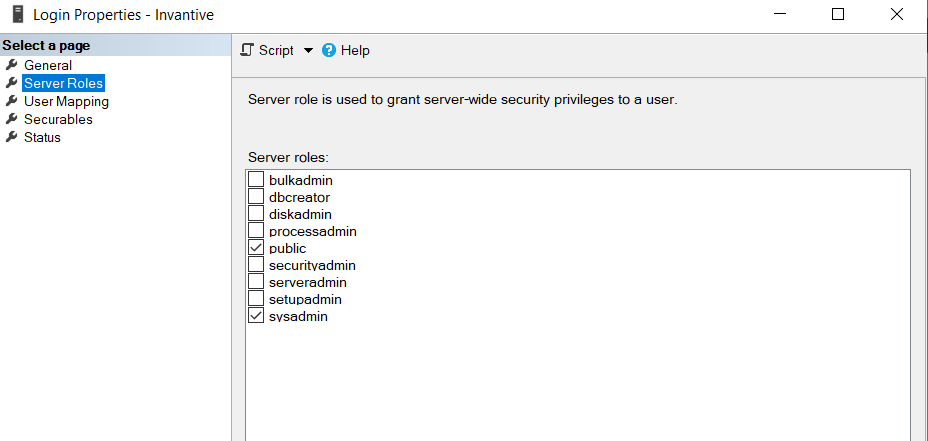
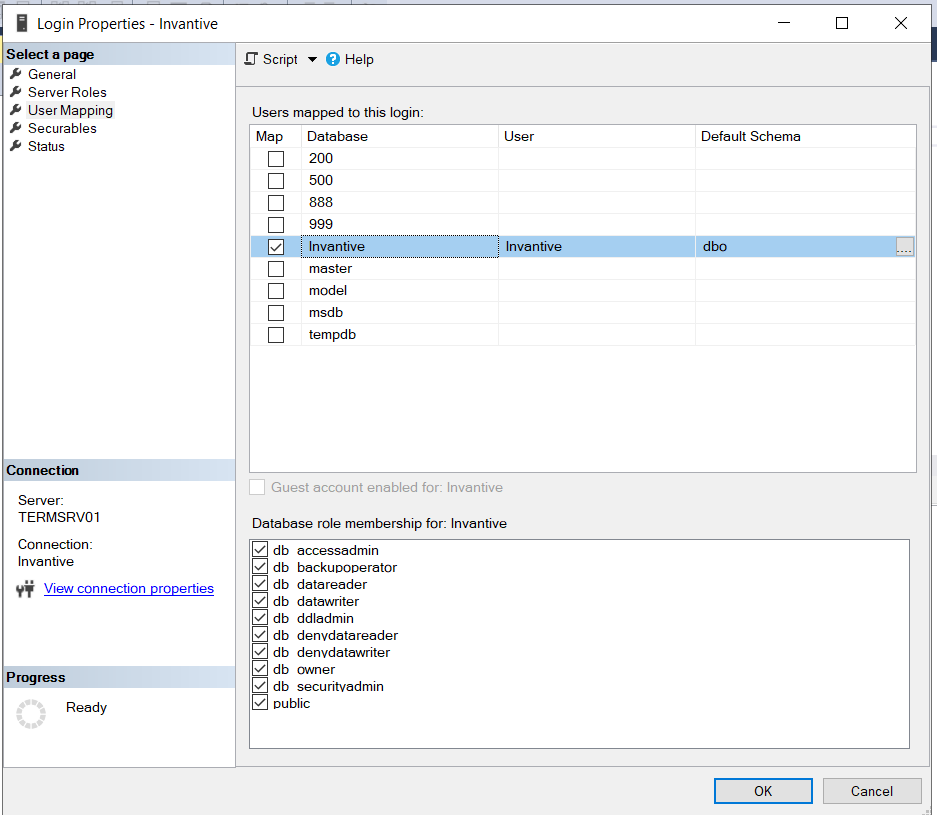
De gebruiker waar de SQL connectie opdraait is SYSADMIN op de Microsoft SQL Server.
De tabel wordt overigens wel aangemaakt maar niet gevuld.
**** 07:19:48.514 Warning itgendhb173: Context: create or replace table eol_test@sql
as
select ‘Test’ Test, getdate() SumatraTimeStamp
07:19:48.598 Error itgenase094: The table can not be created.

Could not bulk insert 1 rows into the table ‘Invantive.dbo.EOL_TEST’.

Cannot access destination table ‘Invantive.dbo.EOL_TEST’.

Invalid column name ‘graph_type’.
Invalid column name ‘graph_type’.
Invalid column name ‘graph_type’.
Invalid column name ‘graph_type’.
Invalid column name ‘graph_type’.
Invalid column name ‘graph_type’.
Invalid column name ‘graph_type’.
Invalid column name ‘graph_type’.
Invalid column name ‘graph_type’.
Invalid column name ‘graph_type’.
EOL_TEST
07:19:50.613 Microsoft.Data.SqlClient.SqlException
System.InvalidOperationException
InvantiveSystemException
ValidationException
at Microsoft.Data.SqlClient.SqlConnection.OnError(SqlException exception, Boolean breakConnection, Action`1 wrapCloseInAction)    at Microsoft.Data.SqlClient.Connection.SqlConnectionInternal.OnError(SqlException exception, Boolean breakConnection, Action`1 wrapCloseInAction)
at Microsoft.Data.SqlClient.TdsParser.ThrowExceptionAndWarning(TdsParserStateObject stateObj, SqlCommand command, Boolean callerHasConnectionLock, Boolean asyncClose)
at Microsoft.Data.SqlClient.TdsParser.TryRun(RunBehavior runBehavior, SqlCommand cmdHandler, SqlDataReader dataStream, BulkCopySimpleResultSet bulkCopyHandler, TdsParserStateObject stateObj, Boolean& dataReady)
at Microsoft.Data.SqlClient.TdsParser.Run(RunBehavior runBehavior, SqlCommand cmdHandler, SqlDataReader dataStream, BulkCopySimpleResultSet bulkCopyHandler, TdsParserStateObject stateObj)
at Microsoft.Data.SqlClient.SqlBulkCopy.RunParser(BulkCopySimpleResultSet bulkCopyHandler)
at Microsoft.Data.SqlClient.SqlBulkCopy.CreateAndExecuteInitialQueryAsync(BulkCopySimpleResultSet& result)
at Microsoft.Data.SqlClient.SqlBulkCopy.WriteToServerInternalRestAsync(CancellationToken cts, TaskCompletionSource\`1 source)
07:19:50.622 itgendhb223: End program execution with exit code 3.
07:19:50.623 itgendhb068: Program finished on 7/17/2026 7:19:50 AM.
itgenpgm001: Application finished
De melding “Cannot access destination table” geeft aan dat er onvoldoende rechten gegeven zijn aan de gebruiker.
Wilt u controleren of de gebruiker waarmee aangemeld wordt rechten heeft op create en insert uit te voeren? Is het mogelijk om via SQL Server Management Studio of soortgelijke apps met de genoemde gebruiker een tabel aan te maken en een rij toe te voegen?
Op forums is terug te lezen dat bij het gebruik van bulk copy met de SQL Server driver voor .NET de fout “Invalid column name ‘graph_type’.” kan optreden.
SQL Server 2016: Operations failed with Invalid column name ‘graph_type’ because the metadata query referenced a column that doesn’t exist before SQL Server 2017.
Zie ook:
Onduidelijk is nog of dat van toepassing is op onze software-release. Welke versie van SQL Server wordt gebruikt? En welke versie van de Invantive-software?
**** 09:27:25.120 Warning itgendhb173: Context: create or replace table test123@sql
as
select
‘Hallo’ as Tekst
09:27:25.188 Error itgenase094: The table can not be created.

Could not bulk insert 1 rows into the table ‘Invantive.dbo.TEST123’.

Cannot access destination table ‘Invantive.dbo.TEST123’.

Invalid column name ‘graph_type’.
Invalid column name ‘graph_type’.
Invalid column name ‘graph_type’.
Invalid column name ‘graph_type’.
Invalid column name ‘graph_type’.
Invalid column name ‘graph_type’.
Invalid column name ‘graph_type’.
Invalid column name ‘graph_type’.
Invalid column name ‘graph_type’.
Invalid column name ‘graph_type’.
TEST123
09:27:27.206 Microsoft.Data.SqlClient.SqlException
System.InvalidOperationException
InvantiveSystemException
ValidationException
at Microsoft.Data.SqlClient.SqlConnection.OnError(SqlException exception, Boolean breakConnection, Action`1 wrapCloseInAction)    at Microsoft.Data.SqlClient.Connection.SqlConnectionInternal.OnError(SqlException exception, Boolean breakConnection, Action`1 wrapCloseInAction)
at Microsoft.Data.SqlClient.TdsParser.ThrowExceptionAndWarning(TdsParserStateObject stateObj, SqlCommand command, Boolean callerHasConnectionLock, Boolean asyncClose)
at Microsoft.Data.SqlClient.TdsParser.TryRun(RunBehavior runBehavior, SqlCommand cmdHandler, SqlDataReader dataStream, BulkCopySimpleResultSet bulkCopyHandler, TdsParserStateObject stateObj, Boolean& dataReady)
at Microsoft.Data.SqlClient.TdsParser.Run(RunBehavior runBehavior, SqlCommand cmdHandler, SqlDataReader dataStream, BulkCopySimpleResultSet bulkCopyHandler, TdsParserStateObject stateObj)
at Microsoft.Data.SqlClient.SqlBulkCopy.RunParser(BulkCopySimpleResultSet bulkCopyHandler)
at Microsoft.Data.SqlClient.SqlBulkCopy.CreateAndExecuteInitialQueryAsync(BulkCopySimpleResultSet& result)
at Microsoft.Data.SqlClient.SqlBulkCopy.WriteToServerInternalRestAsync(CancellationToken cts, TaskCompletionSource\`1 source)
09:27:32.917 itgendhb223: End program execution with exit code 3.
Oorzaak zat in een bekende fout in een component voor SQL Server. Dit component is vervangen in de volgende release. Als deze klaar is is deze beschikbaar via: