Since today, 1 of the 2 administrations from Exact that I import into Excel no longer refreshes. The other one still works fine. The formula I use is: =@I_EOL_BAL_PDE_CLOSE($P$1;$P$2;;R$2;$P244). This formula gives the correct figures for 1 administration and only zeros for the other.
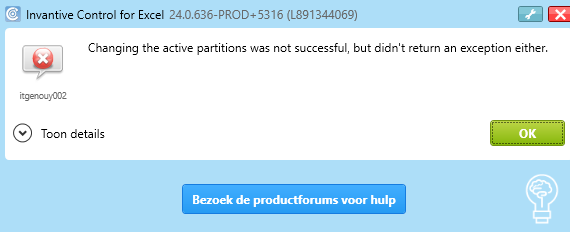
It seems that I can only select 1 administration and not two. When I do, I get the following error message
itgenouy002
Changing the active partitions was not successful, but didn’t return an ex
When starting up Excel, I get two error messages, with the following details:
itgenlic254:
Invantive Control for Excel cannot be used due to the message(s) shown earlier.
and
itgenclr107:
The specified value in System.Windows.Markup.StaticResourceHolder caused an exception.
The method or operation is not implemented.
System.NotImplementedException
System.Windows.Markup.XamlParseException
at System.Windows.Baml2006.Baml2006SchemaContext.ResolveBamlType(BamlType bamlType, Int16 typeId)