Do you know why there is no “Export SAVE AS” option when I run the Query tool from Invantive Control?

After I clicked the Export Excel and there is no save option in next screen (where I can click include header).
I don’t know how to insert the picture in this forum.
I did not use Query Tool separately; the Query Tool is in Invantive Control.
A reproduction scenario or image is needed to understand your issue.
A reproduction scenario can be added by listing all individual actions from the startup of Excel, such that someone can reproduce it in another environment.
An image as an alternative can be inserted by Copy & Paste or using the Upload button above.

Die sichtbare Schriftart ähnelt der Darstellung einer chinesischen Schriftart mit europäischen Zeichen.
Die Einschränkungen von Windows Forms bei hoher Auflösung und speziellen Schriftarten machen es nahezu unmöglich, diese Anzeige zu erstellen.
Bitte versuche es erneut mit einer rein europäischen Unicode-Schriftart und – falls es dann immer noch nicht funktioniert – verwende keinen hochauflösenden Bildschirm, sondern 1920x1200.
Alternativ kannst du mit AltO die OK-Schaltfläche betätigen:
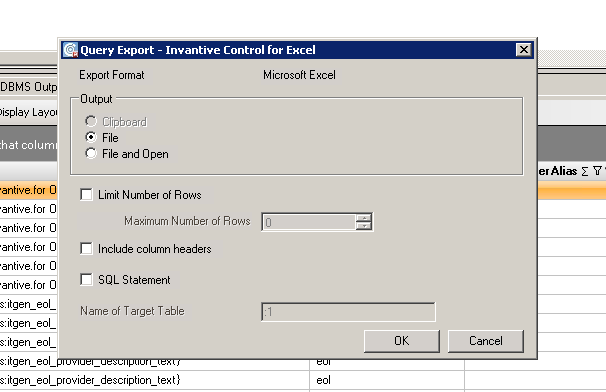
Alternativ kannst du eine Invantive-Script-Anweisung verwenden, um nach Excel zu exportieren, wie unter Export all Outstanding Items (AP and AR) from Exact Online Companies beschrieben und dokumentiert unter:
This question was automatically closed after at least 2 weeks of inactivity after a possible solution was provided. The last answer given has been marked as a solution.
Please ask a new question via a separate topic if the problem occurs again. Please include a link to this topic in the new question by pasting its URL into the text.
Bitte beachte, dass der skriptgesteuerte Export nach Excel auch mit Invantive Script möglich ist, zum Beispiel:
local export results as "${system:userdocumentsdirectory}\probably-unmatched.xlsx" format xlsx include headers
Weitere Informationen findest du hier: