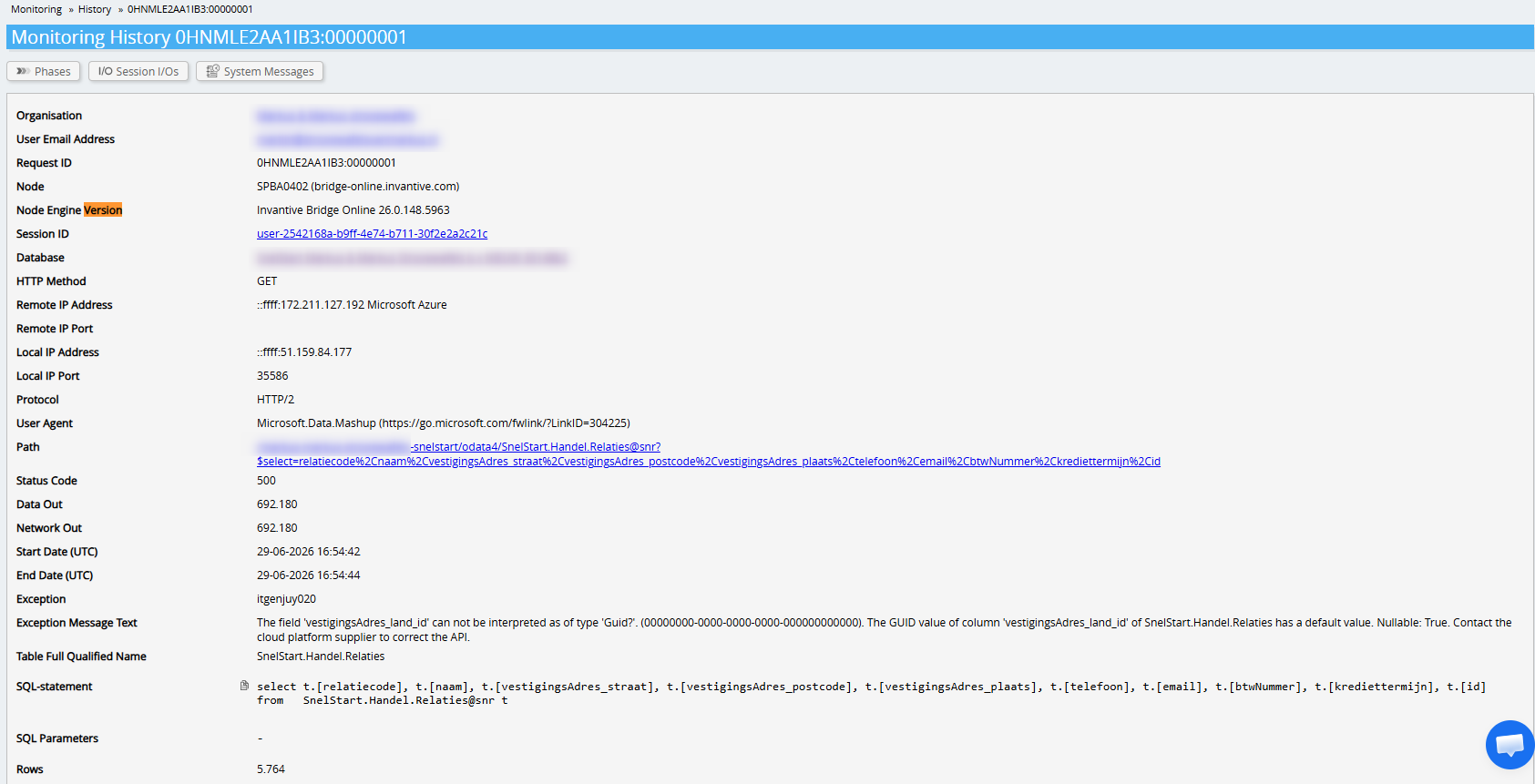
itgenjuy020
Can’t convert field ‘vestigingsAdres_land_id’ to type ‘Guid?’. (00000000-0000-0000-0000-000000000000)
itgenodr028
The GUID value of column ‘vestigingsAdres_land_id’ of SnelStart.Handel.Relaties has a default value.
Nullable: True.
Contact the cloud platform supplier to correct the API.
The field vestigingsAdres_land_id is an optional data type but specifically contains a default value in this field. This may point to a software error in SnelStart.
We will contact SnelStart API Support to ask whether this will be addressed in SnelStart or whether a rewrite from Invantive needs to be implemented to work around it.
After consultation with SnelStart API Support, it has been determined that SnelStart may implement a fix in a future release and Invantive will implement a workaround starting from release 26.0.150.
This new release is/will be put into production on Invantive Cloud.
I have learned that a modification was made, so I have just tested it. The message is different but still along the same lines. The JSON format is still not correct;
DataSource.Error:
OData:
Invalid JSON.
A comma character ‘,’ was expected in scope ‘Array’.
Every two elements in an array and properties of an object must be separated by commas.
Hopefully you can make this addition to the adjustment soon. Many thanks in advance for your efforts!
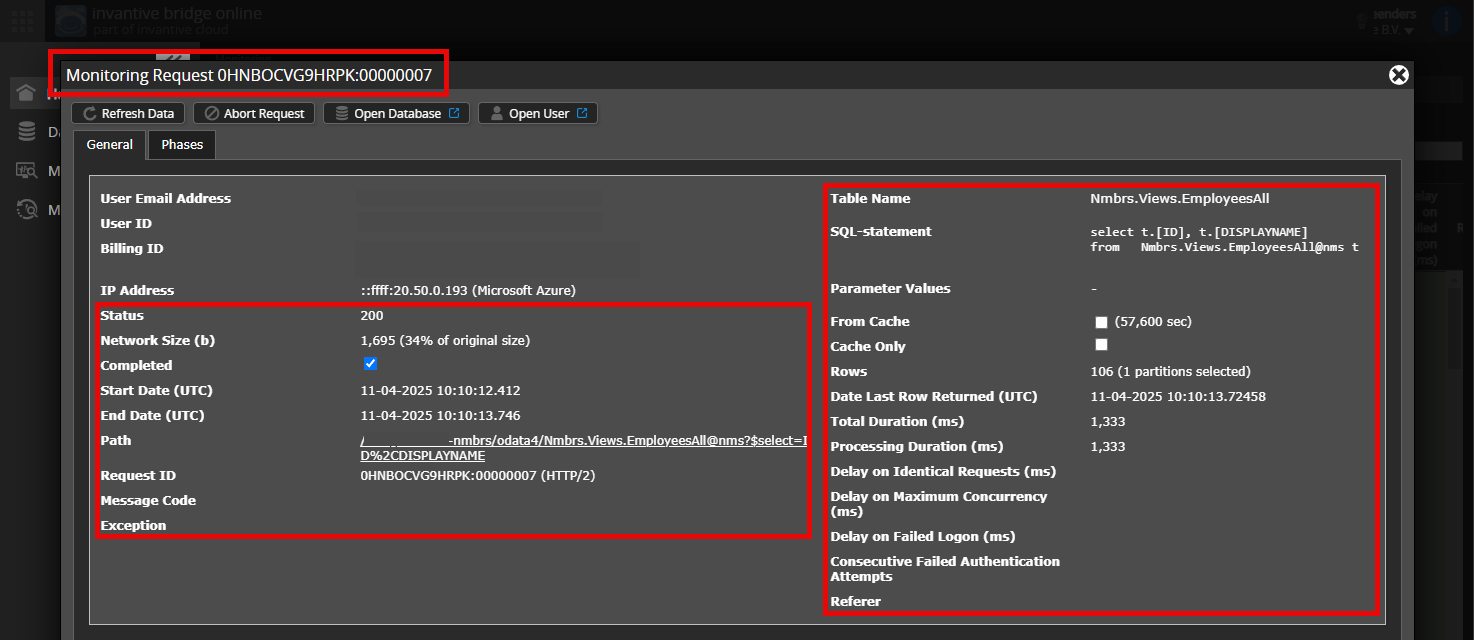
Is it possible to add an (anonymised) screenshot of the request details in Invantive Bridge Online Monitoring as described at Meer inzicht met nieuwe Online Monitoring?
You can find the details by clicking on the download request that represents the subject of this topic.
The download request usually includes an SQL statement in which the table name is visible.
Please ensure at least the following details are visible in both columns:
the title bar with the request ID,
the status code, network size, path, and timestamps in the left column,
the error code and error message at the very bottom of the left column,
the entire right column including the SQL statement, table name, and parameter values.
Make sure you log in to the Bridge Online website also used from Power BI and with the same username. You will only see the requests of the Invantive Cloud user with which you log in to the website.
There are four servers in use:
bridge-online.cloud
app-online.cloud
bridge-online.invantive.com
app-online.invantive.com
You can see the server used in your script or reporting source code.
Check Correct Request and Details
Make sure to select the request first to display the details. Only one request should be visible in the screenshot.
Also, carefully check whether the request has a path with odata4 or apps. Requests with other paths are generally not relevant for this purpose.
Error Message and Tips via Email
Additionally, the Invantive Cloud user who received the error message will usually receive an email with an error message and tips on their email address if there is an error message in Power BI, Power Query, Azure Data Factory, Qlik, or Tableau.
The advice is to check the spam of the user involved for such emails sent from support@invantive.com.
itgenjuy020
The field ‘vestigingsAdres_land_id’ can not be interpreted as of type ‘Guid?’.
The GUID value of column ‘vestigingsAdres_land_id’ of SnelStart.Handel.Relaties has a default value.
Nullable: True.
Contact the cloud platform supplier to correct the API.
The new version 26.0.149 had not yet been installed on the Invantive Bridge Online component. It was still running 26.0.148. Please try again.
Please note that until 1 September 2026, only for widely affecting issues will new versions be deployed to production on Invantive Cloud due to the frozen period.
Immediately after the previous announcement (by phone) that an adjustment had been made, I received the notification I described on this forum on 29/6. The next day, that notification was back as it was before. Now you’re saying that release hadn’t happened.
Here’s my suspicion: the update did occur because it caused a different error. So, the release was incomplete and was quickly rolled back. Now it has been redeployed, and I’m getting that notification again:
DataSource.Error:
OData:
Invalid JSON.
A comma character ‘,’ was expected in scope ‘Array’.
Every two elements in an array and properties of an object must be separated by commas.
The procedural advice is not to open multiple parallel communication channels, but exclusively to escalate via the forums. Multiple channels often prove disruptive and detrimental to quality in practice, no matter how inconvenient.
For the current report, it is advised to add a screenshot of the request as before.
If it is a priority, the advice is to let SnelStart resolve the data corruption.
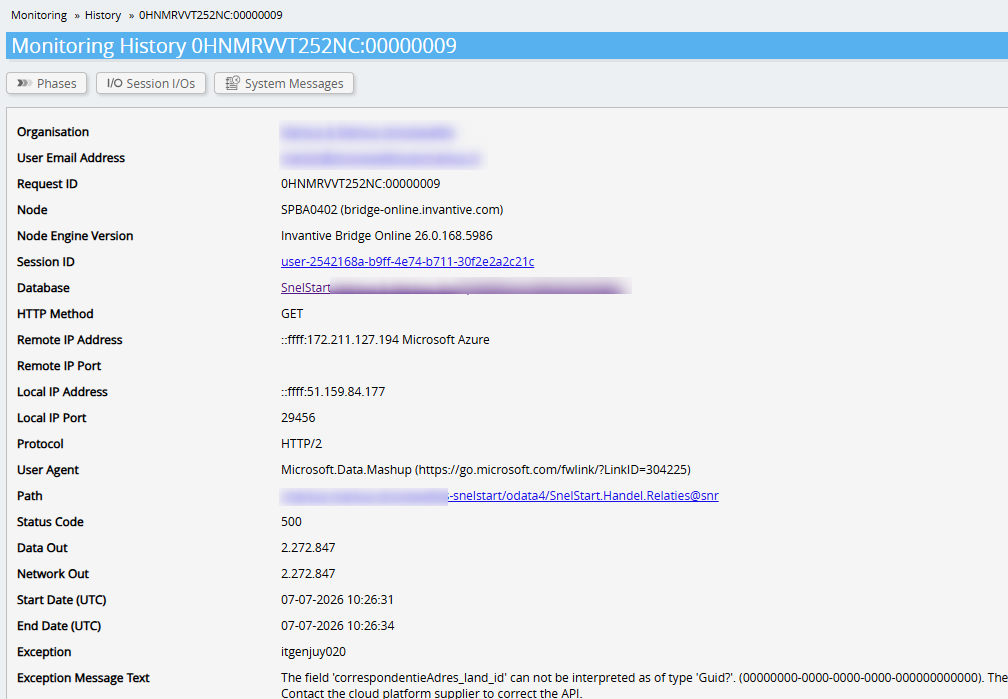
itgenjuy020
The field ‘correspondentieAdres_land_id’ cannot be interpreted as of type ‘Guid?’.
The GUID value of column ‘correspondentieAdres_land_id’ of SnelStart.Handel.Relaties has a default value.
Nullable: True.
Contact the cloud platform supplier to correct the API.
The original error message involved the field vestigingsAdres_land_id. This was blocking the following error message, namely the field correspondentieAdres_land_id.
A workaround for correspondentieAdres_land_id has been included in the software. This will be deployed in production in the next version.
Is there any indication of a timeline for when the next version will be put into production? Since 22 June, we no longer have up-to-date dashboards, and this is becoming critical with the month-end closing, etc.
The release has been withdrawn due to issues in other components that impacted a larger number of users. It is unknown whether there will be another release before the end of the summer break.
Since there is only a limited impact and the cause lies within SnelStart itself, this issue is not considered critical enough to justify breaking the frozen period.
The advice is to choose an alternative (manual) solution if certainty is required.
Ah, what a bummer! We’ve managed to renew successfully once, but now we’ll go through another period without up-to-date data. Very frustrating.
Can you specify exactly what’s going wrong for others and where I can follow this?
Due to the duration and uncertainty of our paid integration, you can surely help us towards a solution:
We don’t recognise that field, and presumably linked country fields are all filled in. No doubt you can let us know which record(s) are causing issues in our administration. Please provide this based on Relationship Code or ID.
I would also like to point out this;
Around this period, our renewal stopped. And in the release are the problematic fields highlighted in the error message.
Can this release be rolled back? I think that would help us.
We understand that this poses challenges, for which we apologise. The issue that forced us to roll back the release affected dozens of customers, leaving us no choice but to do so. A fix for that problem is in the works. Hopefully, we can roll out a revised version soon that will resolve both issues.
We are not entirely clear on what the cause of the problem is. Is the data in SnelStart incorrect, or does the issue lie with the Invantive connection? Over the past few weeks, several people have been working on the problem analysis, but we are unable to clarify it. This makes it difficult to determine a quick and dirty fix as well. Can you clearly describe what is causing the problem?
The cause lies in an error in the data provided by SnelStart. Specifically, the field vestigingsAdres_land_id has an invalid value: 00000000-0000-0000-0000-000000000000. Invantive software has built-in safeguards for data quality, and this prevents the value from being used. In fact, the field should have been empty. This occurs in several relationships in SnelStart.
The problem might be easily resolved on SnelStart’s side by linking a country to the addresses on the relevant relationships, or by giving the field the value null in the SnelStart database (this is likely an action on SnelStart’s side).
The reason the adapted Invantive release cannot be implemented is due to another, unrelated issue which we cannot further elaborate on in this topic.