Function I_EOL_CUT_BAL_PDE_CLOSE
( Optional divisionCode As String = ""
, Optional costUnitCode As String = ""
, Optional reportingYear As Integer = 0
, Optional reportingPeriodFrom As Integer = 0
, Optional reportingPeriodTo As Integer = 0
, Optional glAccountCode As String = ""
, Optional glAccountType As String = ""
, Optional balanceType As String = ""
, Optional afterEntry As Boolean = True
, Optional executionHint As String = ""
)
The function call I_EOL_CUT_BAL_PDE_CLOSE(,“RUF AJWS”,2026,1,3,“0427”) leads to the following mapping:
divisionCode = “”
costUnitCode = “RUF AJWS”
reportingYear = 2026
reportingPeriodFrom = 1
reportingPeriodTo = 3
glAccountCode = “0427”
glAccountType = “”
balanceType = “”
afterEntry = True
executionHint = “”
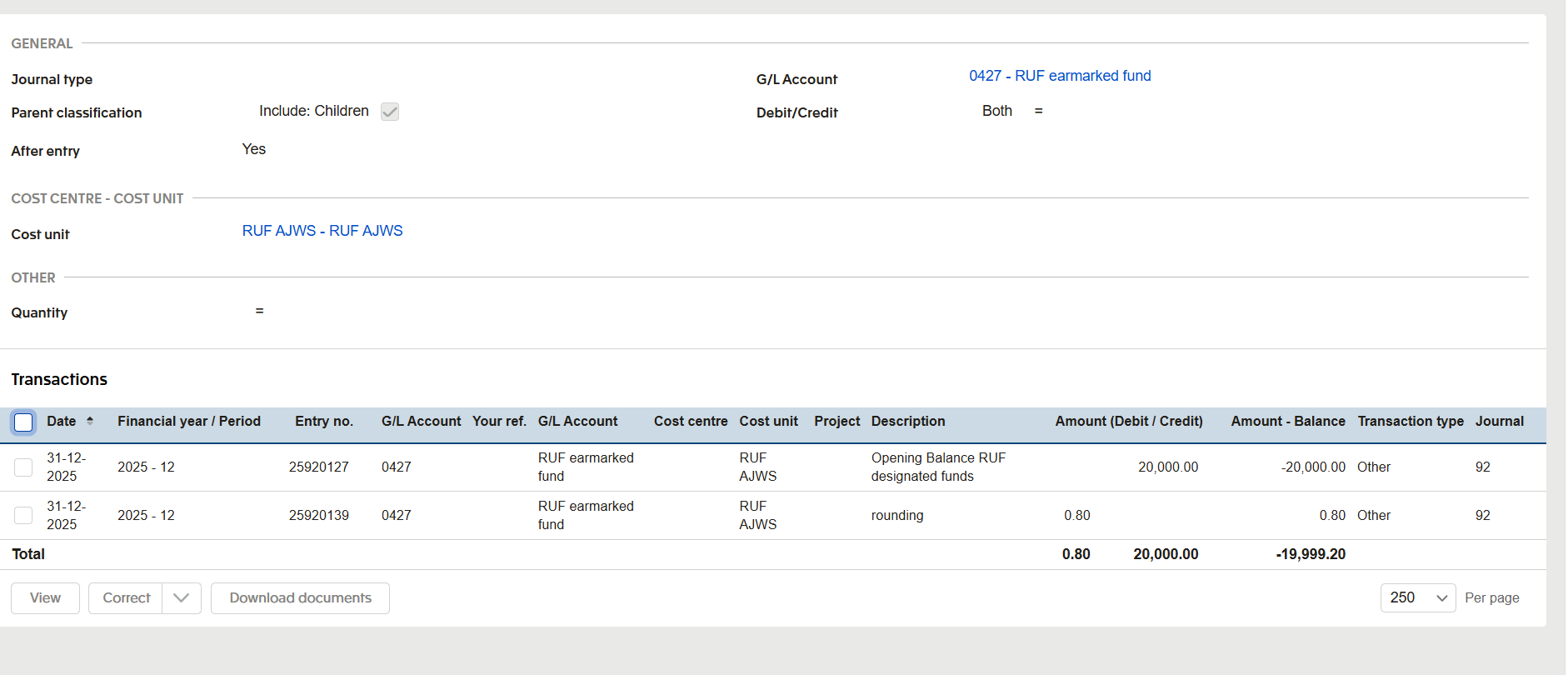
Based upon the screenshot, it can not be concluded that there is a closing balance at the end of period 3 in 2026. The value should be: opening balance of the cost unit, plus cumulative volume from periods 1 through 3.
It is recommended to test using the period 2025-12.
Thank you for this information. When I use the period 2025-12 I get the opening balance. But does this mean in 2027 I will need to use both the period 2025-12 AND the period 2026-12 and add them together, or will 2026-12 include the total correct opening balance?
Yes, the original example that I have was to show the balance at the end of 2026, period 3, but it wasn’t showing the balance - only if I selected 2025 period 12, but the balance should therefore be the same at the end of 2026 period 3.