Following a recent multi-day outage, additional criteria have been added to the existing Fair Use daily limits. These limits only apply when using the (shared) Invantive Cloud environment; they do not apply when using on-premises versions.
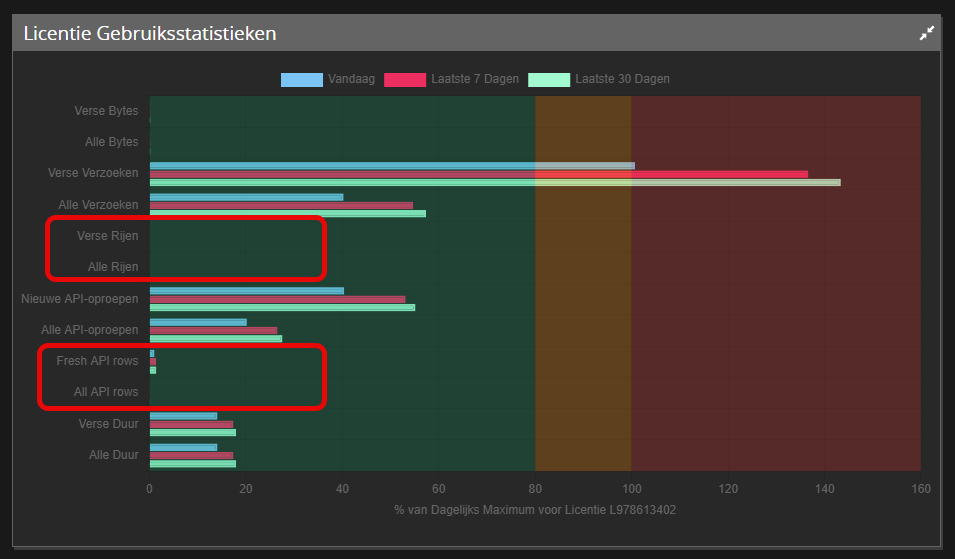
The new daily limits include:
- Maximum number of rows retrieved from (cloud) platforms per day retrieved fresh;
- Maximum number of rows retrieved from (cloud) platforms per day retrieved fresh and/or from cache;
- Maximum number of rows processed by the SQL engine per day retrieved fresh;
- Maximum number of rows processed by the SQL engine per day retrieved fresh and/or from cache.
Realistic limits have been set based on current daily usage. Users are not expected to experience any inconvenience as a result of thes additional limits. If one of the new or existing daily limits is exceeded, a Too Many Requests (HTTP 429) error message will be displayed.
The actual usage is visible on the license usage statistics on the home page of Invantive Cloud:
Analysis 429 Error
A 429 error message does not immediately indicate which dimension has exceeded the limit. The simplest way to find this out is to open the hyperlink displayed in the Monitoring section in a browser. After authentication, a JSON message will appear containing an error code and an explanation.
The error codes and their meanings are:
| Error Code Bridge Online | Error Code Cloud | Dimension |
|---|---|---|
| itgenboe402 | itgencld185 | FreshBytesPerDay |
| itgenboe403 | itgencld186 | TotalBytesPerDay |
| itgenboe404 | itgencld188 | FreshDurationMsPerDay |
| itgenboe405 | itgencld189 | TotalDurationMsPerDay |
| itgenboe406 | itgencld190 | FreshRowsPerDay |
| itgenboe407 | itgencld191 | TotalRowsPerDay |
| itgenboe408 | itgencld192 | FreshRequestsPerDay |
| itgenboe409 | itgencld193 | TotalRequestsPerDay |
| itgenboe655 | itgencld250 | FreshApiCallsPerDay |
| itgenboe656 | itgencld251 | TotalApiCallsPerDay |
| itgenboe670 | itgencld277 | FreshApiRowsPerDay |
| itgenboe671 | itgencld278 | TotalApiRowsPerDay |