After a recent multi-day outage, additional criteria have been added to the existing daily limits for fair use. These limits only apply when using the (shared) Invantive Cloud environment; they do not apply when using on-premises versions.
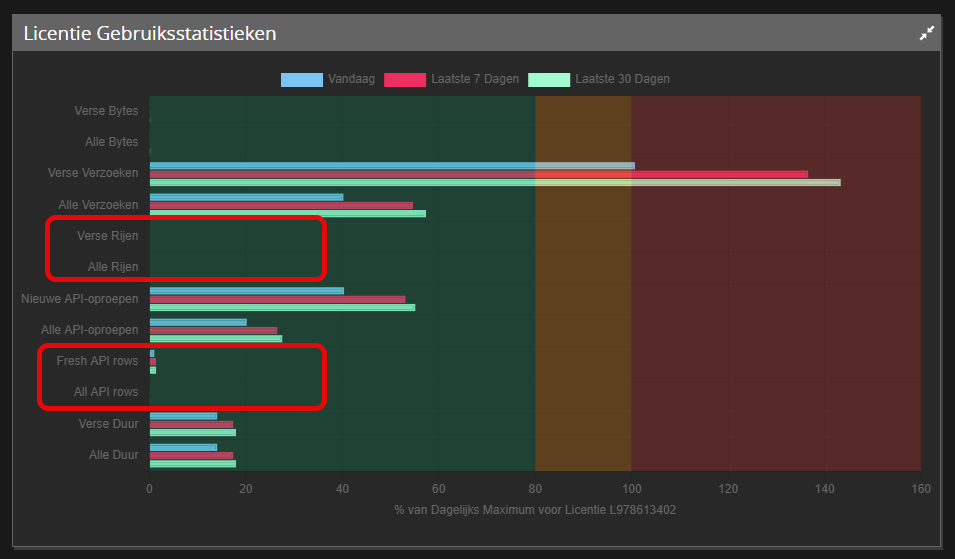
The new daily limits include:
- Maximum number of rows freshly retrieved from (cloud) platforms per day;
- Maximum number of rows freshly retrieved and/or from cache from (cloud) platforms per day;
- Maximum number of rows freshly processed by the SQL engine per day;
- Maximum number of rows freshly processed and/or from cache by the SQL engine per day.
Realistic limits have been set based on current daily usage. Users are not expected to experience inconvenience due to these additional limits. If any of the new or existing daily limits are exceeded, a Too Many Requests error message (HTTP 429) will be displayed.
Actual usage can be viewed in the licence usage statistics on the Invantive Cloud homepage:
Analyse 429 Error Message
A 429 error message does not immediately indicate which dimension has exceeded the limit. The simplest way to find out is to open the hyperlink visible in the Monitoring in a browser. After authentication, a JSON message will appear with an error code and explanation.
The error codes and their meanings are:
| Error Code Bridge Online | Error Code Cloud | Dimension |
|---|---|---|
| itgenboe402 | itgencld185 | FreshBytesPerDay |
| itgenboe403 | itgencld186 | TotalBytesPerDay |
| itgenboe404 | itgencld188 | FreshDurationMsPerDay |
| itgenboe405 | itgencld189 | TotalDurationMsPerDay |
| itgenboe406 | itgencld190 | FreshRowsPerDay |
| itgenboe407 | itgencld191 | TotalRowsPerDay |
| itgenboe408 | itgencld192 | FreshRequestsPerDay |
| itgenboe409 | itgencld193 | TotalRequestsPerDay |
| itgenboe655 | itgencld250 | FreshApiCallsPerDay |
| itgenboe656 | itgencld251 | TotalApiCallsPerDay |
| itgenboe670 | itgencld277 | FreshApiRowsPerDay |
| itgenboe671 | itgencld278 | TotalApiRowsPerDay |