Volgende meding verschijnt bij het refreshen van de account move line data:
Fout in de gegevensbron:
DataSource.Error:
OData:
Invalid JSON.
Unexpected end of input was found in JSON content.
Not all object and array scopes were closed..
Microsoft.Data.Mashup.ValueError.DataSourceKind = OData.
DataSourcePath = https://bridge-online.invantive.com/acme-odoo/odata4/Odoo.account.move_line@odo. .
The exception was raised by the IDataReader interface.
Please review the error message and provider documentation for further information and corrective action.
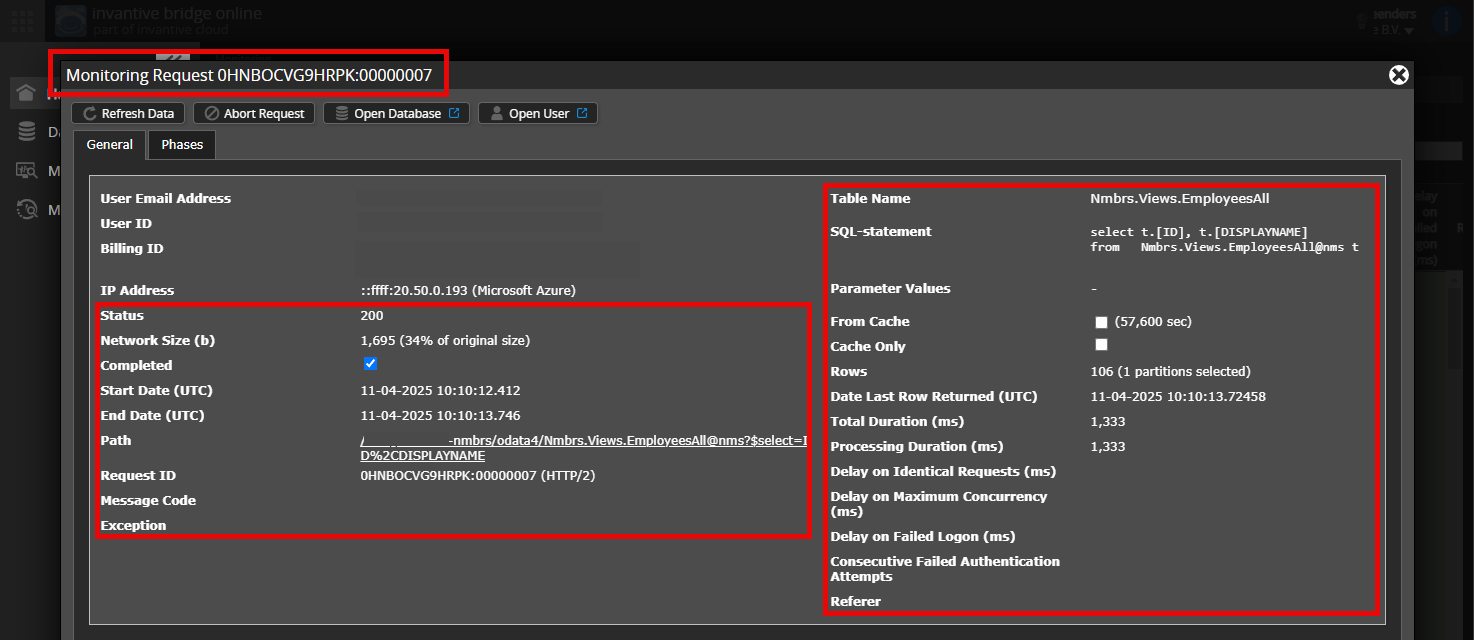
Is het mogelijk om een (geanonimiseerde) schermafdruk van de details van het verzoek in Invantive Bridge Online Monitoring toe te voegen zoals beschreven in Meer inzicht met nieuwe Bridge Online Monitoring?
De details vindt u door te klikken op het downloadverzoek welke het onderwerp van dit onderwerp representeert.
Het downloadverzoek heeft meestal een SQL-statement waarin de tabelnaam zichtbaar is.
Gelieve tenminste de volgende gegevens zichtbaar te laten van beide kolommen:
de titelbalk met de request ID,
de statuscode, netwerkgrootte, pad en tijdstippen in de linkerkolom,
de foutcode en foutmelding helemaal onderaan in de linkerkolom,
de gehele rechterkolom inclusief het SQL statement, tabelnaam en parameterwaardes.
Controleer zorgvuldig dat u zich aanmeldt op de Bridge Online-website die ook gebruikt wordt vanuit Power BI en met dezelfde gebruikersnaam. U ziet alleen de verzoeken van de Invantive Cloud-gebruiker waarmee u zich aanmeldt op de website.
Er zijn vier servers in gebruik:
bridge-online.cloud
app-online.cloud
bridge-online.invantive.com
app-online.invantive.com
De gebruikte server ziet u in uw script of broncode van rapportage.
Controleer juiste aanvraag en details
Zorg ervoor dat u het verzoek eerst selecteert om de details weer te geven. Er hoort maar één verzoek zichtbaar zijn in de schermafbeelding.
Controleer ook zorgvuldig of het verzoek een pad heeft met odata4 of apps. Verzoeken met andere paden zijn over het algemeen niet relevant voor dit doel.
Foutmelding en tips per e-mail
Daarnaast zal de Invantive Cloud-gebruiker die de foutmelding heeft op zijn e-mailadres veelal een e-mail ontvangen met een foutmelding en tips als er sprake is van een foutmelding in Power BI, Power Query, Azure Data Factory, Qlik of Tableau.
Advies is om de spam van de betrokken gebruiker te controleren op dergelijke e-mails verzonden vanaf support@invantive.com.
De verbinding met de website is onverwacht en met geweld verbroken om 22-08-2026 02:41:30 voor redenen zoals onvoldoende rechten, het vastlopen van de website, het opnieuw opstarten van het systeem, het hard afsluiten van een externe host of firewallactie. Het ophalen van gegevens is mislukt voor alle 3 pogingen gedurende 203 seconden. Neem contact op met de API-ondersteuning van Odoo. (https://roy20.odoo.com/jsonrpc). De gegevens kunnen niet worden gedownload omdat de verbinding is verbroken voordat de resultaten werden geretourneerd (time-out 57.000 ms). (https://roy20.odoo.com/jsonrpc). The operation has timed out.
Advies is om de download op een ander tijdstip in te plannen. Het is niet ongebruikelijk dat cloud-platformen meestal tussen 2 en 3 's-nachts activiteiten uitvoeren waardoor ze niet beschikbaar zijn.
Invantive SQL zal een aantal pogingen wagen en bij aanhoudende niet-beschikbaarheid de oorspronkelijke getoonde foutmelding rapporteren.