We see approximately 130,000 lines in the SyncDeleted API. Over 80% pertain to entity types for Sales Orders. They date back to 6 January 2026.
How can we reduce this volume?
These are a very large number of deleted sales order lines.
Six months of history is very long. According to the documentation at Exact Online REST API - Reference documentation, it should be 2 months (previously 1 month):
Note: the log of records deleted is saved for 2 months. Data older than 2 months is automatically deleted and therefore also not available anymore via the deleted API.
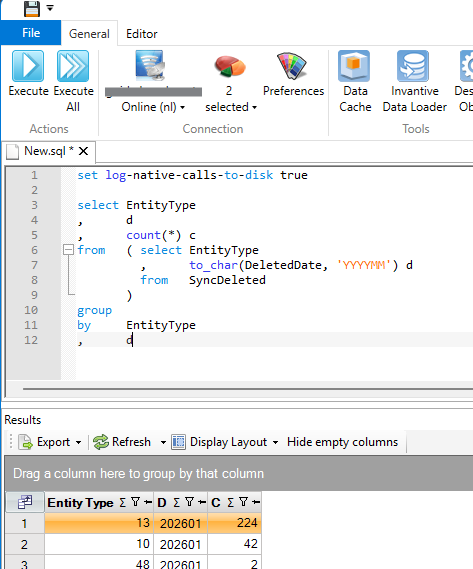
A check was performed on our own production environment with a comparable number of bookings. This also contains 6 months of history, specifically since 2 January 2026 23:26:30. However, the following query revealed significantly fewer mutations; the highest in a month was 1809.
select EntityType
,      d
,      count(*) c
from   ( select EntityType
         ,      to_char(DeletedDate, 'YYYYMM') d
         from   SyncDeleted
       )
group
by     EntityType
,      d
The advice is:
The amount of deleted lines can, but does not necessarily affect the functioning of the Invantive tables, but this requires further study based on the queries used to determine if this is the case and to what extent.
We received the following response:
Thank you for submitting the support query. If old transactions that were deleted in January are still appearing in the Sync/deleted, that indeed sounds like a bug, and we need to resolve this. Data should be available for a maximum of 2 months.
Since I haven’t heard about this issue from other developers, could you provide evidence of this?
- HTTP Request + Response body + Explanation of which data is from January?
- Date + time of the API call
- Explanation of exactly what these entities were, for example, booking lines of a specific booking? If so, what kind of booking? So that I can see if I can find a pattern.
- Is it all in one administration? Or do you experience this in multiple environments?
I look forward to hearing from you! Thank you!
The advice is to collect the requested data via native call logging:
set log-native-calls-to-disk true
%USERPROFILE%\NativeCalls.In the Query Tool, it looks like:
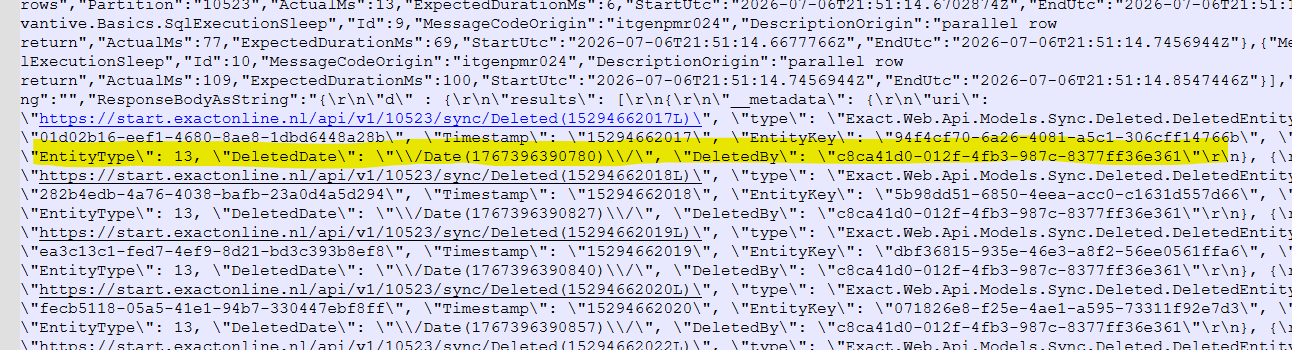
And in the folder as:
The content is more than sufficient for a developer to find an answer to the questions posed:
This question has been automatically closed after 1 week of inactivity. The last given answer has been marked as a solution.
Please create a new question in a separate topic if the problem recurs. In the new question, kindly include a link to this topic by pasting its URL into the text.
From release 26.0.300 onwards, a check has been included in the building of incremental tables.
If an Exact Online environment contains deleted rows older than specified plus 7 days, the processing will be aborted with the error message:
itgeneor878
A deleted item has a deletion date ‘…’, but the specifications dictate that the oldest possible date should be ‘…’.
This check ensures that the specifications align with reality in order to ensure the correctness of the collected data and performance.
The advice is to contact Exact Online Support and request them to clean up the data, aligning it with the specifications at: