De foutcode itgenobr344 treedt sinds 16 juni 2026 16:00:00 structureel op grote aantallen omgevingen op Exact Online. Een analist zal de oorzaak inventariseren met hoge prioriteit.
The advised workaround is to temporarily start processes manually using the Invantive Query Tool, or to run them as a (converted) Invantive Cloud application.
The advised workaround is to temporarily start processing manually using the Invantive Query Tool or to run it as a (converted) Invantive Cloud application.
An alternative route has been taken to re-enable logging into Exact Online from Invantive Data Hub. The route used in Invantive Data Hub over the past years is no longer viable on Exact Online due to technological choices.
The alternative route involves using Invantive Cloud for managing login credentials. During the coming week, a separate node named “Invantive Credentials Server” will be added to Invantive Cloud. This node can be used to request the so-called “access token”, allowing the continued use of Invantive Data Hub with on-premises systems and databases, with the credentials (partially) exchanged via Invantive Cloud.
Please make the following preparations if you wish to switch to using the Invantive Credentials Server:
Log into Invantive Cloud with the email address of the license coordinator.
Check that you can sign in as this service user. The menu will largely remain empty.
Log in again as the license coordinator.
Create a database with the Exact Online credentials from your settings*.xml.
Tick the new checkbox “Allow Invantive Credentials Server Use” in the database screen.
Add the IP address to the database from which Invantive Data Hub will connect to Invantive Cloud to request the access token.
The switch will at least involve (to be supplemented if necessary):
Upgrading Invantive Query Tool to a release available next week
Upgrading Invantive Data Hub to a release available next week
Replace the Exact Online login credentials in settings*.xml for the Exact Online data container with the connection details needed for Invantive Credentials Server.
If you need assistance with this, please schedule a short consultation.
Signing in to Invantive Data Hub via Invantive Cloud is currently in an internally testable state. Extending the connection with a new access token will be worked on tomorrow.
The registration of Invantive Data Hub via Invantive Cloud is currently in an internally testable situation after some corrections. Access tokens are now also automatically renewed.
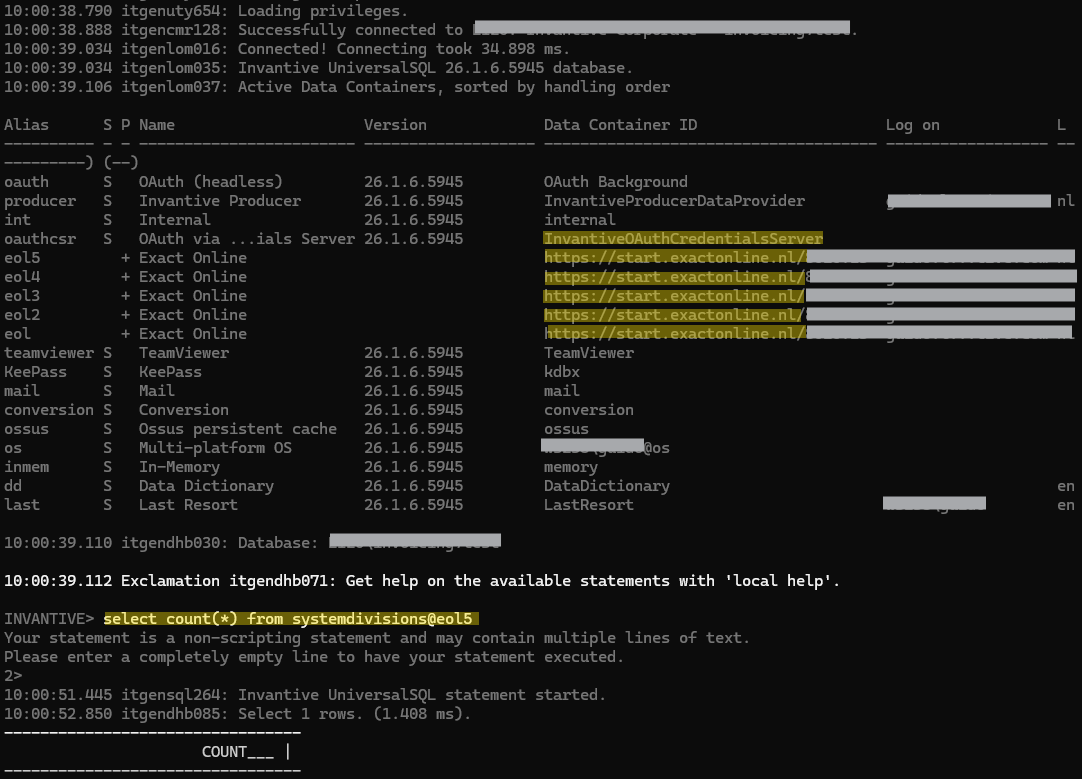
In the example below, a connection was established with five Exact Online environments (eol…eol5) via Invantive Credentials Server:
The combination of Invantive Data Hub with the new addition to Invantive Cloud: Invantive Credentials Server makes using Exact Online possible again, even in combination with local environments such as an on-premises SQL Server.
The improvements are now of a quality and security level suitable for production use.
The changes will be included in release 26.0 and will be available for download. This is expected to take another calendar day.
More information about Invantive Credentials Server can be found at:
The new <credentials> tag for use in settings*.xml is described at:
The new version 26.0.144 of Invantive Data Hub, in combination with Invantive Credentials Server, now handles the quite complex internal processing of Invantive itself without any issues.
This new version is available and resolves the problem. A step-by-step guide for the conversion will be added after a few users have been migrated. If you need support with installation and configuration, you can schedule a short consultation via the chat in the bottom right corner.
The new version of Invantive Data Hub also allows multiple instances to run simultaneously against the same Exact Online environment. Throughput capacity is then (partially) shared, but sometimes also increased because other intermediate steps can utilise the remaining space.
Note that <credentials> is not supported in earlier versions and will not be supported. This also applies to release 25.0.
Users who previously ran Invantive Data Hub on release 24.0 or release 25.0 are advised to take migration steps and/or regression bugs into account.
An Exact Online client ID that is no longer in use can be removed. This could potentially save costs.
As of now (24 June 2026), there is no public 26.0 release of the Invantive Query Tool. Users of Invantive Data Replicator should use only the Invantive Data Hub due to matching version numbers. Users who do not use Invantive Data Replicator can use the 25.0 release, provided that the content of the original settings file is available.
The first problem has been analysed and the solution is known. It requires changes in various parts of Invantive Cloud. These changes and a corresponding adjustment in a new version of Invantive Data Hub will be processed in the course of 26 June 2026.
The second problem will be addressed as soon as the work on the first problem allows.
However, the connection now fails with itgenboe688 during the initial connection:
07:44:39.302 Error itgenboe688: A connection could not be established to the database '...\data-replicator'.

One or more errors occurred.
Invantive Credentials requires the use of a service user account.
Please provide the credentials of a service user account.
The settings*.xml remains unchanged and did not produce this error in the previous version.
From version 25.0.232 onwards, the following products will ignore databases with an Invantive Credentials Server definition component (using <credentials>); these versions are available on download.invantive.com:
The recommendation is to use an Invantive Cloud service account as described at Concept - Invantive Product Documentation. This will resolve the itgenboe688 message.
The definition of this is described in:
The error message with code itgenboe688 is not related to the Invantive Data Hub version, but to an upgrade of the Invantive Credentials Server. The check for using an Invantive Cloud service account was activated on 26 June 2026.