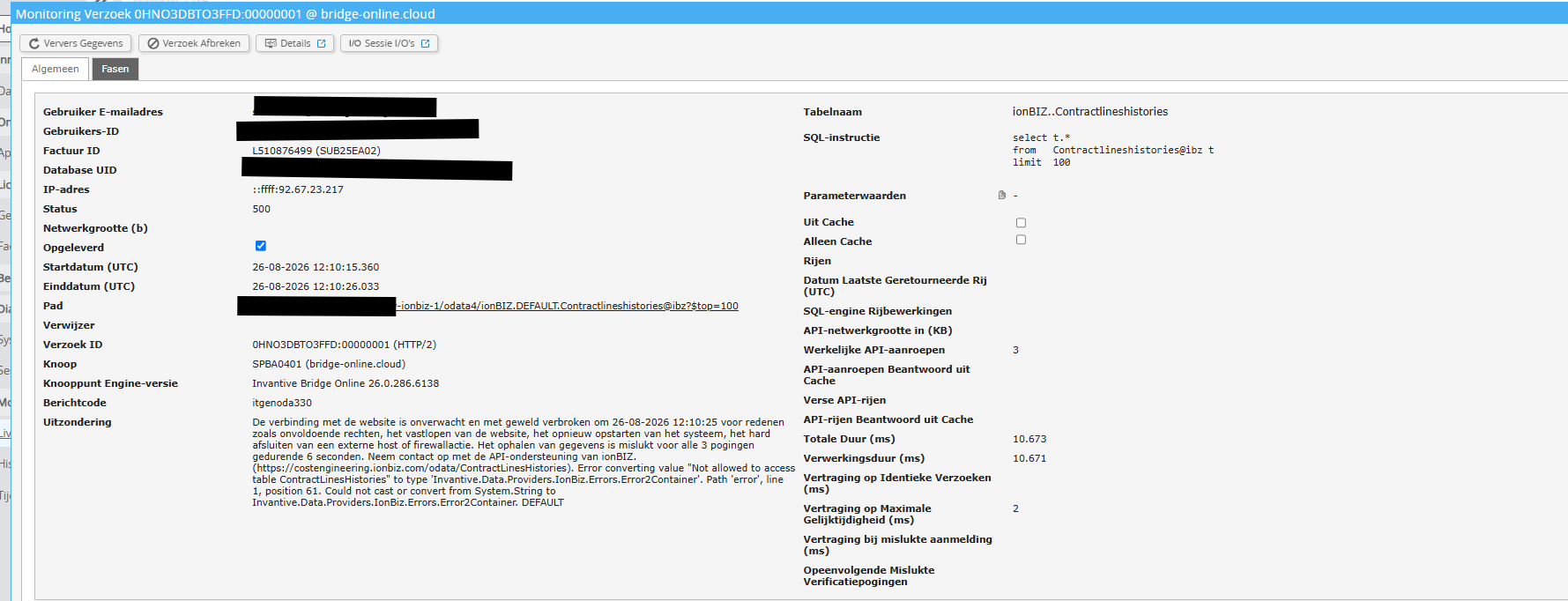
De historie tabellen kunnen niet geladen worden, ook subsets werken niet.
Is er iets wat ik aan moet passen?
Aanvullen informatie
Is het mogelijk om een (geanonimiseerde) schermafdruk van de details van het verzoek in Online Monitoring op Invantive Cloud toe te voegen zoals beschreven in Meer inzicht met nieuwe Online Monitoring?
De details vindt u door te klikken op het downloadverzoek welke het onderwerp van dit onderwerp representeert.
Het downloadverzoek heeft meestal een SQL-statement waarin de tabelnaam zichtbaar is.
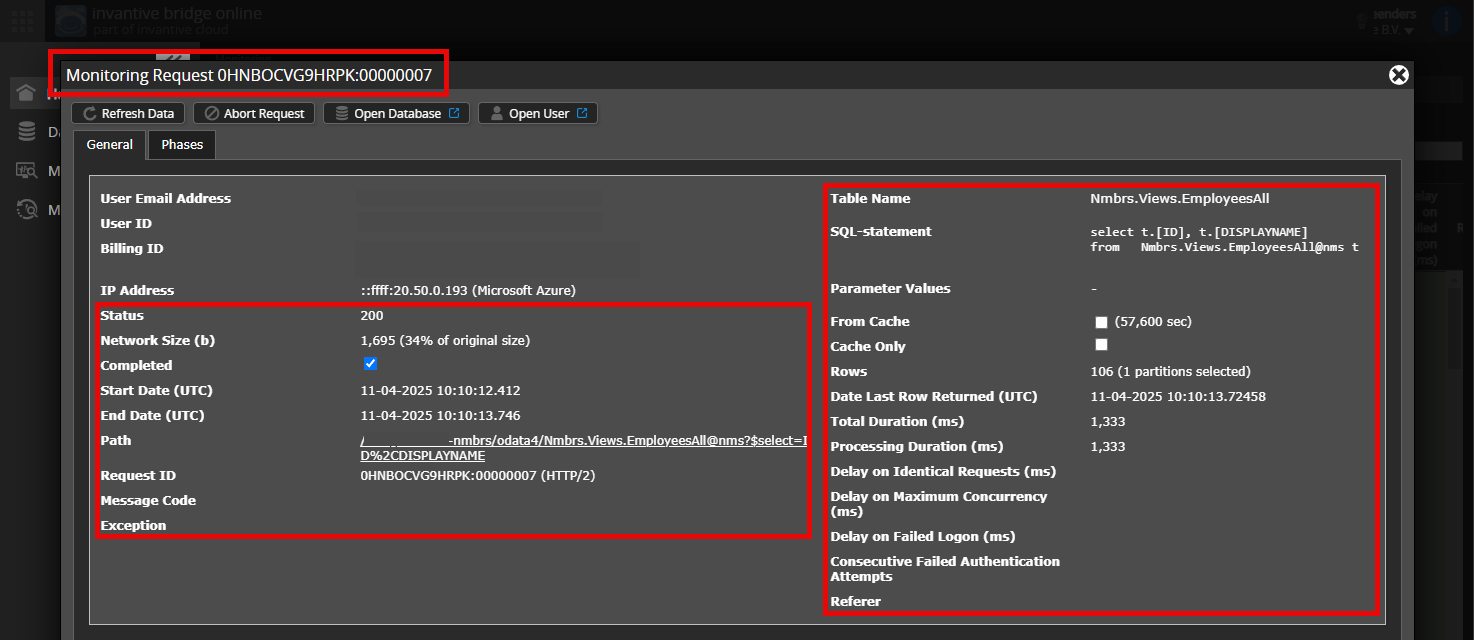
Gelieve tenminste de volgende gegevens zichtbaar te laten van beide kolommen:
- de titelbalk met de request ID,
- de statuscode, netwerkgrootte, pad en tijdstippen in de linkerkolom,
- de foutcode en foutmelding helemaal onderaan in de linkerkolom,
- de gehele rechterkolom inclusief het SQL statement, tabelnaam en parameterwaardes.
Bijvoorbeeld:
Controleer juiste server en gebruiker
Controleer zorgvuldig dat u zich aanmeldt op de Invantive Cloud-website met dezelfde gebruikersnaam als waarmee u gegevens verwerkt via bijvoorbeeld Invantive Bridge Online. U ziet alleen de verzoeken van de Invantive Cloud-gebruiker waarmee u zich aanmeldt op de website.
Controleer juiste aanvraag en details
Zorg ervoor dat u het verzoek eerst selecteert om de details weer te geven. Er hoort maar één verzoek zichtbaar zijn in de schermafbeelding.
Controleer ook zorgvuldig of het verzoek een pad heeft met odata4, apps of mcp. Verzoeken met andere paden zijn over het algemeen niet relevant voor dit doel.
Foutmelding en tips per e-mail
Daarnaast zal de Invantive Cloud-gebruiker die de foutmelding heeft op zijn e-mailadres veelal een e-mail ontvangen met een foutmelding en tips als er sprake is van een foutmelding in Power BI, Power Query, Azure Data Factory, Qlik of Tableau.
Advies is om de spam van de betrokken gebruiker te controleren op dergelijke e-mails verzonden vanaf support@invantive.eu.

itgenoda330
De verbinding met de website is onverwacht en met geweld verbroken om … voor redenen zoals onvoldoende rechten, het vastlopen van de website, het opnieuw opstarten van het systeem, het hard afsluiten van een externe host of firewallactie.
Het ophalen van gegevens is mislukt voor alle 3 pogingen gedurende 6 seconden.
Neem contact op met de API-ondersteuning van ionBIZ.
Error converting value “Not allowed to access table ContactLinesHistories” to type Invantive.Data.Providers.IonBiz.Errors.Error2Container.
Path 'error, line 1, position 61.
Could not cast or convert from System.String to Invantive.Data.Providers.IonBiz.Errors.Error2Container.
Advies is om de foutmelding zorgvuldig te lezen, en de daar geadviseerde actie uit te voeren.
In aansluiting op genormeerd gedrag bij andere drivers zullen vanaf release 26.0.301 geen rijen meer zichtbaar zijn in deze situatie. Geen rijen kan zijn geen data of geen rechten. Alleen SessionIOs@DataDictionary maakt dat verschil zichtbaar.
Deze vraag is automatisch gesloten na 1 week inactiviteit. Het laatste gegeven antwoord is gemarkeerd als oplossing.
Gelieve een nieuwe vraag te stellen via een apart topic als het probleem opnieuw optreedt. Gelieve in de nieuwe vraag een link naar dit topic op te nemen door de URL er van in de tekst te plakken.