When using Invantive Control for Excel we have, since today, been receiving the error message below:
itgenwin001
Exception from HRESULT: 0x800401A8 An unknown error has occurred.
The error message occurs within Invantive Control for Excel version 27.0.27-PROD+6339.
The details of the error message refer to, amongst others: Microsoft.Office.Interop.Excel.\_Workbook.get_Name() and Invantive.Producer.Control.Utility.IsWorkbookStillOpen().
The error occurred on 20-10-2026 at 09:05:48 UTC. Message ID: 418253b6-2489-48ac-90da-0205098027d7.
The full error message, including technical details, is included in the attachment/screenshot.
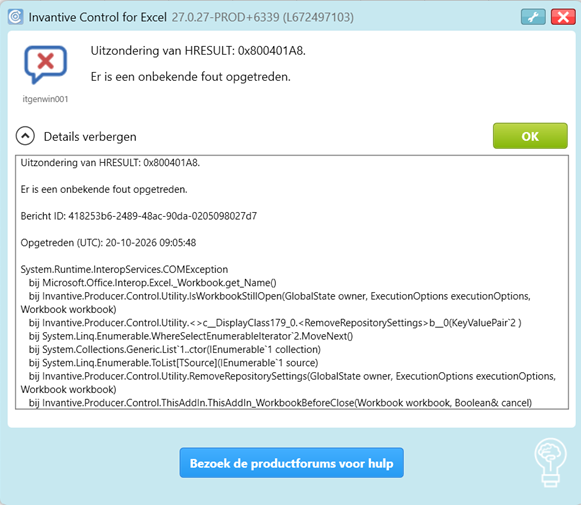
Callstack:
Exception from HRESULT: 0x800401A8.

System.Runtime.InteropServices.COMException
   at Microsoft.Office.Interop.Excel._Workbook.get_Name()
   at Invantive.Producer.Control.Utility.IsWorkbookStillOpen(GlobalState owner, ExecutionOptions executionOptions, Workbook workbook)
   at Invantive.Producer.Control.Utility.<>c__DisplayClass179_0.<RemoveRepositorySettings>b__0(KeyValuePair`2 )
   at System.Linq.Enumerable.WhereSelectEnumerableIterator`2.MoveNext()
   at System.Collections.Generic.List`1..ctor(IEnumerable`1 collection)
   at System.Linq.Enumerable.ToList[TSource](IEnumerable`1 source)
   at Invantive.Producer.Control.Utility.RemoveRepositorySettings(GlobalState owner, ExecutionOptions executionOptions, Workbook workbook)
   at Invantive.Producer.Control.ThisAddIn.ThisAddIn_WorkbookBeforeClose(Workbook workbook, Boolean& cancel)
Could you please indicate what is causing this error message and also resolve it in a future release?