This article describes how to set up a central code signing server in an office or even globally distributed development environment using a SafeNet hardware token, without the need for deploying a full Hardware Security Module (HSM).
A SafeNet token exposed over the network via FlexiHub on a Raspberry Pi or PC can be a pragmatic middle ground between file-based keys and a full HSM. When thoughtfully engineered, it supports a software release process with multiple build servers in an office or globally distributed. Remember to consider trade-offs, compensating controls, and keep an eye on when it’s time to grow to a real HSM or more advanced controls.
Audience
This article is written for IT professionals with a background in software development, DevOps, or IT security. Readers are expected to have a working knowledge of:
- CI/CD pipelines and build automation (e.g. Jenkins, Azure DevOps, GitHub Actions);
- certificate-based code signing and basic PKI concepts;
- network administration and secure deployment practices.
A technical or higher professional education (EQF Level 6 or above) and 2–5 years of relevant experience are recommended. The content is particularly useful for organisations seeking a practical, cost-effective alternative to full HSM deployments, achieving secure code signing in less time than it typically takes to acquire a new signing certificate.
Prerequisites
To execute these steps, make sure the following have been prepared or are achieved in parallel:
- A SafeNet hardware token initialised and tested (for instance 3 years at currently EUR 779 at globalsign.com plus cost of token).
- Raspberry Pi 400 with 4 GB (currently at EUR 53 at Kiwi Electronics)
- FlexiHub accounts created and connected between the Raspberry Pi and build environment (for instance currently at USD 194 per year for a single simultaneous connection).
- All required software (SafeNet Authentication Client, FlexiHub) installed on the devices.
- Network routes, firewall rules, and permissions validated.
- Administrative access to update your build environment.
Why a hardware token?
Code signing works by using a private key to create a digital signature that verifies that software truly comes from the stated publisher and has not been tampered with.
In the good old days, developers could easily sign and ship deliverables using a private key (often *.pfx) stored in a file. The private key was protected by a password and hopefully some protection on the storage device, such as being under lock & key inside a physically and digitally protected network. Malicious insiders or other actors might copy the file containing key and use it later to sign malicious code under a trusted name.
A hardware token (like a SafeNet eToken or HSM) stores the private key used for code signing inside a tamper-resistant chip, ensuring the key can never be exported. The signing operation itself happens within the token, and only the resulting signature leaves. The use of hardware ensures that “ownership” or “location” is required to sign (from “ownership”, “knowledge” and “location”), whereas a file can be copied as often as needed.
Major certificate authorities (CAs) and browsers have been enforcing stricter requirements in line with the Certificate Authority & Browser (CA/B) Forum. These state among other things that starting June 2023:
- Private keys must be generated and stored in hardware that meets FIPS 140-2 Level 2, Common Criteria EAL 4+ or something equivalent.
- Cloud-based key storage is permitted only when equivalent security (such as HSMs) is demonstrated.
Traditional .pfx files can still be used, but the deliverables signed using these no longer qualify for Extended Validation (EV) or even standard Code Signing Certificates in many real-life cases.
Do I need to provide signed software?
A software deliverable can be forced to run fine with some persuasion by an end user on Windows and macOS. Luckily, not in all cultures this is deemed acceptable. However, when software deliverables are forced to run despite incorrect code signing, this introduces some risks.
Does the name on the (digital) box actually take responsibility for the contents of the box?
Attacks are easier when a supplier structurally refrains from signing code. The code can be modified after being made available and be made available through other channels, seducing customers by social engineering or SEO to install them.
Of course, a supply chain attack is still possible depending on the complete system of controls applied. When a malicious actor infiltrates the build environment of a supplier sufficiently deep to add a backdoor, it is still possible to deploy malicious code to thousands of organizations. But the need to access the hardware (which can sign deliverables with the internal-only code signing private key) makes it considerably harder for this type of abuse to occur.
Many programs, even very sensitive programs like Fortify (…) or a Rabobank Smart Pay DLL, distribute without proper signature until at least recently, but providing a valid signature is the least a customer should expect from a company that asks users to install its software.
In many jurisdictions, users have grown accustomed to ignoring warnings about code signing. This is a dangerous habit that erodes one of the few visible security signals. But even if you and your users don’t mind ignoring the risk: what is the (financial) impact on the brand and revenues when the name is linked to a major data breach? Even if the probability of a breach is low, the potential reputational and financial damage is severe and often irreversible.
Typical Use of a SafeNet token
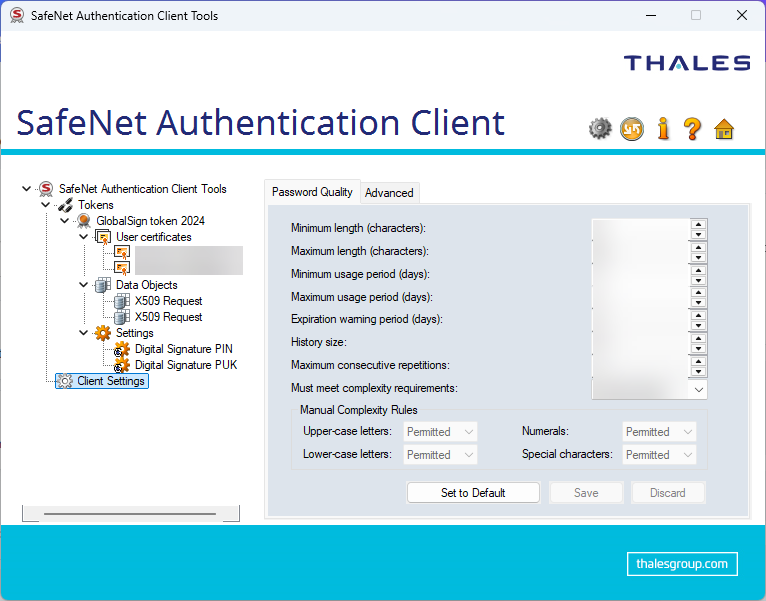
When solely one device needs access to the SafeNet token, the token can be plugged in an available USB port. The SafeNet Authentication Client will then provide access by code signing tools to the code signing capability once the correct token is provided.
Use of token in a network
The SafeNet token however by default can only be used on the device to which it is attached. Some companies for instance employ multiple build servers or even virtualize them with limited USB features. For a network setup without a HSM and supporting software, it is possible to make USB ports available across a network to other devices.
FlexiHub
One of the solutions for remote USB access is FlexiHub. FlexiHub runs on at least:
- Microsoft Windows (Windows 7 and later)
- macOS (10.15 and later)
- Various Linux and Android flavours (untested)
- Raspberry Pi (Bullseye and Bookworm only)
FlexiHub makes USB ports remotely accessible.
FlexiHub Sample Client
FlexiHub makes no real difference between clients and servers.
FlexiHub offers direct connections according to the service architecture and architecture, but it is unclear whether it is easy or possible at all to block any traffic going through a device under control of a third party. An alternative might be to use the Private Tunnel Server as part of the Enterprise plan.
Also note that FlexiHub has no strong authentication on the central web application.
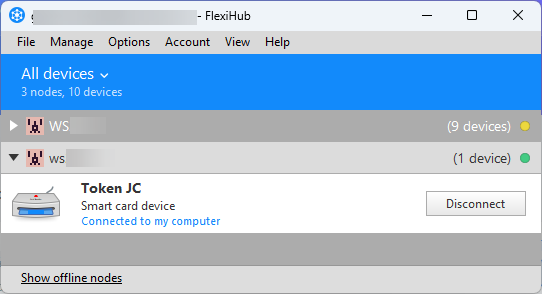
A graphical user interface for FlexiHub on a device accessing a remote USB port provides an overview of the USB devices:
In the image above, the second (open) folder is a forwarded USB device with a SafeNet token on another node running Raspberry Pi. When SafeNet Authentication Client is running, code can be signed using the remote SafeNet token.
The following image shows a run where three certificates (two of which are on a SafeNet token) are considered by signtool.exe before chosing one:
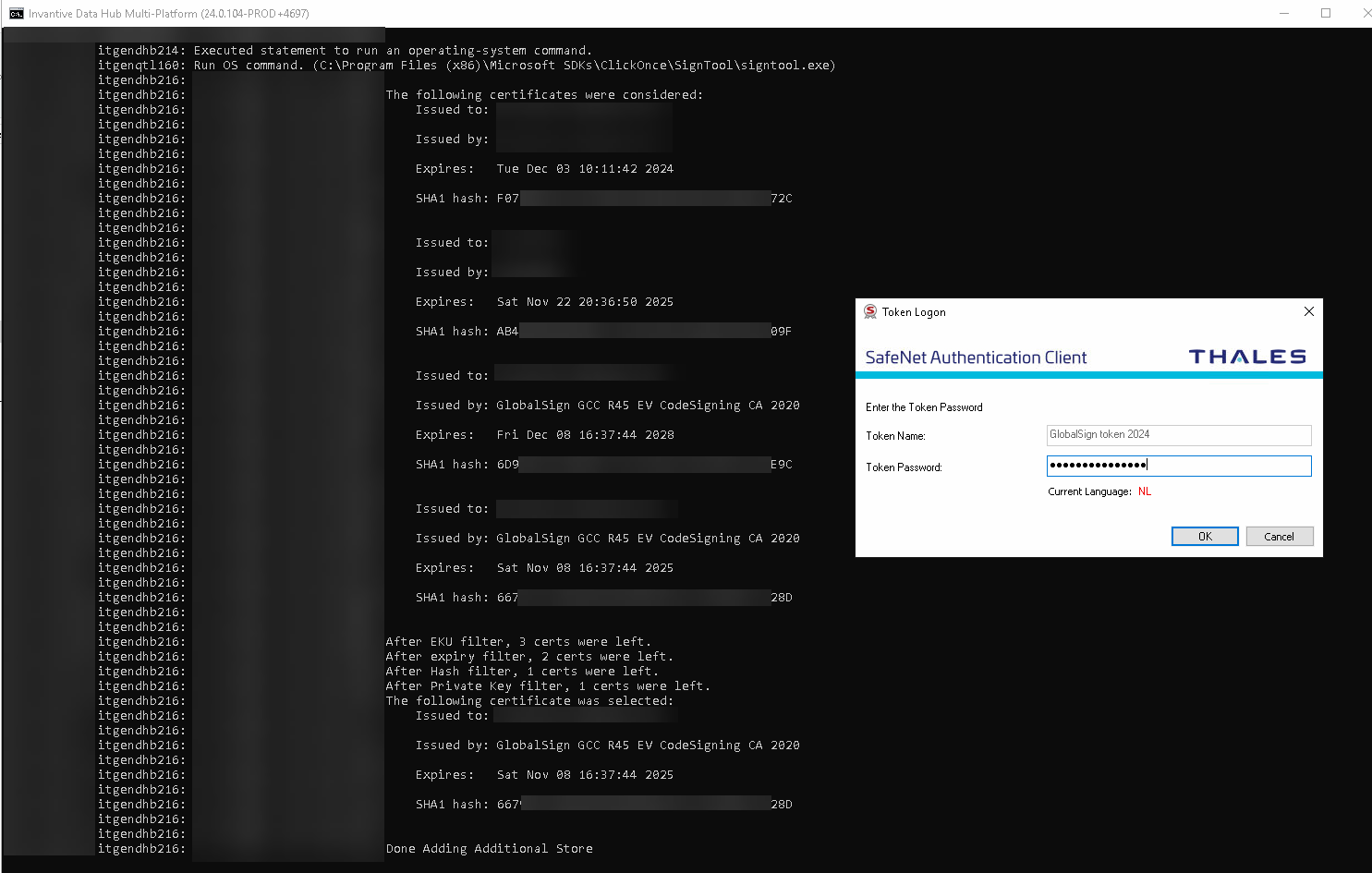
The SafeNet Authentication Client requires in this case the user to enter the token password to generate a signature.
FlexiHub Sample Server
In this sample, FlexiHub was installed on a Raspberry Pi with the SafeNet token attached to it as shown below:
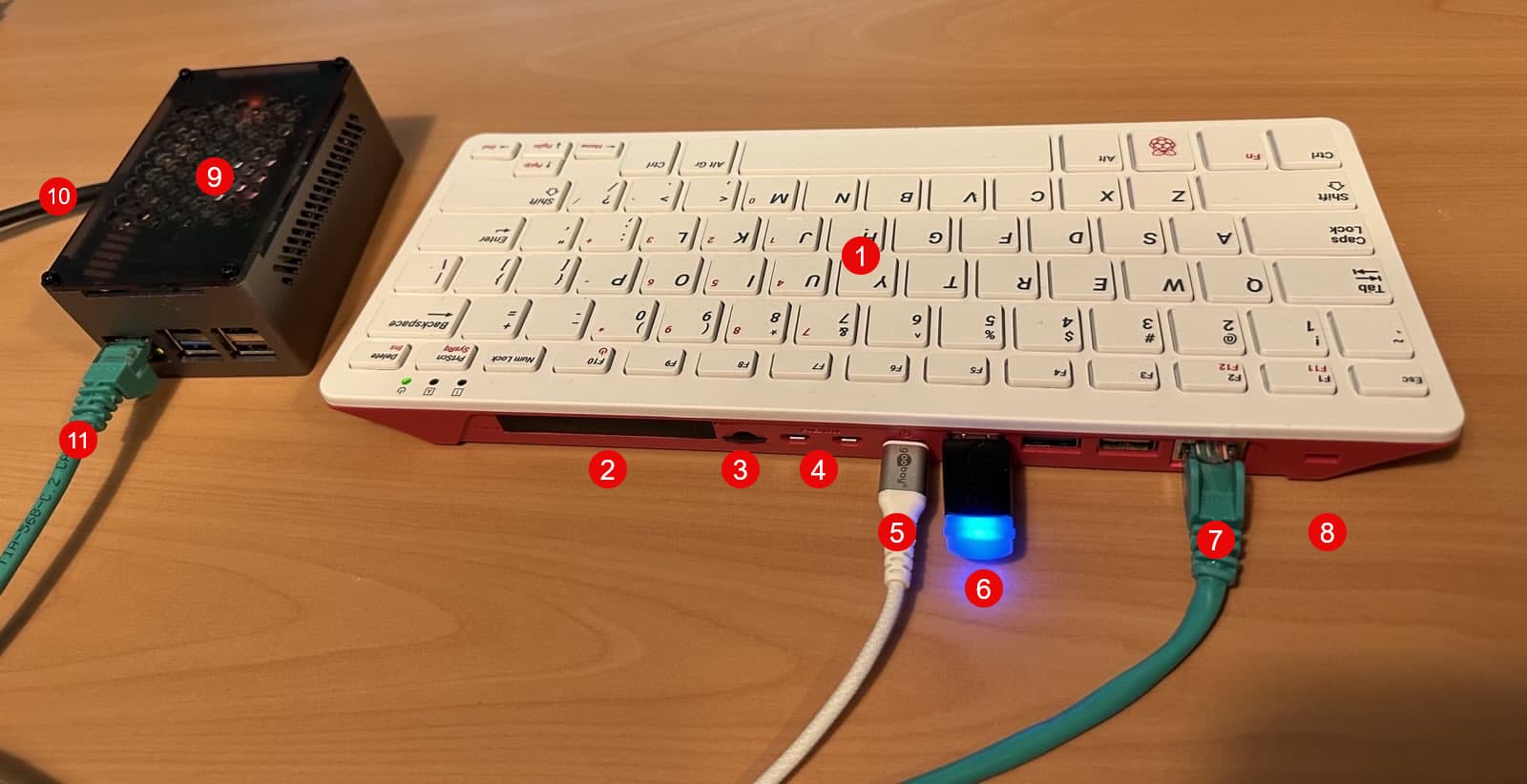
with the white numbers in red dots as follows:
- Raspberry Pi 400 with 4 GB (to improve OS version support compared to Raspberry Pi 5 / 500)
- General I/O (not used)
- 32 GB SD card with OS
- Two display ports (not used)
- Power over USB-C (at least 2A, max 5A)
- SafeNet token
- Network cable to segment
- Kensington slot
- Raspberry Pi 5 with NVMe disk and 16 GB (currently at EUR 107 at Kiwi Electronics without NVMe, NVMe hat and cooler)
- Power over USB-C (at least 2A, max 5A)
- Network cable to segment
The device on the left (with the digits 9 through 11) is just a sample of the typical form a Raspberry Pi is found.
The Raspberry Pi 400 on the right eases adoption of a new OS, providing a shrinkwrapped device that can be locked away near the build servers. 4 GB of memory is sufficient to run FlexiHub and the GUI:
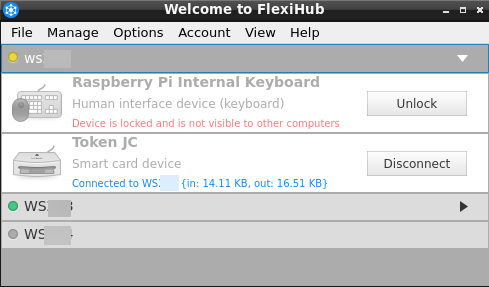
In the image above, the “Token JC” used by the client is shown as being connected, with some statistics on network usage.
Coordinating Access
When multiple build servers are involved, the token must be connected at the right time to the right server. This may need some custom orchestration code to control FlexiHub.
Operational Notes
The setup shown has been in use for over one year in a build environment. Although initially unstable, with release 6.0 of FlexiHub issues are almost gone, thanks to daily rebooting the Raspberry Pi from crontab.
On an incidental basis, an additional manual reboot of the Raspberry Pi is needed. It seems that the setup fails after generating more than a few hundred signatures in a single day. This reboot could also be integrated into the build process, e.g. via custom logic in your build pipeline or Ansible (yet another component to secure).
What are risks introduced by this setup?
FlexiHub introduces some new risks. There are various other signing alternatives which provide signing in a network or cloud. The discussion below typically also may hold for these or justify a more extensive discussion, so please always carefully consider your local plan together with your local security officer.
And yes, meeting only Level 2 limits the capabilities to protect your software deliverables. Other new risks introduced by this setup might be considered insignificant compared to those implied by the minimal restrictions. As always, carefully design your architecture to minimize risks considered relevant now and in the future in relationship to the goal at hand. The Internet community moved from using no encryption in a browser through ancient forms of SSL to the current standard, which neither will be the final solution for traffic encryption.
Deployment
The deployment extends the build environment by an additional device to be protected. Make sure the device is located in a physically and digitally protected environment. When ignored, a careful attacker can even relocate the token without being noticed, for instance by replacing the Raspberry Pi with a device configured to forward signing requests to the attacker’s chosen location.
FlexiHub software
Using third-party software like FlexiHub introduces some extra risks as compared to directly attaching the hardware token to a PC. I consider the risks of FlexiHub larger than those of a traditional USB hub, which is harder to upgrade by a malicious actor with new logic, but still the risks bear similarity.
The biggest risk is that a state actor (like the US administration) enforces the FlexiHub to inject logic. However, other parties such as certificate authorities would probably neither be able to withstand such forces, as well might not be able to withstand attacks such as with Diginotar (which was not really a challenge it seems).
A malicious insider at FlexiHub might also be able to inject malicious logic. Malicious logic as seen with a major brand of enterprise-grade network routers or even factories turning out perfectly standard router hardware not known by the brand’s systems require a motive and some time to set it up. Therefore, malicious logic will typically be trivial and easy to detect in the software delivery process when reviewing changes or executing a code review.
Also, the website of FlexiHub to manage computers offers no strong authentication.
The quality and independence of the review process at FlexiHub seems to control the quantity of risks.
Raspberry Pi
Also, the new device is provided and supported by Raspberry Pi. Raspberry Pi might also be susceptible to several attacks as described for FlexiHub. Sure, similarly unlikely, but nothing unheard of.
Audit
So far, I have been unable to find logging features or even an immutable audit feature or registration feature on the token used. Perfectly within specifications of Level 2. Only starting at FIPS 140-2 Level 3 there are requirements that require an audit trail.
Nonetheless, there is no perfect way to prove that a token was not used to generate a code signature. The build environment or FlexiHub logs might provide some proofs, but these are not covering when the token silently went under physical control by a malicious actor.
Other Considerations
As always: identify, assess, weigh, decide, then remember to revisit periodically. Security baselines evolve (as TLS did over the years), and your architecture should evolve too. This article provides some hints, but is not intended to be used as a complete reference, so don’t expect to find relevant topics like key management, build pipelines or alternatives here.