Breaking Simplicate change
Please take note of Geen data uit Simplicate query (translated from Dutch to English):
These improvements may also contain breaking changes due to changing the data type of created_at and updated_at. Historically, Simplicate specifies date fields as text, which is not always obvious to finance professionals. This often leads to unnecessary performance issues on Simplicate.
The changes will be included in release 25.0 after testing. This release will be gradually put into production after the summer holidays and includes thousands of small and large changes.
Release 25.0 is running on https://cloud.invantive.com, but currently NOT on any of the Bridge Online or App Online servers. An upgrade for Bridge Online and App Online is planned to occur in the next three weeks without prior notice and might take several efforts.
Complete information
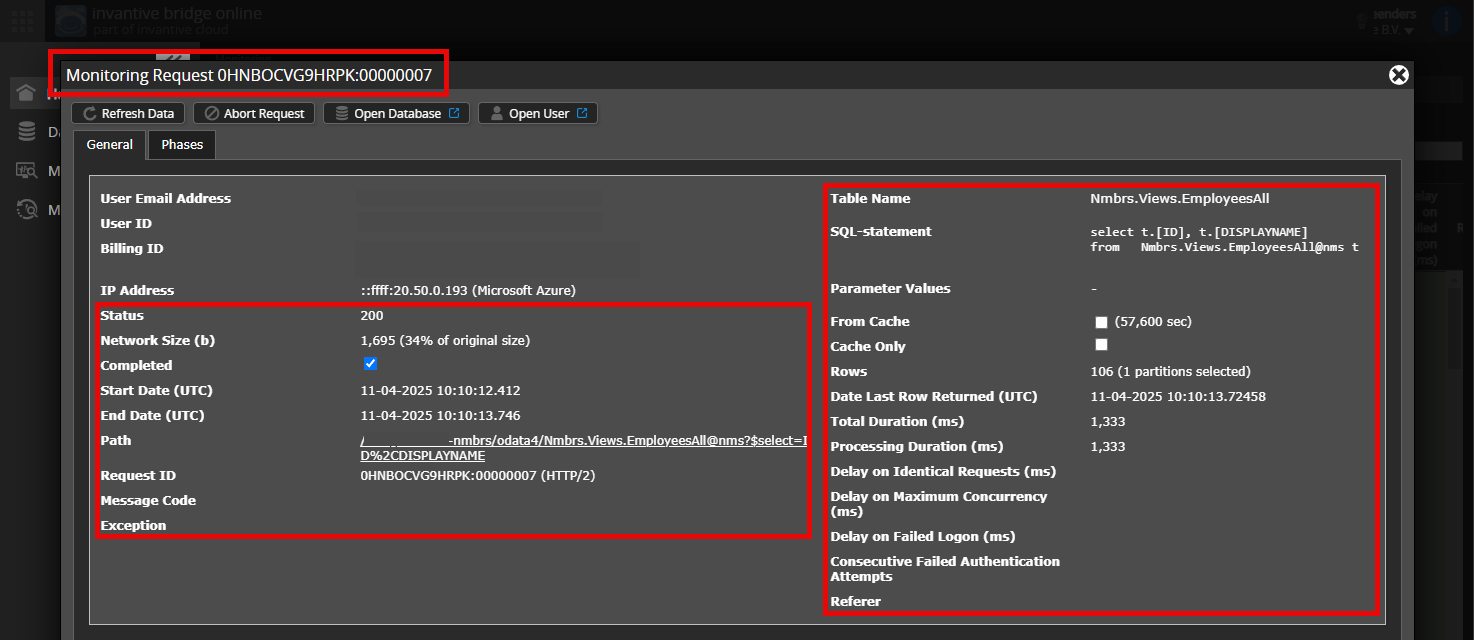
Is it possible to add a (anonymized) screenshot of the request details in Invantive Bridge Online Monitoring as described in More insight with new Bridge Online Monitoring?
Details can be found by clicking on the download request which represents the issue discussed in this topic.
The download request typically has a SQL-statement with table name visible.
Please leave at least the following data visible from both columns:
- the title bar with the request ID,
- the status code, network size, path and times in the left column,
- the error code and error message at the very bottom of the left column,
- the entire right column including the SQL statement, table name and parameter values.
For example:
Verify correct server and user
Check carefully that you are logging into the Bridge Online website that is also used from Power BI and with the same user name. You will only see the requests from the Invantive Cloud user you are logging into the website with.
There are four servers in use:
bridge-online.cloudapp-online.cloudbridge-online.invantive.comapp-online.invantive.com
You can see the server used in your script or source code of reporting.
Verify correct request and details
Please make sure to select the request to display the details. Only one single request should be visible in the screenshot.
Also check carefully that the request has a path with odata4 or apps. Other requests are in general non-relevant for this purpose.
Error message and tips per email
In addition, the Invantive Cloud user who has the error message will usually receive on his email address an email with an error message and tips if there is an error message in Power BI, Power Query, Azure Data Factory, Qlik or Tableau.
Advice is to check the affected user’s spam for such emails sent from support@invantive.com.