Summary
The post describes a challenge encountered when sending large annual email batches using AWS Simple Email Service (SES). Because many addresses become invalid over time, AWS SES generates event notifications (including JSON-formatted details such as event type, mail metadata, and bounce reasons) for undeliverable messages. Traditionally these notifications were handled manually from a dedicated mailbox, but this becomes impractical with large volumes.
To address this, the author outlines an automated approach using Invantive UniversalSQL together with Outlook. First, all SES event notifications are collected from an Outlook folder. Then, using the Invantive Query Tool connected to Outlook via a COM driver, SQL queries can read the emails and extract the full body. The JSON content is parsed directly within SQL using jsontable. This enables structured extraction of key event details (such as bounce type and bounced recipient addresses) into an in-memory table for further analysis and processing, avoiding manual handling.
AWS SES Bounce Event Notification Handling
Yearly around the most common switch in fiscal years, Invantive sends a large batch of emails with tips on finishing the ending fiscal year and starting the new fiscal years. It is not uncommon for email addresses to no longer be available, which is registered through an AWS SES Event Notification.
For this purpose, a dedicated email box exists with in general daily at most a few messages. These are manually checked upon and corrective action is taken.
But on the yearly batch, the number of undeliverable mails is higher than reasonable to handle manually, leading to many emails such as:
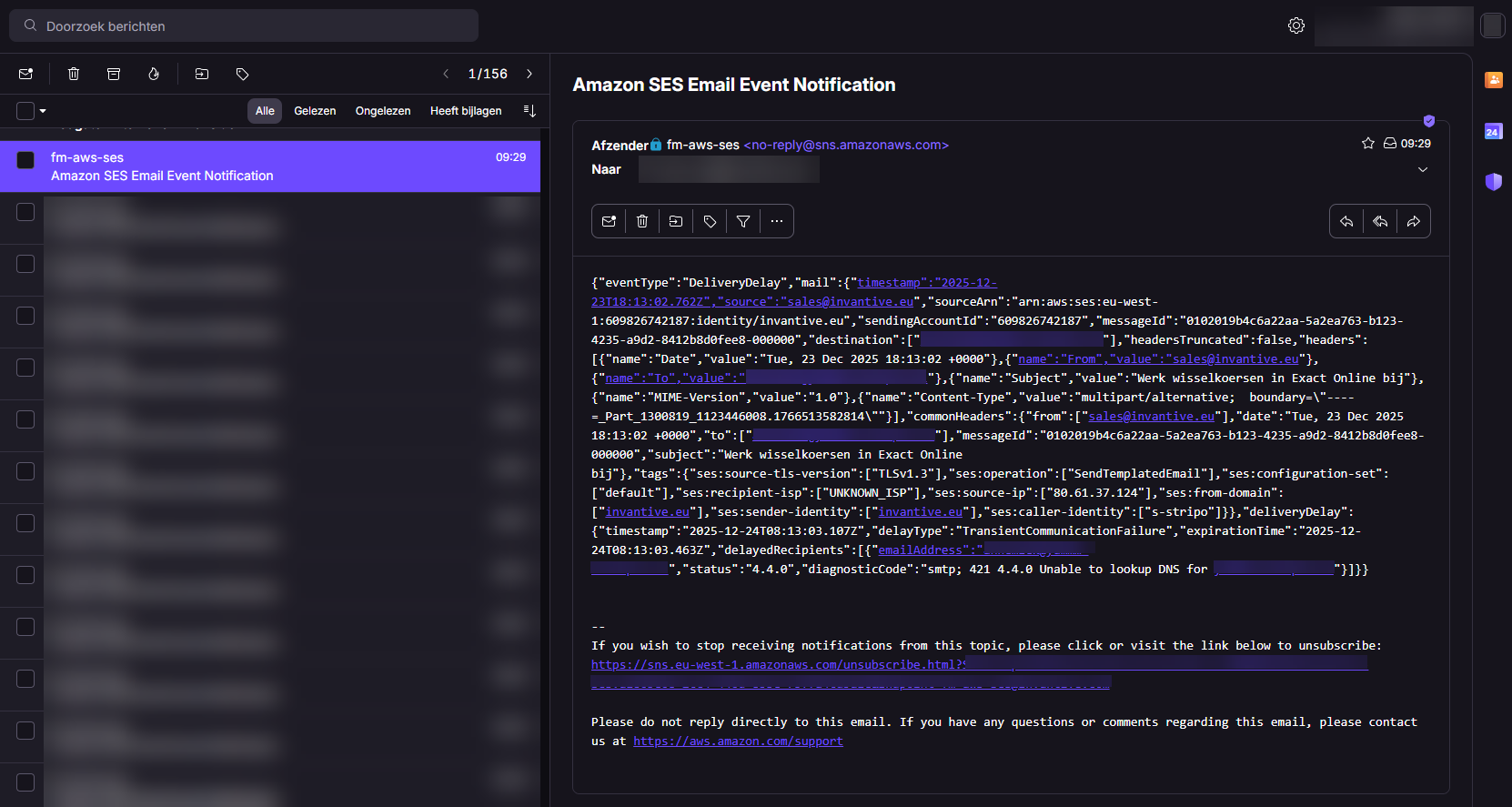
with - besides text - also JSON:
{
  "eventType": "DeliveryDelay",
  "mail": {
    "timestamp": "2025-12-23T18:13:02.762Z",
    "source": "sales@invantive.eu",
    "sourceArn": "arn:aws:ses:eu-west-1:1234567:identity/invantive.eu",
    "sendingAccountId": "1234567",
    "messageId": "0102019b4c6a22aa-5a2ea763-b123-4235-a9d2-8412b8d0fee8-000000",
    "destination": [
      "john.doe@acme.eu"
    ],
    "headersTruncated": false,
    "headers": [
      {
        "name": "Date",
        "value": "Tue, 23 Dec 2025 18:13:02 +0000"
      },
      {
        "name": "From",
        "value": "sales@invantive.eu"
      },
      {
        "name": "To",
        "value": "john.doe@acme.eu"
      },
      {
        "name": "Subject",
        "value": "Tip on fiscal year"
      },
      {
        "name": "MIME-Version",
        "value": "1.0"
      },
      {
        "name": "Content-Type",
        "value": "multipart/alternative;  boundary=\"----=_Part_1300819_1123446008.1766513582814\""
      }
    ],
    "commonHeaders": {
      "from": [
        "sales@invantive.eu"
      ],
      "date": "Tue, 23 Dec 2025 18:13:02 +0000",
      "to": [
        "john.doe@acme.eu"
      ],
      "messageId": "0102019b4c6a22aa-5a2ea763-b123-4235-a9d2-8412b8d0fee8-000000",
      "subject": "Tip on fiscal year"
    },
    "tags": {
      "ses:source-tls-version": [
        "TLSv1.3"
      ],
      "ses:operation": [
        "SendTemplatedEmail"
      ],
      "ses:configuration-set": [
        "default"
      ],
      "ses:recipient-isp": [
        "UNKNOWN_ISP"
      ],
      "ses:source-ip": [
        "80.61.37.124"
      ],
      "ses:from-domain": [
        "invantive.eu"
      ],
      "ses:sender-identity": [
        "invantive.eu"
      ],
      "ses:caller-identity": [
        "s-stripo"
      ]
    }
  },
  "deliveryDelay": {
    "timestamp": "2025-12-24T08:13:03.107Z",
    "delayType": "TransientCommunicationFailure",
    "expirationTime": "2025-12-24T08:13:03.463Z",
    "delayedRecipients": [
      {
        "emailAddress": "john.doe@acme.eu",
        "status": "4.4.0",
        "diagnosticCode": "smtp; 421 4.4.0 Unable to lookup DNS for acme.eu"
      }
    ]
  }
}
Of course, it is also possible to direct such event notifcations to a database or file storage. In this case, with use of AWS SES decreasing rapidly within Invantive, the challenge was taken to process these event notifications using Invantive UniversalSQL.
Automated Mail Processing
First step was to download all events into an Outlook mailbox. With Outlook (classic) still running, the Invantive Query Tool was started and a connection was made using any free or premium driver (such as Dummy).
The Invantive Query Tool connected also to the Outlook COM-instance and the mail folder could be determined using:
select *
from   Folders@outlook fdr
Next, the mails were all accessed including hydration of the full mail body using includeFullBody and filtered on the subject “Amazon SES Email Event Notification”:
select mal.Body
from   Folders@outlook fdr
join   Mails@outlook
       ( folderEntryId => fdr.EntryID
       , includeFullBody => true
       ) mal
where  mal.ConversationTopic = 'Amazon SES Email Event Notification'
The mail body text also contained a signature text besides the JSON, so some corrections were necessary to only keep the JSON. The full SQL statement to retrieve the bounce reasons and email addresses involved was:
create or replace table BounceEvents@InMemoryStorage
as
select distinct jte.*
from   Folders@outlook fdr
join   Mails@outlook
       ( folderEntryId => fdr.EntryID
       , includefullbody => true
       ) mal
join   jsontable
       ( ''
         passing trim(replace(substr(body, 1, regexp_instr(body, '--\r.*', 1, 1, 1, 'm') - 4), chr(13), '', chr(10), ''))
         columns eventType  varchar2 path 'eventType'
         ,       bounceType varchar2 path 'bounce.bounceType'
         ,       bouncedRecipient1 varchar2 path 'bounce.bouncedRecipients[0].emailAddress'
       ) jte
on     jte.EventType not in ('DeliveryDelay')
where  mal.ConversationTopic = 'Amazon SES Email Event Notification'
The rows in BounceEvents@InMemoryStorage could then be further analyzed and processed.