Invantive Cloud has come to exist as a large number of servers, each with a separate monitoring screen located at a URL such as:
https://bridge-online.invantive.com/monitoring
Many first-time users find it challenging to analyze messages, while experienced users running hundreds or even thousands of daily jobs across multiple servers often spend valuable time searching for specific request details. For example, the Power BI OData client sometimes provides vague or no error messages at all, making troubleshooting difficult.
Centralized Monitoring
With the new monitoring feature available on the Invantive Cloud website, all requests can now be easily tracked in a single central monitoring screen. This enables faster issue resolution and provides a clear overview of the growing landscape of server nodes:
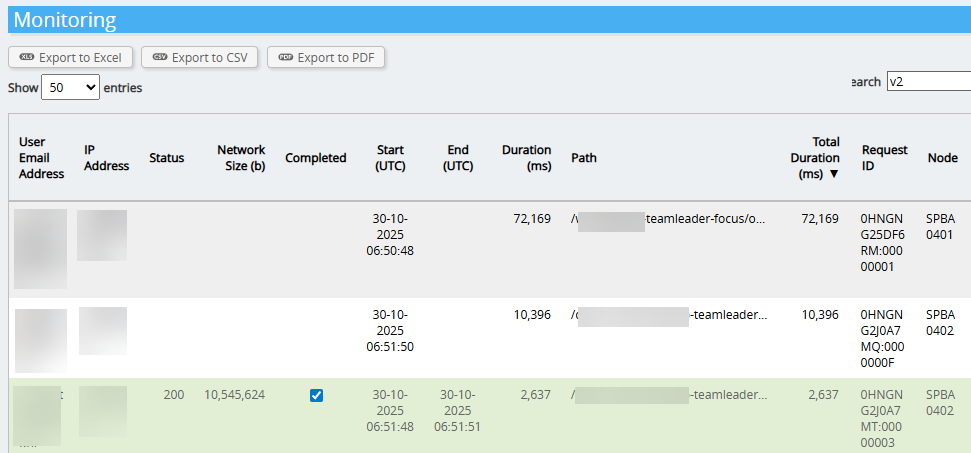
Shown with each requests is a column “Node” whose value reflects those of the server. Of course, the full URL can be found in the details.
Latency
Request progress is sent by the product such as Invantive Bridge Online to a central location. This central location forwards the request information to user sessions in the Invantive Cloud websites.
A change in request status can take up to a few seconds to arrive at the user session. Typically however, this latency will be below one second.
Transition
Existing links to monitoring from Invantive App Online and Invantive Bridge Online instances will all be redirected to Invantive Cloud itself.
Open Bugs
The following bugs are new:
Release memory earlier; too many requests per day.
Missing feature monitoring sessions. → Partially available.
Missing phases. → Partially solved.
Undefined monitoring dashboard in JavaScript.
Normal users have no access to new centralized monitoring on Cloud.
Missing row count, user, etc.
Open Enhancements
Open enhancements that might be added:
Replace memory cache by database backend form for reduced memory usage, server restarts long term search in requests.
Add monitoring for Valuta Tools. → Partially available, not linked to pool identity.
Add monitoring for Get My Report. → Partially available, not linked to pool identity.
Add monitoring for UniversalSQL Server on Invantive Cloud.
View requests from other users of same party when key user.
Include engine version on server node in request.
Show spinner while downloading initial result set.