Bij het gebruik van de Sumatra Management Console kan ook een koppeling gemaakt worden met een Invantive UniversalSQL Server-database.
Bij “Catalog” moet echter niet de catalog uit UniversalSQL ingevuld worden. Dit leidt tot de melding:
itgenssr065
No current database.
Gebruik daarom de alias van de datacontainer (en dus de naam van de SQL Server-database in SQL Server Management Studio).
Een werkend voorbeeld is dan:
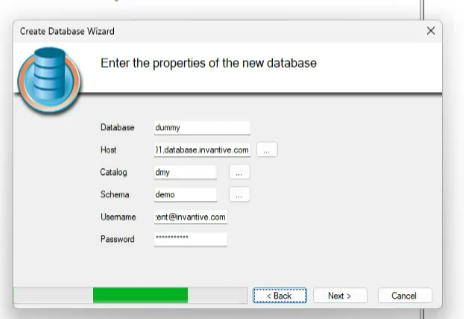
met:
- Database: een willekeurige naam ter identificatie binnen Sumatra,
- Host: de SQL Server server name,
- Catalog: de alias van de datacontainer binnen Invantive UniversalSQL,
- Schema: het schema van de tabellen binnen Invantive UniversalSQL,
- Username: de Invantive Cloud-aanmeldcode,
- Password: het Invantive Cloud-wachtwoord van de aanmeldcode.
De volledige documentatie van Invantive UniversalSQL Server is te vinden op: