I am not able to connect to VismaNet.SalesOrder.SalesOrders@vnt table (which always worked fine). I previously experienced issues with other tables when columns were renamed but this time I can’t access the table at all.

Complete information
Is it possible to add a (anonymized) screenshot of the request details in Invantive Bridge Online Monitoring as described in More insight with new Bridge Online Monitoring?
Details can be found by clicking on the download request which represents the issue discussed in this topic.
The download request typically has a SQL-statement with table name visible.
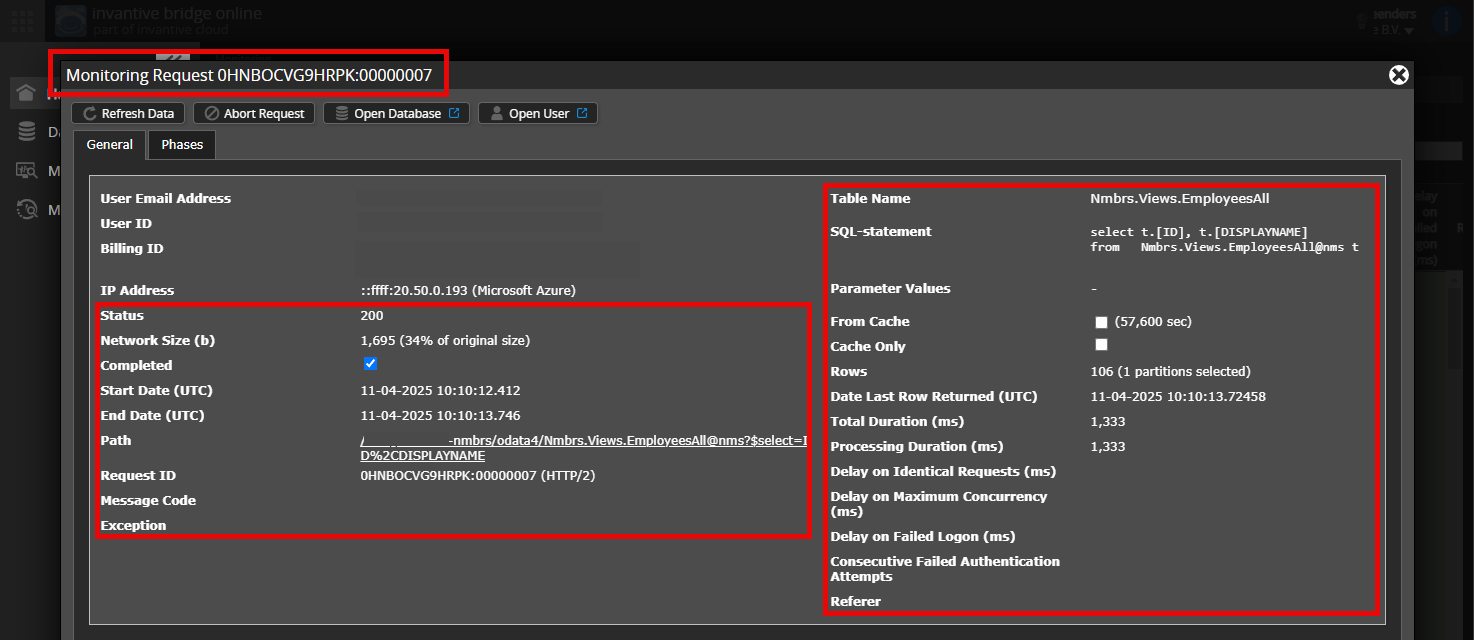
Please leave at least the following data visible from both columns:
- the title bar with the request ID,
- the status code, network size, path and times in the left column,
- the error code and error message at the very bottom of the left column,
- the entire right column including the SQL statement, table name and parameter values.
For example:
Verify correct server and user
Check carefully that you are logging into the Bridge Online website that is also used from Power BI and with the same user name. You will only see the requests from the Invantive Cloud user you are logging into the website with.
There are four servers in use:
bridge-online.cloudapp-online.cloudbridge-online.invantive.comapp-online.invantive.com
You can see the server used in your script or source code of reporting.
Verify correct request and details
Please make sure to select the request to display the details. Only one single request should be visible in the screenshot.
Also check carefully that the request has a path with odata4 or apps. Other requests are in general non-relevant for this purpose.
Error message and tips per email
In addition, the Invantive Cloud user who has the error message will usually receive on his email address an email with an error message and tips if there is an error message in Power BI, Power Query, Azure Data Factory, Qlik or Tableau.
Advice is to check the affected user’s spam for such emails sent from support@invantive.com.
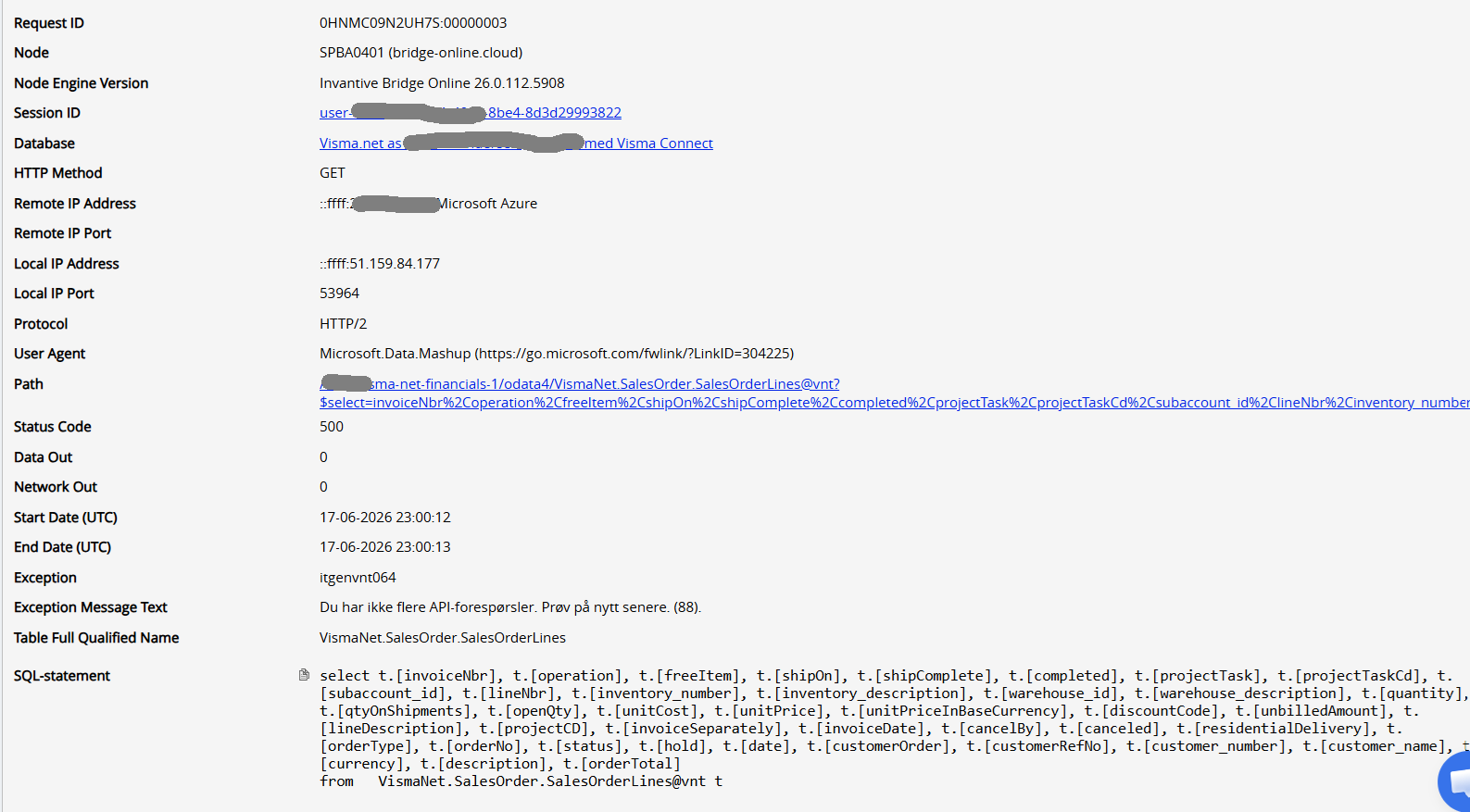
It seems that Visma activated a new rate limiter for Visma.net Financials as approximately described on:
The documentation seems to be missing the new entry 31-fixed-window, and the count of “two policies” does not align with the effecetive count.
The URL failed is:
https://api.finance.visma.net/v1/salesorder?pageNumber=13&pageSize=100
https://api.finance.visma.net/v1/salesorder?pageNumber=1&pageSize=100
https://api.finance.visma.net/v1/salesorder?pageNumber=88&pageSize=100
https://api.finance.visma.net/v2/salesorder?pageNumber=1&pageSize=100
https://api.finance.visma.net/v2/salesorder?pageNumber=44&pageSize=100
https://api.finance.visma.net/v2/salesorder?pageNumber=46&pageSize=100
https://api.finance.visma.net/v2/salesorder?pageNumber=77&pageSize=100
https://api.finance.visma.net/v2/salesorder?pageNumber=89&pageSize=100
The error code itgenvnt064 that this rate limit policy is not supported in the current software release. An analysis revealed one or two handful occurrences on May 24 and 25, and on June 3. Maybe these were test environments.
Starting June 15, the volume of errors has grown over hunderdfold.
An analist will study the possibilities to add support for the new rate limiter 31-fixed-window. As part of this step, the Visma API Support will be contacted.
Depending on the changes needed, it is not uncommon for such a change to take a calendar week or longer.
As a workaround, it is suggested to reach out to Visma.net Financials Support and request an exemption.
I have just wrote email to Visma. Can you please also push from your side on resolution as this is time critical? I am a big proponent of Invantive Cloud in our company but if this reporting fails there will be push for choosing another more stable solution.
It is unclear whether some partners or all approved partners have not been informed beforehand of this breaking change. For reasons of stability, it might be wise to consult Visma Support whether some partners have better information channels and switch to these.
Analysis.
Striking is that the problem only occurs on SalesOrders. Visma issued a desupport notice:
According to Visma the v1 and v2 would be throttled using a “Policy 8-fixed-window Salesorder V1/V2 Endpoints (Migration)” rate limiter. This one is named differently, but the behavior matches.
Well as I understood from the article there should be a version 3 which supersedes the V1 and V2. I don’t see these when I connect to list of tables. Why?
Analysis.
According to End of SalesOrder V1/V2 endpoints | Visma Net API | Visma Software Nordic Documentation, the Swagger for V3 API should be available. The Swagger links to Visma Net API | Visma Software Nordic Documentation and then to Swagger UI.
However, this Swagger still includes V1 / V2 (striked) and no Sales Order V3.
A ticket 00757161 has been raised with Visma API Support.
Since neither the rate limiter nor V3 documentation can be found, the analysis will be halted awaiting information by Visma.
The use of SalesOrders has been throttled to 88 API calls per hour. As a workaround till analysis can continue, it is recommended to filter the data and/or reduce use such that at most 88 API calls are made per hour.
In the next 26.0 release, the 31-fixed-window will have a reserved error code itgenvnt080.
Update.
Visma API Support has requested an exemption to the severely lowered rate limit for the V1 and V2 SalesOrder endpoint till September.
In between time preliminary steps as far as possible with the current documentation have been taken to add the V3 SalesOrder API.
Visma has extended the use of V1 and V2 SalesOrder APIs till September 30, 2026. This should return service to original levels.
In parallel Invantive will try to add support for V3 SalesOrder API.
The new Visma Net Journal Transactions API will not be included for now; it is not yet out of pilot phase.