We hebben een Exact Online via de Invantive MCP Server. Na het toevoegen van het ontbrekende database-url-segment hebben we opnieuw getest, maar de koppeling werkt nog steeds niet volledig.
Status:
me (identiteit/gebruikersgegevens ophalen): werkt goed, geeft correcte gegevens terug
describe_entities (entiteitenlijst opvragen): geeft een generieke fout, zonder verdere details
read_records (bijvoorbeeld op entiteit SalesInvoices): geeft eveneens een generieke fout, zonder verdere details
De koppeling lijkt dus wel geauthenticeerd (me werkt), maar zodra er daadwerkelijk metadata of records uit Exact Online opgevraagd worden, loopt het vast. Er komt geen foutcode of nadere toelichting mee terug.
Zou iemand hier naar kunnen kijken? We proberen omzetgegevens per periode op te halen.
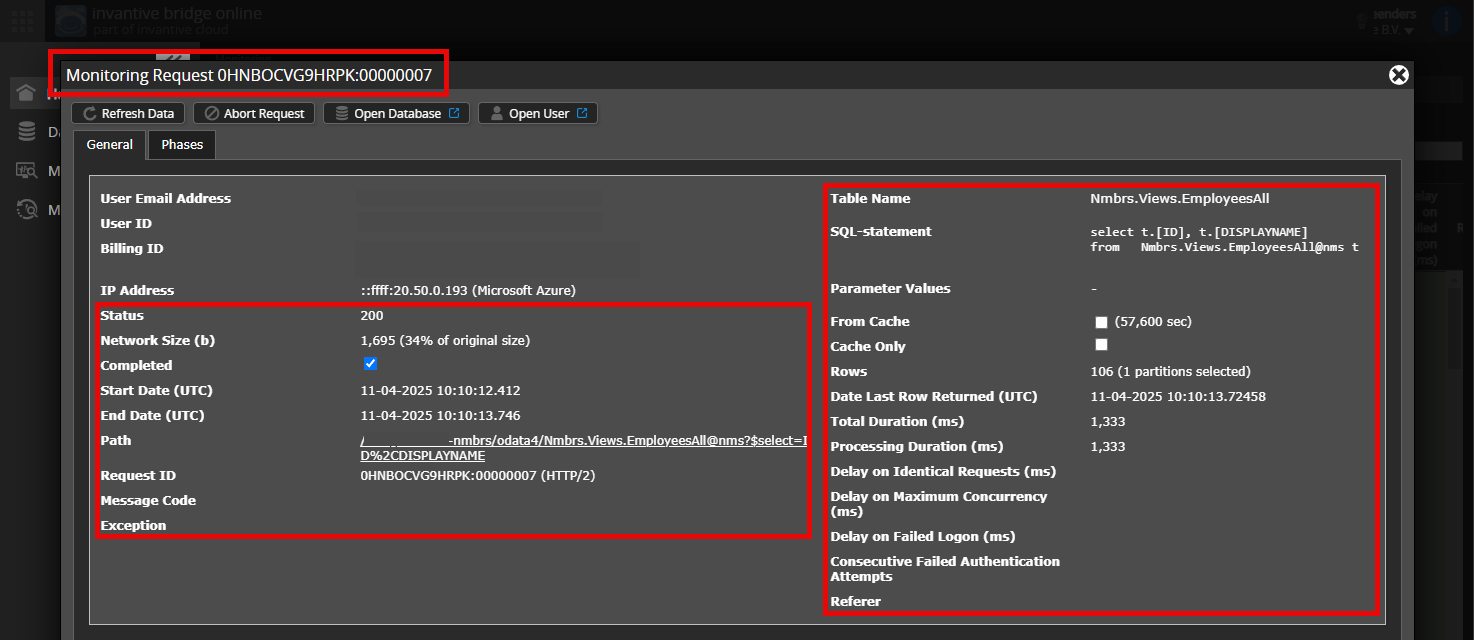
Is het mogelijk om een (geanonimiseerde) schermafdruk van de details van het verzoek in Invantive Monitoring toe te voegen zoals beschreven in Meer inzicht met nieuwe Bridge Online Monitoring?
De details vindt u door te klikken op het downloadverzoek welke het onderwerp van dit onderwerp representeert.
Het downloadverzoek heeft meestal een SQL-statement waarin de tabelnaam zichtbaar is.
Gelieve tenminste de volgende gegevens zichtbaar te laten van beide kolommen:
de titelbalk met de request ID,
de statuscode, netwerkgrootte, pad en tijdstippen in de linkerkolom,
de foutcode en foutmelding helemaal onderaan in de linkerkolom,
de gehele rechterkolom inclusief het SQL statement, tabelnaam en parameterwaardes.
Zorg ervoor dat u het verzoek eerst selecteert om de details weer te geven. Er hoort maar één verzoek zichtbaar zijn in de schermafbeelding.
Foutmelding en tips per e-mail
Daarnaast zal de Invantive Cloud-gebruiker die de foutmelding heeft op zijn e-mailadres veelal een e-mail ontvangen met een foutmelding en tips als er sprake is van een foutmelding in Claude of andere AI-tool.
Advies is om de spam van de betrokken gebruiker te controleren op dergelijke e-mails verzonden vanaf support@invantive.com.
Deze vraag is automatisch gesloten na 1 week inactiviteit. Het laatste gegeven antwoord is gemarkeerd als oplossing.
Gelieve een nieuwe vraag te stellen via een apart topic als het probleem opnieuw optreedt. Gelieve in de nieuwe vraag een link naar dit topic op te nemen door de URL er van in de tekst te plakken.