Multiple queries are failing, including Customers, Items, and Sales Lines. The same error occurs in a new, empty Excel workbook. Renewing authorisation and logging in again hasn’t helped. System messages keep loading, even after refreshing the page.
Occurred on 8 October 2026, around 14:45–14:55 Dutch time.
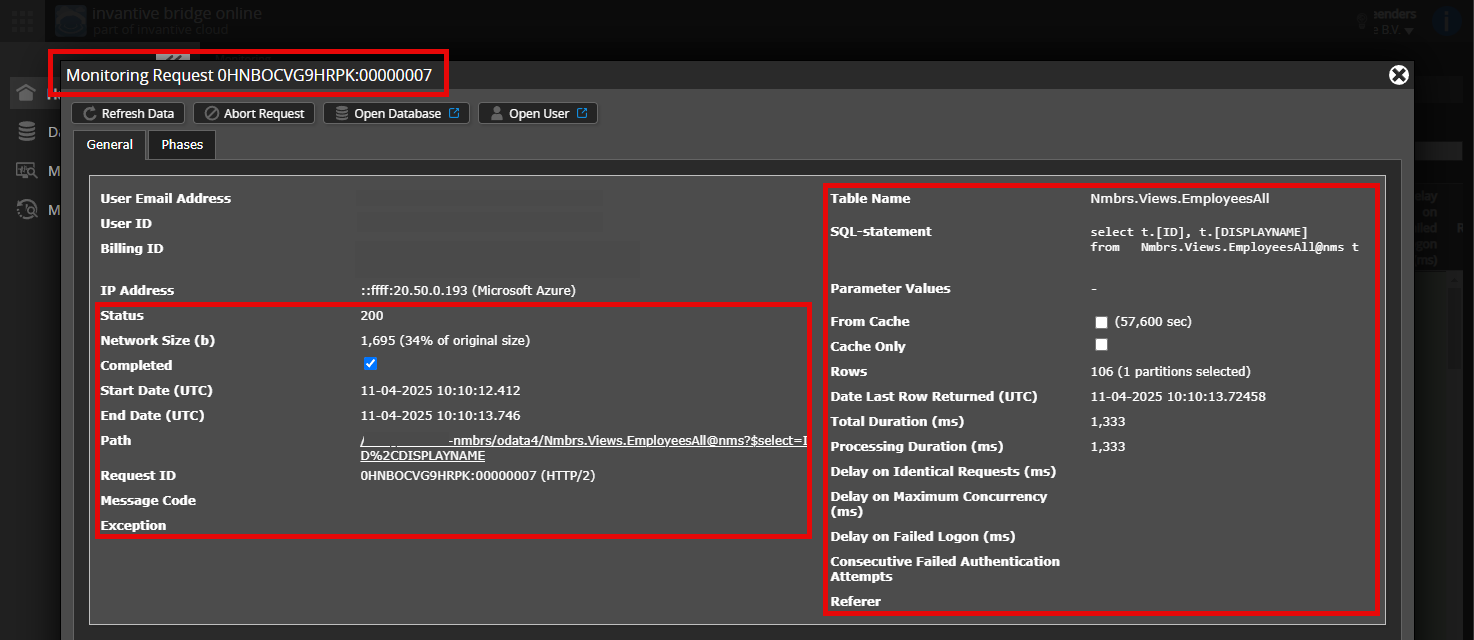
Is it possible to add an (anonymised) screenshot of the request details in Online Monitoring on Invantive Cloud as described in Meer inzicht met nieuwe Online Monitoring?
You can find the details by clicking on the download request that represents the subject of this topic.
The download request usually contains an SQL statement in which the table name is visible.
Please ensure that at least the following data is visible from both columns:
the title bar with the request ID,
the status code, network size, path, and timestamps in the left column,
the error code and error message at the very bottom of the left column,
the entire right column including the SQL statement, table name, and parameter values.
Carefully check that you log in to the Invantive Cloud website using the same username with which you process data, for example, via Invantive Bridge Online. You will only see the requests of the Invantive Cloud user with whom you log into the website.
Check Correct Request and Details
Ensure that you select the request first to display the details. Only one request should be visible in the screenshot.
Also, carefully check whether the request has a path with odata4, apps or mcp. Requests with other paths are generally not relevant for this purpose.
Error Message and Tips via Email
Additionally, the Invantive Cloud user who has the error message will often receive an email with an error message and tips on their email address if there is an error message in Power BI, Power Query, Azure Data Factory, Qlik, or Tableau.
It is recommended to check the spam of the involved user for such emails sent from support@invantive.eu.
itgenscr817
The last active subscription … of … expired 28 days ago.
The database uses drivers that require a Free Plan or a Premium subscription.
Sign up for a subscription via Invantive Sales at … or …
(SUBAATR)
This question was automatically closed after 1 week of inactivity. The last answer given has been marked as the solution.
Please ask a new question via a separate topic if the issue occurs again. Please include a link to this topic in the new question by pasting its URL into the text.