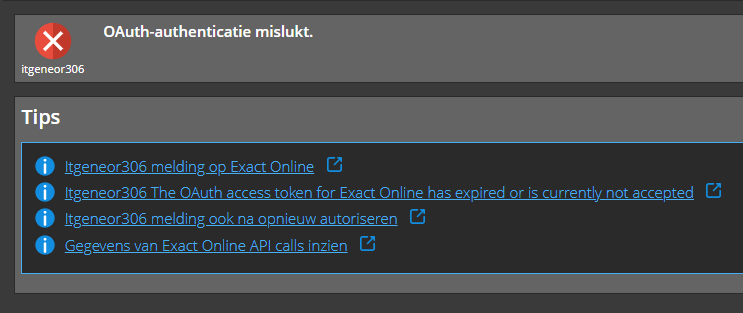
Wij lopen tegen een probleem aan met de Exact Online-verbinding via Invantive. Bij het uitvoeren van onze bestaande koppeling krijgen we sinds kort de volgende foutmelding:
Het OAuth-accesstoken voor {res:itgen_exact_online_combined} is verlopen of wordt momenteel niet geaccepteerd.
De verbinding heeft hiervoor normaal gewerkt. De fout ontstaat nu bij het ophalen van gegevens uit Exact Online via itgen_exact_online_combined.
We proberen te achterhalen waardoor het OAuth-token niet meer automatisch vernieuwd of geaccepteerd wordt en hoe we de verbinding opnieuw correct kunnen autoriseren.
Concreet voorbeeld
Bij het uitvoeren/verversen van de bestaande Exact Online-query stopt de verwerking met bovenstaande OAuth-melding. Er worden daardoor geen nieuwe gegevens uit Exact Online opgehaald.
Wat we al geprobeerd hebben
We hebben gecontroleerd of het probleem opnieuw optreedt bij een nieuwe uitvoering/verversing van de koppeling, maar de fout blijft bestaan.
Onze vragen zijn:
Wat is de aanbevolen manier om de OAuth-autorisatie voor itgen_exact_online_combined opnieuw tot stand te brengen?
Is er een manier om te controleren wat de actuele status van de OAuth-autorisatie is?
Kan de verbinding opnieuw geautoriseerd worden zonder de bestaande configuratie/query’s opnieuw op te bouwen?
Om het probleem analyseerbaar te krijgen, is het noodzakelijk om het te kunnen herleiden. Helaas ontbreekt echter de foutcode om onbekende redenen. Die had moeten staan onder het rode kruisje.
Daarom als eerste stap het herleidbaar krijgen. Gelieve deze foutmelding terug te zoeken in het scherm Systeemberichten of in het scherm Historie (onder Monitoring). In Systeemberichten staan alle foutmeldingen van de organisatie en in Historie staan alle verzoeken van de momenteel aangemelde gebruiker.
Voeg als afbeelding toe hetzij een afdruk van de foutmelding uit Systeemberichten, hetzij het request onder Monitoring. Zorg dat altijd het verzoek ID (request ID) zichtbaar blijft.
De systeemmelding is onleesbaar door de resolutie, maar de foutcode is n wel herkenbaar itgeneor306.
Dit betekent dat na het openen van de verbinding de gegevens van de Exact Online-gebruiker niet opgehaald kunnen worden.
Advies is om contact op te nemen met de applicatiebeheerder van Exact Online en te controleren dat de Exact Online-gebruiker nog rechten heeft. Zo ja, kies daarna voor Autorisatie Vernieuwen zoals beschreven in bijvoorbeeld:
Ik heb naar de rechten gekeken maar die lijken goed te zijn.
Welke rechten zijn er nodig voor de integratie met Invantive? Zijn er vragen die we aan de systeembeheerder moeten stellen waarmee we alvast volgende stappen kunnen zetten mocht het niet aan de rechten liggen?
Voldoende rechten om te autoriseren is te controleren door met de Exact Online-gebruiker (en niet een andere) aan te melden op het geselecteerde Exact Online-land.
Is het Exact Online hoofdmenu zichtbaar op start.exactonline.TLD? Dan is dit niet de oorzaak van het probleem.
Is het Exact Online-hoofdmenu niet zichtbaar te krijgen? Neem dan contact op met de beheerder om meer rechten te krijgen en/of wachtwoord te laten verifieren/herstellen.
Via een ander platform kan ik met dit account wel data ophalen.
Dus ik denk dat het probleem ergens anders zit.
Is het wellicht een oplossing om de datacontainer te verwijderen en opnieuw toe te voegen? Blijft alles dan werken? Moet ik dan ergens nog rekening mee houden?
Dit is geen bekend probleem bij de wisseling tussen Exact Online SaaS en Exact Online Premium.
Correct: het gebruik van Invantive-producten met Exact Online Premium vereist Invantive Office Premium; Invantive Office for Entrepreneurs ondersteunt geen Exact Online Premium.
Deze vraag is automatisch gesloten na 1 week inactiviteit. Het laatste gegeven antwoord is gemarkeerd als oplossing.
Gelieve een nieuwe vraag te stellen via een apart topic als het probleem opnieuw optreedt. Gelieve in de nieuwe vraag een link naar dit topic op te nemen door de URL er van in de tekst te plakken.