Bij het aanmelden met Invantive Credentials Server vanuit Invantive Data Hub krijg ik de melding:
itgenoac023:
A connection could not be established to the database ‘ACME\eolmss’.
The connection to the Invantive Credentials Server could not be established within 3 tries spread across 120,0538767 seconds for the database segment ‘acme’.
The operation has timed out.
System.Net.WebException
Invantive Data Hub heeft meerdere keren contact gezocht met de Invantive Credentials Server, maar kon geen verbinding krijgen doordat (in ieder geval) de laatste poging een “time out” gaf.
Advies is om Invantive Data Hub nogmaals te starten.
Wij hebben hetzelfde probleem volgens mij. Hoe kan ik de data hub opnieuw opstarten? Server wordt al dagelijks opnieuw opgestart en dit probleem hebben we sinds 15-9.
Ter aanvulling: De Invantive Data Hub wordt voor meedere klanten gebruikt op deze server. Voor Klant A werkt niet maar voor de klant B werkt de Data Hub wel.
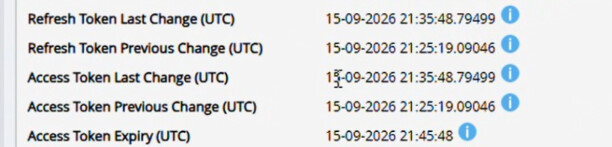
Na het opnieuw opstarten van de batch files nog steeds dezelfde melding. In de cloud omgeving is te zien dat het refresh token het laatst is bijgewerkt op 15-09 om 21;35 daarna is het proces stil komen te staan.
2026-09-18 10:05:24.450 Error itgencun016: Error itgenoac023:** A connection could not be established to the database '...'.
The connection to the Invantive Credentials Server could not be established within 3 tries spread across 120,0817954 seconds for the database segment '...'.

The operation has timed out.
https://credentials.invantive.com
2026-09-18 10:05:26.458 Error itgenoac023: System.Net.WebException
ValidationException
ValidationException
   at System.Net.HttpWebRequest.GetResponse()
   at Invantive.Data.Providers.OAuth.InvantiveOAuthCredentialsServerProvider.GetDatabaseConnectionInfo(GlobalState owner, ExecutionOptions executionOptions, SqlExecutionStep sqlExecutionStep, IProviderManager manager, SerializableCredentialsDataContainer dataContainer, Credentials credentials, String databaseFullName)
2026-09-18 10:05:26.474 Error itgencun016: Error itgendhb005: Could not connect to database 'xxxxxx'. Application will be closed.
2026-09-18 10:05:26.475 Error itgendhb005: ValidationException
   at Invantive.Basics.ValidationException..ctor(GlobalState owner, ExecutionOptions executionOptions, String messageCode, String errorMessage, String kindRequest, String localStackTrace, String nk, Exception innerException, Boolean inheritMessageCodeWhenPresent, Nullable`1 uid, Nullable`1 isRecoverable, String poolIdentityId, String url, Nullable`1 partyUid, String partitionCode, String tableName, String parameter1, String parameter2, String parameter3, String parameter4, String parameter5, String clientId)
   at Invantive.Producer.Data.Hub.QueryEngine.Run(GlobalState owner, ExecutionOptions executionOptions, String[] arguments)
   at Invantive.Producer.Data.Hub.Program.Main(String[] args)
   at Invantive.Producer.Data.Hub.QueryEngine.Run(GlobalState owner, ExecutionOptions executionOptions, String[] arguments) in c:\smoke\ws-26.0\Invantive.Data.Hub\src\Invantive.Producer.Data.Hub\QueryEngine.cs:line 613
2026-09-18 10:05:26.478 Error itgendhb005: Could not connect to database '...'. Application will be closed.
Advies is om de gebruikersnaam en het wachtwoord voor Invantive Credentials Server zorgvuldig te controleren.
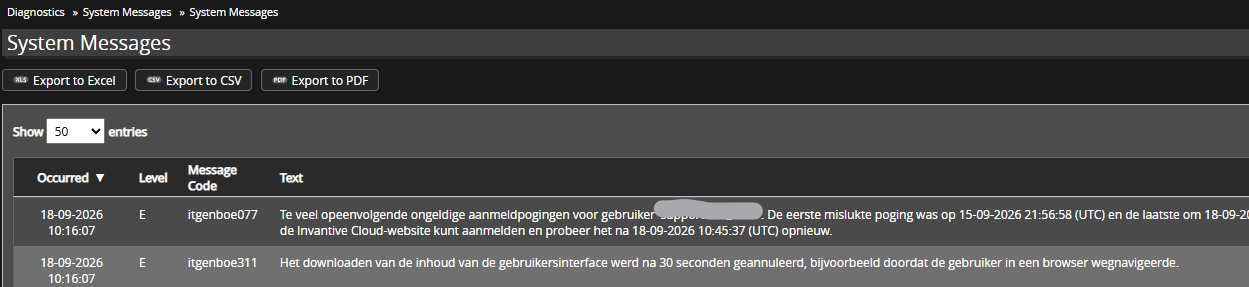
U kunt dit controleren in het Tijdlijn-venster op Invantive Cloud en bij Systeemmeldingen. Meldingen zoals hieronder geven aan dat het wachtwoord verkeerd is:
itgenboe077
Te veel opeenvolgende ongeldige aanmeldpogingen voor gebruiker ‘john.doe@acme.eu’. De eerste mislukte poging was op 15-09-2026 21:56:58 (UTC) en de laatste om 18-09-2026 10:07:51 (UTC). Controleer of u met deze aanmeldcode op de Invantive Cloud-website kunt aanmelden en probeer het na 18-09-2026 10:45:37 (UTC) opnieuw.
itgenboe311
Het downloaden van de inhoud van de gebruikersinterface werd na 30 seconden geannuleerd, bijvoorbeeld doordat de gebruiker in een browser wegnavigeerde.
Na enkele tientallen pogingen met verkeerd wachtwoord zal elke poging vertraagd worden met tenminste 30 seconden totdat het een keer lukt. Als het goed is, dan ontvangt u automatisch een e-mail hierover.
In de release 26.0.301 en later zal de blokkade beperkt worden van 30 seconden aar 15 seconden zodat de melding ook in de clientapplicatie zichtbaar kan worden voordat de timeout optreedt.
Deze vraag is automatisch gesloten na 1 week inactiviteit. Het laatste gegeven antwoord is gemarkeerd als oplossing.
Gelieve een nieuwe vraag te stellen via een apart topic als het probleem opnieuw optreedt. Gelieve in de nieuwe vraag een link naar dit topic op te nemen door de URL er van in de tekst te plakken.